Subcategories

  • General LTE-M (Cat M1) connection problems thread

    Pinned Moved lte-m cat m1 connect issues
    29
    2 Votes
    29 Posts
    11k Views
    E
    @jmarcelino said in General LTE-M (Cat M1) connection problems thread: So specific issues don't get mixed up or lost in one thousands other threads I'm starting this thread to collect all general issues with Cat M1 connections. Please post your connection reports here if you have problems connecting to a public Cat M1 network. Please include at a minimum operator, country, SIM card used It would help if you know the APN and frequency bands used If you have a more specific issue, e.g. using an LTE simulator please post a new thread. Thank you Country= Mexico I use Fipy LTE-M SIM CARD=Vasanta Operator= Vasanta. I used this code: import time from machine import RTC from network import LTE NTP_SERVER = "au.pool.ntp.org" #Need to use global variables. #If in each function you delare a new reference, functionality is broken lte = LTE() rtc = RTC() #Returns a network.LTE object with an active Internet connection. def getLTE(): # If already used, the lte device will have an active connection. # If not, need to set up a new connection. if lte.isconnected(): return lte #Modem does not connect successfully without first being reset. print("Resetting LTE modem ... ", end='') lte.send_at_cmd('AT^RESET') print("OK") time.sleep(1) #While the configuration of the CGDCONT register survives resets, #the other configurations don't. So just set them all up every time. print("Configuring LTE ", end='') lte.send_at_cmd('AT+CGDCONT=1,"IP","telstra.internet"') print(".", end='') lte.send_at_cmd('AT!="RRC::addscanfreq band=28 dl-earfcn=9410"') print(".", end='') lte.send_at_cmd('AT+CFUN=1') print(" OK") #If correctly configured for carrier network, attach() should succeed. if not lte.isattached(): print("Attaching to LTE network ", end='') lte.attach() while(True): if lte.isattached(): print(" OK") break print('.', end='') time.sleep(1) # Once attached, connect() should succeed. if not lte.isconnected(): print("Connecting on LTE network ", end='') lte.connect() while(True): if lte.isconnected(): print(" OK") break print('.', end='') time.sleep(1) #Once connect() succeeds, any call requiring Internet access will #use the active LTE connection. return lte #Clean disconnection of the LTE network is required for future #successful connections without a complete power cycle between. def endLTE(): print("Disonnecting LTE ... ", end='') lte.disconnect() print("OK") time.sleep(1) print("Detaching LTE ... ", end='') lte.dettach() print("OK") #Sets the internal real-time clock. #Needs LTE for Internet access. def setRTC(): # Ensures LTE session is connected before attempting NTP sync. lte = getLTE() print("Updating RTC from {} ".format(NTP_SERVER), end='') rtc.ntp_sync(NTP_SERVER) while not rtc.synced(): print('.', end='') time.sleep(1) print(' OK') #Only returns an RTC object that has already been synchronised with an NTP server. def getRTC(): if not rtc.synced(): setRTC() return rtc Program starts here. try: print("Initially, the RTC is {}".format("set" if rtc.synced() else "unset")) rtc = getRTC() while(True): print("RTC is {}".format(rtc.now() if rtc.synced() else "unset")) time.sleep(5) except Exception: pass # do nothing on error finally: endLTE() I got this: [image: 1587666738929-anotaci%C3%B3n-2020-04-23-132854.png]
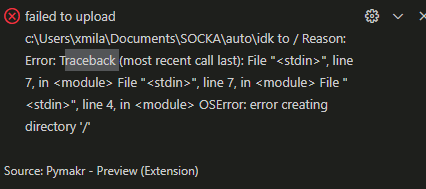
  • Upload program to lopy4 problem

    5
    1
    0 Votes
    5 Posts
    25 Views
    robert-hhR
    @Milan-Novak I never use one of the IDEs. Too much trouble reported to keep them in sync. For uploading files, I used either FTP or recently the MicroPython tool mpremote from the Linux command line.
  • i need 5.000 pieces pycom w01 module...who can help to me?

    1
    0 Votes
    1 Posts
    15 Views
    No one has replied
  • FiPy HMAC implementation issue

    2
    0 Votes
    2 Posts
    10 Views
    J
    @Kostas-Nomikos Where do hashlib and hmac come from? If I'm not mistaken, they're not standard Pycom libraries. I suppose they're the MicroPython version? Also see https://forum.pycom.io/topic/2180/hmac-on-on-lopy
  • Crash when instantiating Bluetooth

    3
    0 Votes
    3 Posts
    27 Views
    O
    Thanks for the information. The legacy firmware does work but there are some problems related to the PyMakr Plugin. Well, its unfortunate but i will switch to another hardware platform then.
  • FiPy & LTE-M from wall power

    2
    0 Votes
    2 Posts
    22 Views
    Y
    Hi Sean, I don't know what issue you are facing, but I managed to connect my FiPy to LTE-M, from PC, battery and wall power. Which firmware version do you run on MCU, dev. board and modem? Are you trying to connect on Cat-M1 or Cat-NB1? I supposed you read this article, right? Pycom seems dead, webshop, service desk and forum. I worked many hours on developing one IoT solution for one of our customer; I must admit it was a bad idea. I'll try my best to migrate my solution to a reliable supplier.
  • I2C bus error: Using I2C ADS1115 16-Bit with FiPy

    bugs
    11
    0 Votes
    11 Posts
    59 Views
    J
    @Benjamin-Mirad-Gurini it’s not clear from your schematic that you are indeed using the same ground for all devices, could you confirm that? Can you also try with the default pins (P9, P10)? Removing the pins arg to the I2C constructor of course. Also, did you notice that there are many confusing numbering schemes for the FiPy pin out? P9, P10, P11 are close to the WiFi/BLE antenna. Can you check the voltage between GND and SDA when powered?
  • PYGO Does not charge

    2
    0 Votes
    2 Posts
    28 Views
    robert-hhR
    @PeteD No help is available, since Pycom closed it's business. If you connect a terminal to the cradle, you should see that the device starts, and you can get a REPL prompt. That's it so far. Most likely, there will be no new firmware. And lacking information, not even an interested user group could carry on.
  • Pybytes IOS app won’t allow login

    bugs
    2
    0 Votes
    2 Posts
    16 Views
    J
    Video: https://drive.google.com/file/d/198RBmQFS-s0MoR9aZXWJeAJBZqlxSxyq/view?usp=drivesdk Keep in mind IOS screen record removes the keyboard and password from video. I marked out my email. This isn’t an incorrect password situation as an incorrect password raises “incorrect password”
  • Why my boot.py is not executed at starstup

    2
    0 Votes
    2 Posts
    21 Views
    robert-hhR
    @gmgia-dinh176 It seems that boot.py was not copied to the board's file system. boot.py has to be at the board to get executed at boot time.
  • FiPy undefined behavior

    4
    0 Votes
    4 Posts
    39 Views
    L
    @Lukas-González The undefined behavior was the memory allocation. Because of how I wrote the code, it wasn't deallocating memory as intended, to solve this I used isolated scopes for application tasks. Before: 1 - Init resources (Lora, UART, etc) 2 - Loop forever 2A - Read UART-1 2AA - Send data through LoRa 2B - Listen LoRa 2C - Listen UART-2 Here the code wasn't able to deallocate all memory resources, because of how I wrote the code. Forcing the FiPy to explode I figure it out that memory allocation it is closely related to function scopes (That's my point of view at least), so isolating a program task in a function would help the compiler understand when deallocate resources. Also to double check, the next line of a unused variable I delete it. i.e buffer = uart.read() /use buffer/ del buffer -------------------NEW LOGIC-------------------- After: 1 - Init resources (Lora, UART, etc) 2 - Loop forever (main application loop) 2A - Application function 2AA - read UART1 2AB - send data through LoRa 2AC - read UART2 2AD - garbage collect 2B - garbage collect If memory allocation fail when calling program function, it resets the FiPy. For now, the application doesn't explode because of a memory fragmentation D: . Hope anyone could find this helpful as it is for me to keep learning. If anyone has more info that I'm not taking care of, please let me know on this post or via dm.
  • how to connect two Pycom via WIFI

    2
    1
    0 Votes
    2 Posts
    20 Views
    G
    I don't have any specific recommendations to make, but it seems to me as if you are attempting (deliberately or inadvertently( to send a raw frame on the wireless link, but there is no implementation to support such efforts. I would have thought that you should be trying to operate above the network layer, and should therefore be opening a transport layer (TCP or UDP) socket and attempting to communicate through that. That would involve considering the notions of source and destination IPV4 address (unicast or broadcast) and transport layer port numbers. I could be wrong though, and you might really be trying to operate at lower levels of the stack. In that case, I do not have any suggestions to make.
  • Pygate radio calibration

    1
    0 Votes
    1 Posts
    20 Views
    No one has replied
  • Problème construction de nanogateway vers TTN

    1
    2
    0 Votes
    1 Posts
    18 Views
    No one has replied
  • Calibration of RTC not possible?

    3
    0 Votes
    3 Posts
    34 Views
    J
    @Elizar Thanks. But how to do that? I am using LoRaWAN (class A). I figured out how to correct the RCT manually by now and then calculating the time shift error (from the received data that also contain RTC time) and sending a downlink to the lopy4 with a carefully calculated 'corrective' time shift. I have not yet figured out how to use a timestamp from a downlink message to automatically correct RTC time. And it would require that a downlink is automatically sent, e.g., once a day. How to do that? I think that the CLK drift with temperature is much smaller than the systematic error of the CLK. That is what I saw from data from a device that was operating outside for 2 months (without doing any 'manual' correction with a downlink). Each half an hour I received a payload from the device which contained the RTC time that I could plot against the time that the payload was received on the server (i.e. the real time with a transmission delay of few seconds only). The relationship is very linear (see picture below), but the RTC on the lopy4 clearly runs too fast: The RTC consistently advances 10 minutes in a day. You can see that the slope of the trendline in the graph is 1.0073 (RTC goes 0.73% too fast). But it is a straight line notwithstanding that the temperature in the enclosure that contained the lopy4 varied considerably (2nd graph). If I correct the RTC time by 'slowing it down' by dividing it by a factor 1.00732, the difference between the RTC time and the server time would never have been larger than 80 seconds (deltaSeconds in 3rd figure), while without correction, the difference after the two month period had become 12 hours. On another lopy4 I observed that the RTC clock advances 8 minutes in 24 hours. From this graphs I conclude that correcting for that systematic error would already help a lot. But there is in indeed also a fluctuation with temperature. So automatically correcting the RTC with a server is of course better. But how to do that with LoraWAN (and keeping power consumption minimal)? [image: 1654541936918-rtc-resized.jpg] [image: 1654542518434-temperature-resized.jpg] [image: 1654547696753-deltaseconds-resized.png]
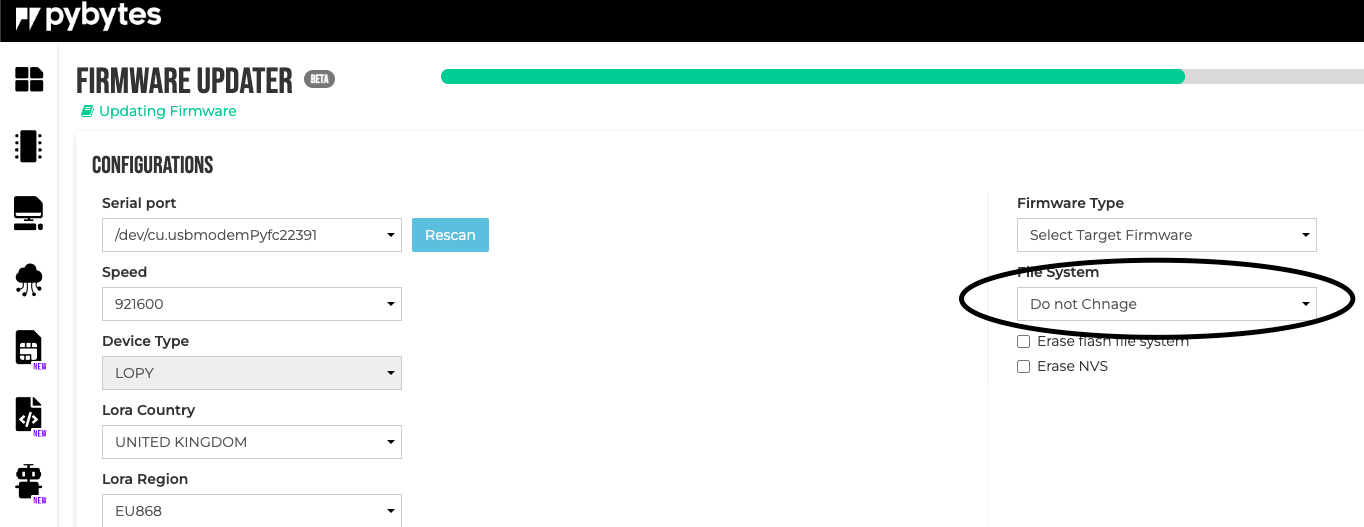
  • Typo in PyBytes Firmware Updater

    1
    1
    1 Votes
    1 Posts
    18 Views
    No one has replied
  • Same code, same hardware, same place, but no connection on one card(!?)

    4
    0 Votes
    4 Posts
    26 Views
    J
    @Johan164 can you list: the GPy firmware version the modem firmware type and version the GPy hardware version the country, network, and subscription type? Are any of the GPys enrolled in Pybytes? Is Pybytes disabled (or, on the contrary, actively used) on all? Are the settings for wifi_on_boot, lte_on_boot (or whatever it is called), pybytes_on_boot the same for all? Have you tried a full flash erase and then flashing and uploading again? Are there any differences in boot messages? Have you checked modem diagnostics? What is the error you get? Relevant parts of your source (I.e. a minimum viable example) and associated logs could help.
  • Gpy ADC Pins outputting Voltage

    1
    0 Votes
    1 Posts
    22 Views
    No one has replied
  • How to change username in forum

    1
    0 Votes
    1 Posts
    8 Views
    No one has replied
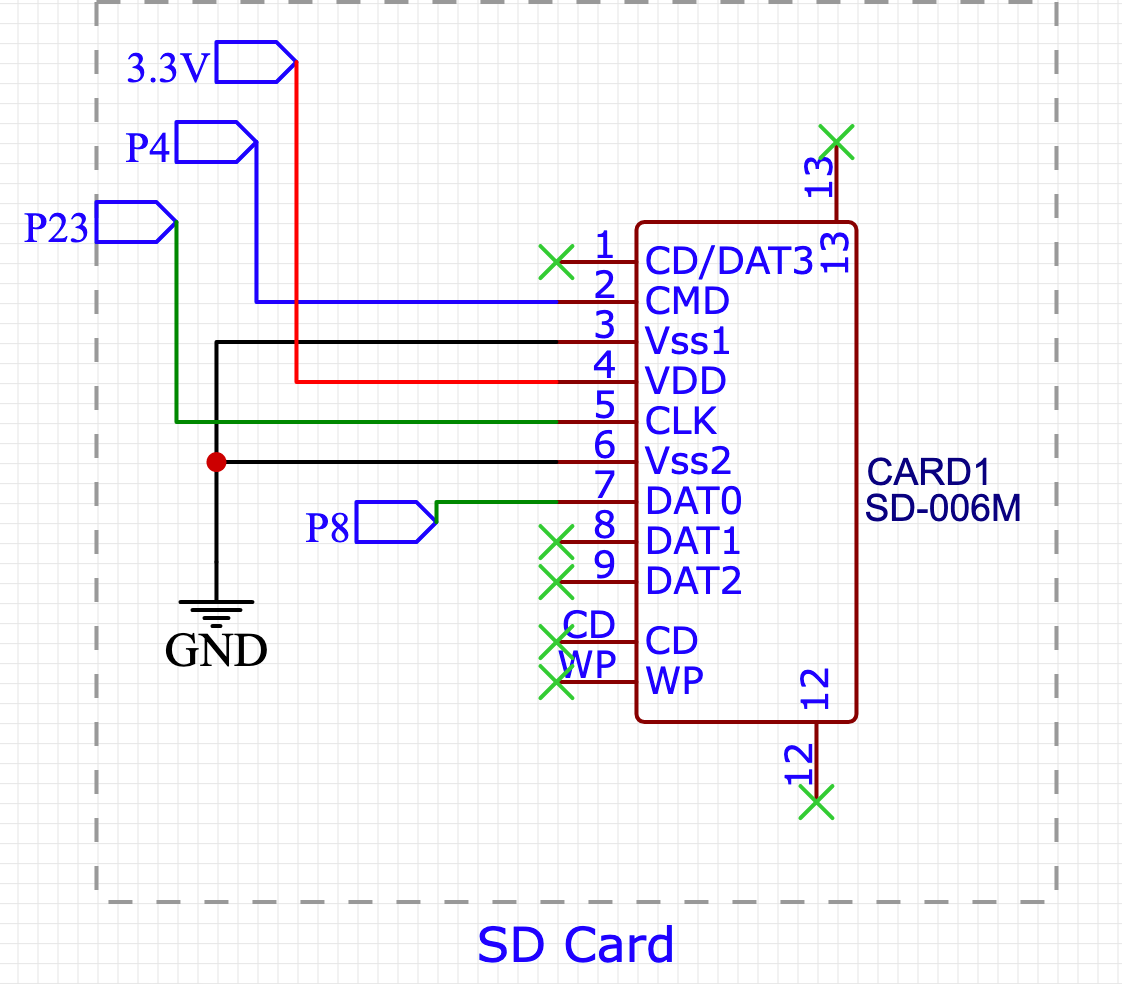
  • PCB Board with external SD socket doesn't work

    4
    1
    1 Votes
    4 Posts
    13 Views
    robert-hhR
    @Nicolò-Vallana Nothing but to re-check all connections end-to-end. I made an PCB board with SD socket as well once and it worked. I do not know if it is important, but I added a 100 µF capacitor between Vdd and Vss close to the socket. But even if I connect a simple SD socket breakout using the wiring you have (no CS) with jumper cables, it works.

Pycom on Twitter