[SOLVED] WiPy firmware to a standard WROOM-32?
-
@easyrider The revision check is done at many places in the code. I managed to create a version of the 1.10.1b1 firmware for the LOLIN32 lite with a rough hack. I changed the function esp_get_revision() in system_api.c of the esp_idf to always return 0, so the code believes it runs on a revision 0 chip. That is not a clean way and maybe has other side effects.
-
Hello!
I'm tryng to run the newest wipy fw (1.10.2.b1) on the WROOM32.
All i have is reboot.
The board work fine with 1.9.2 fw
Any ideas?
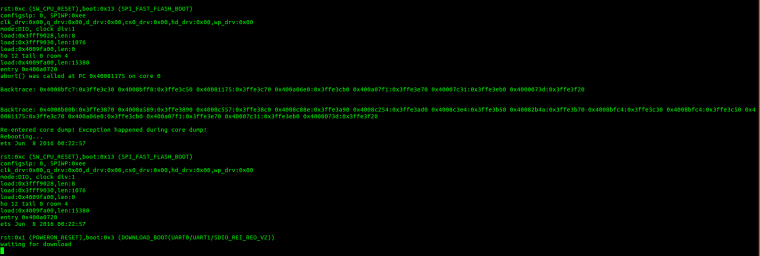
-
@paco88 I might be that that the device you are trying uses a revision 1 chip. You can tell by using esptool.py. If the xxPy firmware detects a revision 1 chip, it also assumes 4 Mbyte external RAM and 8 MByt eexternal flash. If that is not present, it will not work.
Please do not blame Pycom for that. They focus on making software for their own devices, which is hard enough. -
@robert-hh said in [SOLVED] WiPy firmware to a standard WROOM-32?:
fi
Only curiosity, i'm not blaming pycom.
I'm using both wipy2.0 and WROOM32 -
-
@paco88 I understand that the carrier PCB is called ESP32_Core_board_V2, not the esp32 chip.
-
@robert-hh Did you have found some workaround?
-
@paco88 See below about the hack I made. But that was just a trial. I'm not using that practcally. It's not worth the effort to maintain it.
"The revision check is done at many places in the code. I managed to create a version of the 1.10.1b1 firmware for the LOLIN32 lite with a rough hack. I changed the function esp_get_revision() in system_api.c of the esp_idf to always return 0, so the code believes it runs on a revision 0 chip. That is not a clean way and maybe has other side effects." -
@paco88 I have made a build of wipy.bin, which you'll find here:
https://github.com/robert-hh/Shared-Stuff
You have to upload it as wipy.bin to your device using esptool, after you loaded it first with the standard wipy file set.
esptool.py --chip esp32 --port /dev/ttyUSB0 --baud 115200 write_flash -z --flash_mode dio --flash_freq 80m --flash_size detect 0x10000 wipy.bin -
@robert-hh Thanks!
Can you tell me what part of the code have you modified?
I've modified the esp_get_revision() to return always 0, but can't get the board working. -
@paco88 That is a little bit tricky, since you have to rebuild lib/libesp32.a too. For that, I did the following:
a) go into any of the pycom-esp-idf/examples. I choose. examples/wifi/scan
b) run make. It will lead you through configure. Just exit there, and compiles a build. The configuration does not matter, since you will take that from the pycom directory in step c
c) take skdconfig.h from pycom's esp32 directory and put that into pycom-esp-idf/examples/wifi/scan/build/include
d) touch it, such that it has a new modification date
e) run make again on that example
f) now there is a libesp32.a in pycom-esp-idf/examples/wifi/scan/build/esp32 with the modified esp_get_revision
g) copy that lib file back to pycom's esp32/lib. Don't forget to save the old version.- You will need that for pycom's devices.For convenience, I've uploaded my modified libesp32.a to https://github.com/robert-hh/Shared-Stuff
But still this is not a full port. Some GPIO's cannot be addressed, only those, which are available on a WiPy. If you want seamless support, better use the Pycom devices with Pycom's firmware, and use the micropython.org or loboris port for other devices.
-
@robert-hh
Thanks, You helped me a lot!

Hello! It looks like you're interested in this conversation, but you don't have an account yet.
Getting fed up of having to scroll through the same posts each visit? When you register for an account, you'll always come back to exactly where you were before, and choose to be notified of new replies (either via email, or push notification). You'll also be able to save bookmarks and upvote posts to show your appreciation to other community members.
With your input, this post could be even better 💗
Register Login