Pymakr will not connect - inconsistent following firmware 0.9.3.b2
-
Hi,
Two LoPy - both working fine without any unknown issues. Then I run the updater for firmware version 0.9.3.b2 and all succeeded OK.
Apart from now, Pymakr will connect to the one Lopy and not the other.
I have reflashed it, reset it to factory settings - everything that my limited knowledge allows me to do.
Does anyone have any idea why Pymakr can't connect or is there any test I should do?
Thanks in anticipation.
-
I have a similar situation:
Windows 10
Pymakr 1.0.0.b6
usb COM11 (device manager shows 115200,8,n,1)
Pymakr>settings>Preferances>Pycom Device
Device:COM11
User:micro
Password:pythonLoPy 0.9.3.b2
here is my boot.py
# boot.py -- run on boot-up
import os
from machine import UART
uart = UART(0, 115200)
os.dupterm(uart)

#Setup the WiFi Network
from network import WLAN
# configure the WLAN subsystem in station mode (the default is AP)
wlan = WLAN(mode=WLAN.STA)
# go for fixed IP settings (IP, Subnet, Gateway, DNS)
wlan.ifconfig(config=('192.168.0.118', '255.255.255.0', '192.168.0.1', '192.168.0.1'))
wlan.scan()     # scan for available networks
wlan.connect(ssid='goofy', auth=(WLAN.WPA2, 'mypass'))
while not wlan.isconnected():
    pass
print(wlan.ifconfig())
Putty (Serial mode connection) on COM11 gets a >>> prompt and works consistently
Putty (Telent to 192.168.0.118) gets a >>>Filezilla gets
Status:	Logged in
Status:	Retrieving directory listing of "/flash"...
Command:	CWD /flash
Response:	250
Command:	TYPE I
Response:	200
Command:	PASV
Response:	227 (192,168,0,118,7,232)
Command:	LIST
Error:	Connection closed by server
Error:	Failed to retrieve directory listing
Pymakr 1.0.0.b6
gets a popup window
Warning:
QStackedWidget::setCurrentWidget: widget 0x4ba19c8 not contained in stack
Pymakr configured to COM11, Pycom Console shows
Connecting to a Pycom device...
Error while communicating with the Pycom device! (click to attempt to reconnect)
Connecting to a Pycom device...
Error while communicating with the Pycom device! (click to attempt to reconnect)
Connecting to a Pycom device...
Error while communicating with the Pycom device! (click to attempt to reconnect)
Pinged 192.168.0.118 - pinged ok
changed the Pycom device config to 192.168.0.118
Pycom Console showsConnecting to a Pycom device... Error while communicating with the Pycom device! (click to attempt to reconnect) Connecting to a Pycom device... Error while communicating with the Pycom device! (click to attempt to reconnect) Connecting to a Pycom device... Error while communicating with the Pycom device! (click to attempt to reconnect)Tried this whole thing over again using Ubuntu, similar results.
My thought is that Server() is still not working correctly in 0.9.3.b2...
Steve
-
@AgriKinetics @MainSheet One thing you should try is adding this line to your boot file, above your wifi code
if machine.reset_cause() != machine.SOFT_RESET:What happens is that Pymakr sends a soft reset after connecting to the device, making boot.py run and re-initiate the wifi connection, which in turn breaks the connection. This line prevents that. Check the docs for more info
-
@Ralph Thank you very much - your answer was spot on :) All working again!
-
thanks @Ralph, yes that did help things.
-
Hi @Ralph and @MainSheet I am using the same versions and OS as @MainSheet and getting the same issues. I'm not sure how to access the boot.py to edit this. I've tried via FileZilla (host: 192.168.4.1 user: micro pwd: python) it using the Site Manager while connected and not connected to the lopy-wlan but it just times out. I have ping-ed it and it's fine. Did you have to install the FTDI drivers and if so, is there a user-friendly instructions on which one to install and how to install it? I'm looking into www.ftdichip.com but there's three of them and I've got limited knowledge and don't want to blindly change my computer driver and registry settings. Help please!
-
HI @kwix,
For FTP you don't need the FTDI drivers. Make sure you follow these exact instructions. Notice the passive mode and don't forget to configure the 'one data connection at a time'.
If that works, place the REPL script in the boot file and try to connect via pymakr or commandline. Very probably windows either already has the ftdi drivers or will try to install them automatically when first connecting the expansion board to your pc.
-
@Ralph thanks for the help. I've missed off selecting the passive mode and now I am able to access the boot.py file. I've updated the boot.py file to something like below:
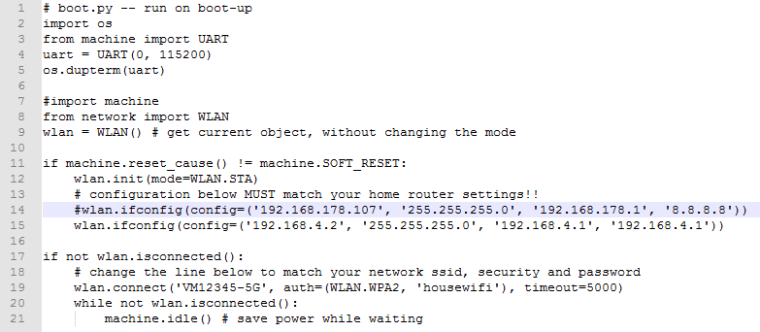
I've tried both with and without the commented "import machine"
When I go to Pymakr, it reaches REPL then after a few seconds the popup window with Warning QStackedWidget::setCurrentWidget: widget ... appears. I'd click OK to close the window then I get the same error message that an error occurred while communicating with the Pycom device:
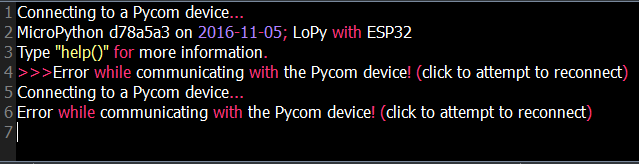
After that it will just keep displaying the same error message until I "reset" the device (unplug and plug the USB cable into the LoPy) and reconnect to the lopy-wlan. Also, is it normal to "reset" the LoPy everytime I switch between Filezilla to edit the boot.py and PyMakr to test it?
Please suggest a better approach for this as I think I might end up breaking the board if I keep on doing this.
-
@kwix Good to see you made it a step further.
The import machine is definitely needed, since you're using it on line 11. First of all, after editing the boot.py file, you need to reboot the device so that it actually executes. Pressing the reset button on the board is enough.
From your screenshot of the device console in Pymakr, I see that it does connect the first time, but then imidiately disconnects again, and after that doesn't manage to reconnect. I suspect the code breaks somewhere shortly after connecting. A good way to debug is to keep a telnet connection open from the commandline while trying to connect from Pymakr. This way you can see if any exception occurs that messes things up.
The QStackedWidget error will be fixed in the next release (either this weer or next week) but you should still get it to connect anyway. We will definitely improve Pymakr's error messages so you can get more info on this in Pymakr itself.
Let me know if that helps or if you manage to get more information on the issue you are having.
-
@Ralph hiya - thanks for the detailed response. I have a kept the telnet connection open and it seems to be working fine:
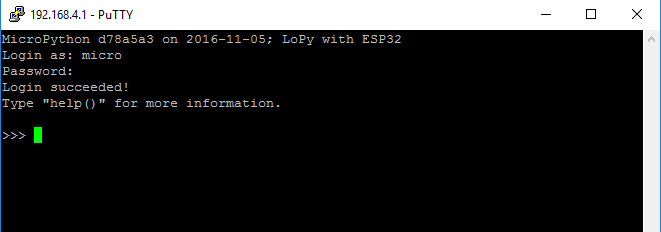
I tried connecting to Pymakr again while telnet connection is open, and now I am only getting error message, unlike before where it connects for a few seconds before it disconnects again:
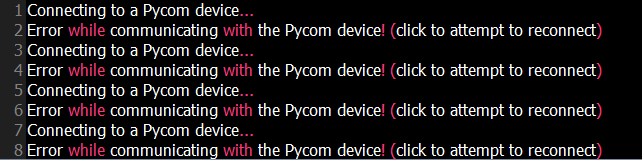
I don't get any messages from command line of the telnet connection but I got a different pop-up error message from the Pymakr:
[0_1479340260779_LoPy-ErrorMsg.txt](Uploading 100%)Not sure if this is related to this or just a result of me disconnecting to lopy-wlan so I can post this entry.
Is there any other places where I can see some logs? Or maybe i'm just doing something wrong/missed off?
-
Hi @kwix, which firmware version are you using? We discovered a bug that's in the latest few versions (0.9.3.b2 and up, as far as we know), that makes the connection to Pymakr fail (this issue) It could be that this is your problem, in which case you'll have to wait for the next release. Did you try connecting over usb?
A good way to check what's going on, is keeping a connection open to the board via the terminal while trying Pymakr, to see what's going on on the board and with your code. If you are using telnet in Pymakr, keep a screen session open to the serial port from the command line. Or the other way around. -
@Ralph hi again, I tried connecting over USB and kept a screen session open to the serial port and this is what I got when I try to connect via Pymakr:

Same error messages obtained in the Pymakr: QStackedWidget Warning, the popup window, though looking at the timestamp, I think it was from yesterday.
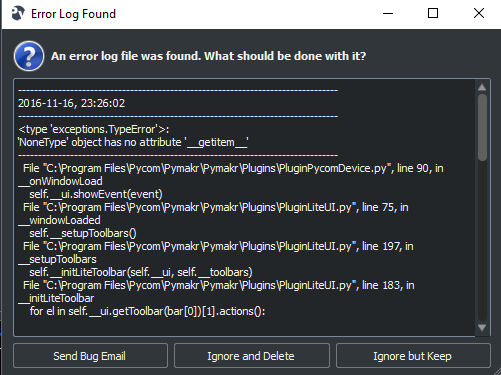
In addition to those, another pop-up message appears:
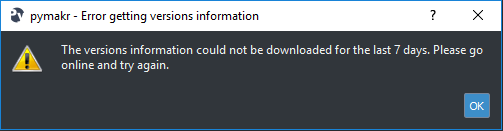
I've checked my device manager and it recognises whatever's plugged into COM3 as an FTDI device. I'm probably doing something wrong here - I have not come across anyone else having the same issues as I am :(
I will just wait for the next release and hopefully it would work out - unless you have other suggestions that I should try? Really appreciate your immediate response.
-
@kwix
i have exactly the same - you are not alone -
This post is deleted! -
@Ralph Can I ask exactly when the next release will be available? Also, forgot to mention the versions I'm using:
LoPy 0.9.3.b2
Windows 10
Pymakr 1.0.0.b6
Device:COM3@livius that's nice to know! though I meant in general...or most people are just not using Windows. Will attempt to use Mac OS X, hoping I get somewhere.
-
still can not connect to WiPy2 throught CMM by pymakr with current firmware 0.9.5.b1
i work on Windows platform (Windows 10) -
@Ralph @daniel Hi guys, just a quick note of thanks. Following the release of firmware 0.9.5.b1, I can now happily connect to the LoPy's using WiFi and Com (using Windows 7).
Look forward to receiving the new PyMakr which will hopefully get rid of the message related to not being able to contact the PyCom servers within the last 7 days (on startup).
Also thank you @LoneTech for sorting the pin issues (32 and above), that work was much appreciated!
We can at least get on with some testing of the boxes.
-
@Ralph ditto - upgraded to latest firmware 0.9.5b1 and it works on Windows 10 but only if connected via wlan. Thank you for your help - really appreciate your immediate responses.
I've also tried serial connection via putty and Pymakr - it does not work for me and I get the same issues as before (i.e. QStackedWidget warning message, last 7 days error message and error communicating with LoPy).
-
I'm also having this problem on Linux and W10.
I received my LoPy's the other day, they worked fine for about a day then they stopped accepting connections.
I've never been able to connect to them via ssh, telnet or COM on Linux or W10.
I can connect to the LoPy AP, and the Pymakr will connect, however it will not let me sync my code to the LoPy.
-
Hi-
I just received my WiPi 2.0 the other day and immediately upgraded the firmware (as I usually do with such things). Now I'm able to telnet into it just fine, and I can use Putty to get a serial console, however Pymakr fails as many others have said.My boot.py is set to default. Nothing has been changed from factory except that I updated the firmware out of the box.
Here is my boot.py:
import os
from machine import UART
uart = UART(0, 115200)
os.dupterm(uart)
Any word from Pycom about this? I'm thinking about trying to reach support or going on Github and posting a bug for Pymakr if I can't find one yet.
Hello! It looks like you're interested in this conversation, but you don't have an account yet.
Getting fed up of having to scroll through the same posts each visit? When you register for an account, you'll always come back to exactly where you were before, and choose to be notified of new replies (either via email, or push notification). You'll also be able to save bookmarks and upvote posts to show your appreciation to other community members.
With your input, this post could be even better 💗
Register Login