Lopy4 433MHz
-
Hi,
How can I change my Lopy4 to work on 433Mhz. When I run command:
C:\Program Files (x86)\Pycom\Pycom Firmware Update>pycom-fwtool-cli.exe -p COM4 lpwan
My output is:
Running in PIC mode
SMAC: 70B3D54997FB6121
SID: 004D367E
PAC: 5C044BFB32BC008E
LORA REGION=EU868Then I try to change in EU433
C:\Program Files (x86)\Pycom\Pycom Firmware Update>pycom-fwtool-cli.exe -p COM4 lpwan --region EU433the output is:
Invalid LoRa region EU433 must be one of: EU868 US915 AS923 AU915BR Mladen
-
From what I could tell from looking at the code, the front ends to the update tool, and the python interfaces to the LoRaWAN stack only support a subset of regions:
(from pycom-micropython-sigfox/esp32/mods/modlora.c)
static void lora_validate_region (LoRaMacRegion_t region) {
    if (region != LORAMAC_REGION_AS923 && region != LORAMAC_REGION_AU915
        && region != LORAMAC_REGION_EU868 && region != LORAMAC_REGION_US915) {
            nlr_raise(mp_obj_new_exception_msg_varg(&mp_type_ValueError, "invalid region %d", region));
    }
}
The regions are supported in the main LoRaWAN stack, but it doesn't look like the support has trickled through to the pycom code yet.
I wonder if anyone from pycom could tell us where EU433 is on the priority list?
-
Actual LoPy4 specification on the WEB site says:
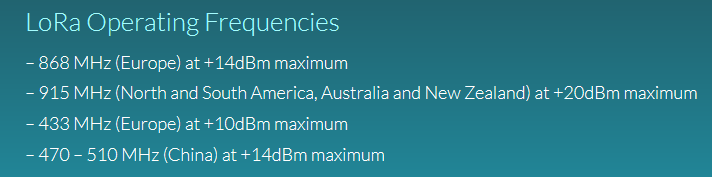
According to this EU433 must be working!
-
@mladen Have you tried just adding the EU433 setting when you setup LoRa in your code? The device-level setting (in the firmware update tool) is just a default anyway...
-
@mladen The code seems inconsistent. The settings and QSTR for EU433 are not included, but using EU868, you can set the frequency to as low as 410 MHz. (esp32/mods/modlora.c, line 1143 ff)
        case LORAMAC_REGION_EU868:
                #if defined(LOPY4)
                    if (frequency < 410000000 || frequency > 870000000) {
                #else
                    if (frequency < 863000000 || frequency > 870000000) {
                #endif
                        goto freq_error;
                    }
                    break;
Besides the frequencies, the spec for EU433 and EU868 seem very similar.
-
@robert-hh - Thanks, really good point.
I hadn't looked that deeply. As you say, the specs for EU433 are very similar to EU866, though the default channel frequencies are different. Still that should be easy to fix up by removing the defaults and adding in new defaults.
So we know that we CAN'T use something like this:
lora = LoRa(mode=LoRa.LORAWAN, region=LoRa.EU433, ....)But it looks like we can use:
LoRa(mode=LoRa.LORAWAN, region=LoRa.EU866)Followed by removing the 3 default channels (0, 1, 2) and adding them back in manually. Except in the documentation, it says:
On the 868MHz band the channels 0 to 2 cannot be removed, they can only be replaced by other channels using the lora.add_channel method.So, it looks like the pseudo-code to use EU433, ON A LOPY-4 is:
# Using EU433, but have to select region EU866 on the LOPY-4 to access EU433
# Put any other arguments into this call that you need
LoRa(mode=LoRa.LORAWAN, region=LoRa.EU866)
# Replace the three default channels:
lora.add_channel(index=0, frequency=433175000, dr_min=0, dr_max=5)
lora.add_channel(index=1, frequency=433375000, dr_min=0, dr_max=5)
lora.add_channel(index=2, frequency=433575000, dr_min=0, dr_max=5)
It looks like this is a work-around until the actual region parameter handling is hooked up. @Mladen I would love to know if this actually works in the field.
-
@bed I considered that, but did not find an answer yet on how the switch of the antenna connector happens. I have to look into the driver code, if that is done by the drive upon selecting the frequency range.
Besides that, clearly supporting the region EU433 seems not the largest change of the code. -
Hi @robert-hh - I'm fuzzy about how the lf vs. hf antenna switch works - I hoped that it would just work :)
From my reading of the Semtech SX1276 datasheet, it seems that there are two RF sections, one for the lf and one for the hf:
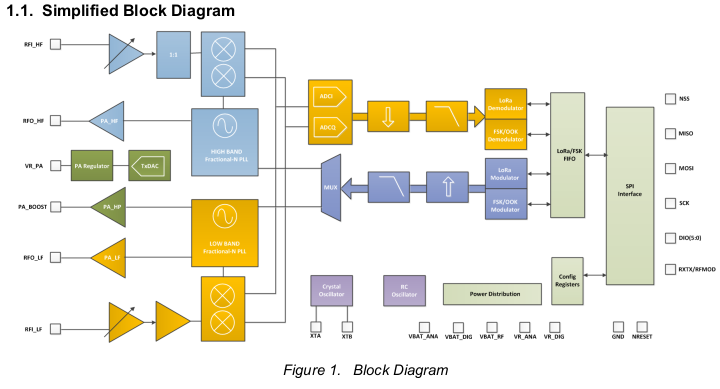
I figured (hoped) that the pycom U.FL connectors went to the two different sections and that the Semtech chip then used the correct section depending on the frequency that was written into it's registers.
But, again, I've only use the hf side for AU915 and AS923, so I don't know if this is true or not. It would make things easier - just hook up an antenna to the correct U.FL connector for which band you are using, and that's it. But it could be wishful thinking.
-
@bed I did not look into the details yet. i could give it simply a try and look, which output is used, if any.
-
@robert-hh That would be useful -- try the EU433 values on a transmit and see if there is transmission on the correct antenna. I saw some of your other posts w.r.t. the receive windows being out of alignment and that setup looked awesome.
I'm not at the point of using EU433 yet, but knowing if the current firmware could be used for those frequencies would be useful.
-
@bed OK. I will not have time for that before the weekend.
-
THX for replys, I will try next week
-
@mladen Sorry, I could not test that. It's only supported with a LoPy4, which I do not own. I just have LoPy's ans FiPy's. I did not consider that before, even if it was obvious (!).
-
@mladen I now have a LoPy4 and made a first test. Using region EU868 and just setting the frequency to 433 MHz creates a 433 MHz carrier at the proper antenna output of the LoPy4. I'll continue my testing.
-
@robert-hh That's really promising -- thanks for checking that out.
-
@bed @Mladen I tested now LoraWan with Loriot, and both uplink and downlink work. I did not try OTAA join yet. The old problem with inconsistent timing of downlink messages at the nanogateway still remains. It is recommended to select the RX2 response window at the Loriot device setting. With that, OTAA join should work too. TTN has no support for EU433.
The modified code is at this repository and branch: https://github.com/robert-hh/pycom-micropython-sigfox/tree/eu433. It still requires a second review pass. I'll do that in a few days, when the changes made are not so obvious to me any more, forcing me to reconsider them.
-
@robert-hh Hi Robert,
I had a quick look at the code diffs and it makes sense to me (nothing bad stuck out). I'll pull it in the next couple of days to look at it in full context and report back any issues.
It all looks pretty straight forward -- add in the region file, add manual add/remove of channels, and other sanity checks. Looks great so far.
Regards,
Brian -
@bed Thanks. I did not make my second pass through modlora.c yet and compare it with the LORaWAN specs. In my first run I had the impression, that also the existing code has some 'shortcuts'.
B.T.W.: I tried OTAA join on Wednesday, and besides the inherent timing problem of the nanogateway it works. Since in general downlink worked, that was to be expected. -
I am testing my LoPy4 on the 433MHz with the NanoGateway. However, no matter how I defined the frequencies, the node still operates on 868MHz band and I am not receiving anything on the Nano Gateway configured at 433. All the messages are picked up by my 868MHz LoRaWAN gateway...
This is my code to set the channels on the node:
# Using EU433, but have to select region EU868 on the LOPY-4 to access EU433
# Put any other arguments into this call that you need
lora = LoRa(mode=LoRa.LORAWAN, region=LoRa.EU868)
# Replace the three default channels:
lora.add_channel(index=0, frequency=434375000, dr_min=0, dr_max=5)
lora.add_channel(index=1, frequency=434375000, dr_min=0, dr_max=5)
lora.add_channel(index=2, frequency=434375000, dr_min=0, dr_max=5)

# remove all the non-default channels
for i in range(3, 16):
    lora.remove_channel(i)
I am trying now with the FW version 1.20.0.rc4
Any idea what is going on or how could I get my LoRaWAN operating at 433MHz?
-
@berni 433 MHz is not supported in the standard . I made a version of the firmware once, but I removed it. I can re-build it, but it is at an old version of MicroPython, something like 1.14.x


Hello! It looks like you're interested in this conversation, but you don't have an account yet.
Getting fed up of having to scroll through the same posts each visit? When you register for an account, you'll always come back to exactly where you were before, and choose to be notified of new replies (either via email, or push notification). You'll also be able to save bookmarks and upvote posts to show your appreciation to other community members.
With your input, this post could be even better 💗
Register Login