Help with I2C connection to BME280 on WiPy 2.0 ...
-
Just trying to connect to a BME280 sensor on I2C with a WiPy 2.0 on a 2.0 Expansion Board but seem to be having a problem. Running V1.8.6-849-9569a73 which I believe is current since I just did a firmware update. First I'm just trying to get a basic I2C connection using the standard SDA and SCL pins (which I believe are G16 (P9) for SDA and G17 (P10) for SDL. I've removed the LED jumper on the expansion board. I'm running the REPL through ATOM on COM. When I run this:
from machine import I2C
i2c = I2C(0, I2C.MASTER, baudrate=100000)
i2c.scan()it hangs for quite a while (at least 30 seconds) and returns nothing ([ ]). Don't understand the hang and I expected to see the BME280's default I2C address of 0x76. I'm new to I2C communication, so I apologize if I'm making any dumb mistakes at this point. Please point me in the right direction!
Do I need a pull-up resistor on SDA?
Also looking for a library for the BME280. If anyone knows of a good one that actually works well, please post a link.
Would appreciate any help. Thanks.
-
@sealyons said in Help with I2C connection to BME280 on WiPy 2.0 ...:
a while (at least 30 seconds) and returns nothing ([ ]). Don't understand the hang and I expected to see the BME280's default I2C address of 0x76. I'm new to I2C communication, so I apologize if I'm making any dumb mistakes at this point. Please point me in the right direction!
What is the behavior when you have no wires connected? Still 30 sec hang?
-
No. With no wires connected, it returns immediately and obviously returns no addresses.
-
@sealyons Can you try another I2C peripheral? Can you post pic of your hookup?
-
@sealyons Hi!
Check the simple things at first:- Do you have Pull-Ups on the SDA and SCL lines (4k7 Ohm)?
- Try to switch SDA and SCL and check what happens.
- How long are the cabels? <= 1m should be fine.
- is the BME280 connected in the right way? CS should be HIGH to activate the I2C bus.
Cheers,
Thomas -
Here's some updates. First, I'm just trying to get I2C working properly before continuing with the BME280 connection. I originally did not have external pull-ups on SDA & SCL (and I have not added them yet) . I decided to try another I2C sensor to at least see if I could get scan() to find it's address. I connected to an Adafruit TSL2561 I2C Luminosity Sensor (since I had one kicking around) with it's I2C ADDR line floating, so it's I2C address should be 57 decimal (0x39). I believe this breakout has integrated pull-ups on SDA & SCL. When I connected everything and ran the same code I gave at the beginning of my post, it worked and returned [57]. So, it appears my WiPy I2C is working correctly. Back to connecting to the BME280 ...
-
Before trying to access the BME280 itself, just want to be sure I can see the sensor over I2C first. I'm not sure whether my BME280 breakout has integrated pull-ups or not. I'm thinking it does but I did add 4.7K pull-ups just in case. CS is tied HIGH. All cables are 6 in. or less. When I run this it's not hanging as long (just a few seconds now) but it's still not returning anything. It just returns [ ]. Expecting to see [118] since the BME280's address is 0x76. I guess it's possible the breakout is bad, I have another I will try.
-
@sealyons I have responded to that discussion in the other forum. I tested a BME280 with that library https://github.com/catdog2/mpy_bme280_esp8266/blob/master/bme280.py with a LoPy4 and it worked. The test lines to run that module are:
from machine import I2C
from bme280 import *
i2c = I2C()
bme280 = BME280(address=0x76, i2c=i2c)
bme280.values
Connection:
BME280 LoPy ----------------------- VIN 3.3V GND GND SDA P9 (aka G16) SCL P10 (aka G17) -
Thanks for your reply but it's really not helping me much. I'm using a WiPy 2.0 & Expansion Board 2, not a LoPy4 which I have no experience with so I'm not sure whether there are syntax differences. As far as I know, when defining the I2C object on the WiPy 2.0 you have to include the I2C.MASTER keyword as I did.
Also, as I said in my last post, I can't talk with the BME280, so I'm not there yet. As I stated, I can't get the I2C scan to find the BME280. My BME280 has 6 connections; Vcc, GND, SCL, SDA, CSB and SDO. Since I verified that my WiPy can talk with other sensors, I'm guessing there must be something wrong with my BME280 sensor. I may either connect this sensor to Arduino and see if I can get it to work there or connect the other BME280 sensor I have (same model) and see what it does (still have to prep it).
-
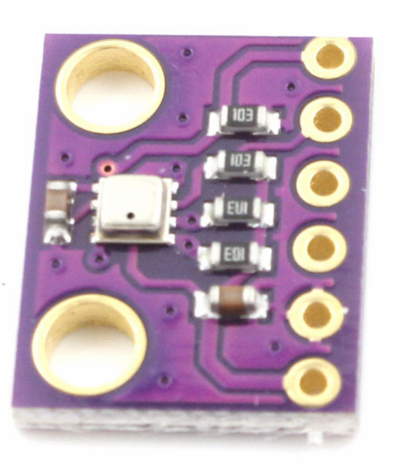
Just tried the other BME280 that I have and I can't get that to respond to the I2C scan either. Not sure how to proceed. I believe I have it connected correctly, using Vcc, GND, SDA, SCL and CSB. If anyone has a BME280 that looks like this and can confirm connections, please reply.
-
@sealyons For I2C there is no difference between a WIPy and a LoPy. The Lopy is a WiPy with an SX127x chip for Lora and Sigfox. Looking at the picture, I see 10 kOhm pullup-resistors for the data lines. I cannot see the traces at the back side, but form what I see, the connections should be (from left to right, connections pointing to you): Vcc -> 3.3v, GND, SCL, SDA, CSB -> 3.3V, SDO -> GND. CSB must be connected to 3.3V at power-on. So it is always a good idea make the Vcc as the last one. Is the picture form the module you use? I cannot see any signs of connecting attempts.
-
@sealyons Just to please you soul, I have tested that with a WiPy2 clone, which is just a generic ESP32 module with the WiPy firmware. It works.
And I also found backside pictures of the modules you showed. -
I do appreciate your help. Ok, I knew nothing about LoPy. The image I originally posted was from the vendor where I purchased the BME280 (it's exactly the same as what I'm using). Attached are images of my exact BME280 (this is one of the 2 that I have, both are not responding to the I2C scan).
I've already stated this but my connections are as follows;
Vcc to 3.3V,
GND to GND,
SCL to P10 / G17
SDA to P9 / G16
CSB to 3.3VHere's an image of my setup. I've tried it with and without external pull-ups (the 10K pull-ups are on the breakout), same result.
Again, neither are responding to the I2C scan() function. The function hangs for a few seconds to a few minutes but it does return. When I use other I2C sensors, the scan() function works properly and I do get the correct addresses returned, so I believe my WiPy is functioning correctly. So, either my BME280's are not working or the connections are wrong. This should be pretty simple, I've never had such trouble. I'm going to switch this over to Arduino and give it a run there just to see if the BME280 will function in that environment. If anyone has any other suggestions, please reply.
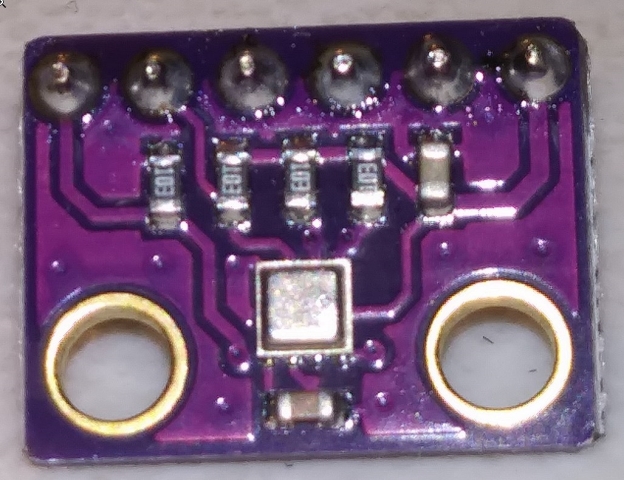
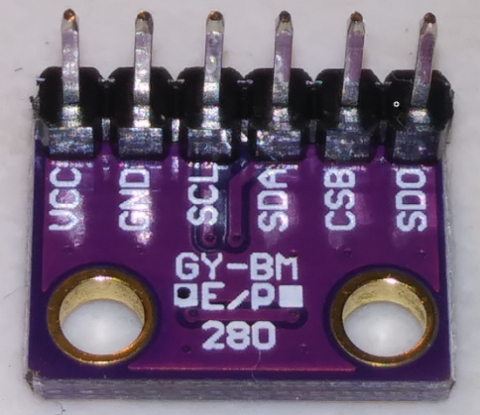
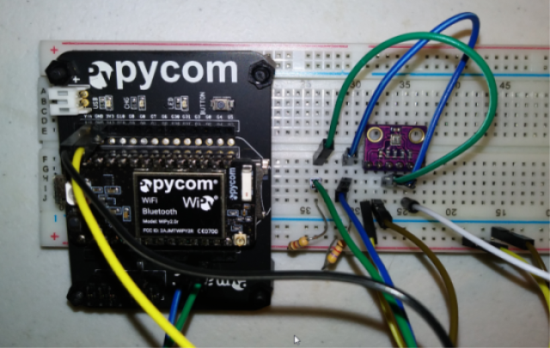
-
@sealyons If I look at you wiring, I cannot clearly see how the power is connected. In the orientation of you picture, the topmost left connector is 5V. That must not be used. The second from the left is GND, the third is 3.3V. You must use GND and 3.3V to power your device.
And yes, the breakout board has pull-up resistors (SDO pull-down). That are the small components with 103 = 10 followed by three zeroes = 10000 Ohm printed on them. And they are conected to SDA, SCL, CSB and SDO. So you do not even have to connect CSB and SDO yourself.
I'm asking because I received once boards with the wrong components on them, capacitors instead of resistors. -
No need to explain the SMD resistors, I'm an EE. The pins on the breakout board are Vin, GND, and 3V3 starting at the left. I'm using the GND and 3V3 pins and I bring those to the -/+ rails on the breadboard. And I did measure the 3V3 value before I did any work with the BME280, just to be sure. Neither of them have gotten anything above 3.3V. Still don't understand why the BME280's won't respond to the I2C scan.
-
@sealyons said in Help with I2C connection to BME280 on WiPy 2.0 ...:
No need to explain the SMD resistors, I'm an EE.
That's good. So you can read follow the traces on the board and understand the logic. The level of knowledge is varying here. As said, I could not clearly see the wiring. Black on black give a bad contrast. So you surely have measured the level of SDA and SCL when not communicating as being ~3.3 V. Even if SDA and SCL are swapped, scan() should return fast. The long time for scan() can be caused by SCL being pulled low. The situation is quite confusing.
Can you read the imprint on the case of the BME280. The letters are pretty small, so you need a magnifying glass. According to the data sheet, it should be nnn and UP, which nnn being a 3 alphanumeric symbols, and UP identifying the device as BME280.
But from the position of the vent hole it looks like a BME280 and not a BMP280, which anyhow has the same pin-out and the same communication specs. -
Just a quick update ....
Both of my BME280's have the UP marking.
When I looked at both SCL & SDA when not communicating, they were measuring LOW. Something is odd. Just on an odd chance, I moved everything off the breadboard I was using to another breadboard and BEHOLD, scan is now returning the correct 118 address for both of my BME280's!!!! Not sure what the issue is with that breadboard but that appears to have been my problem all along.
Now I'm going to try to get the BME280 library running and see if I can communicate with it ...
-
@sealyons Puh! That's odd. There were some reports about faulty breadboard in the past. Below is a module which I was using with my BME280. It is the initially linked one with the compensation calculation changed to float. The unit I have show far too low humidity values.
# Authors: Paul Cunnane 2016, Peter Dahlebrg 2016
#
# This module borrows from the Adafruit BME280 Python library. Original
# Copyright notices are reproduced below.
#
# Those libraries were written for the Raspberry Pi. This modification is
# intended for the MicroPython and esp8266 boards.
#
# Copyright (c) 2014 Adafruit Industries
# Author: Tony DiCola
#
# Based on the BMP280 driver with BME280 changes provided by
# David J Taylor, Edinburgh (www.satsignal.eu)
#
# Based on Adafruit_I2C.py created by Kevin Townsend.
#
# Permission is hereby granted, free of charge, to any person obtaining a copy
# of this software and associated documentation files (the "Software"), to deal
# in the Software without restriction, including without limitation the rights
# to use, copy, modify, merge, publish, distribute, sublicense, and/or sell
# copies of the Software, and to permit persons to whom the Software is
# furnished to do so, subject to the following conditions:
#
# The above copyright notice and this permission notice shall be included in
# all copies or substantial portions of the Software.
#
# THE SOFTWARE IS PROVIDED "AS IS", WITHOUT WARRANTY OF ANY KIND, EXPRESS OR
# IMPLIED, INCLUDING BUT NOT LIMITED TO THE WARRANTIES OF MERCHANTABILITY,
# FITNESS FOR A PARTICULAR PURPOSE AND NONINFRINGEMENT. IN NO EVENT SHALL THE
# AUTHORS OR COPYRIGHT HOLDERS BE LIABLE FOR ANY CLAIM, DAMAGES OR OTHER
# LIABILITY, WHETHER IN AN ACTION OF CONTRACT, TORT OR OTHERWISE, ARISING FROM,
# OUT OF OR IN CONNECTION WITH THE SOFTWARE OR THE USE OR OTHER DEALINGS IN
# THE SOFTWARE.

import time
from ustruct import unpack, unpack_from
from array import array

# BME280 default address.
BME280_I2CADDR = 0x76

# Operating Modes
BME280_OSAMPLE_1 = 1
BME280_OSAMPLE_2 = 2
BME280_OSAMPLE_4 = 3
BME280_OSAMPLE_8 = 4
BME280_OSAMPLE_16 = 5

BME280_REGISTER_CONTROL_HUM = 0xF2
BME280_REGISTER_CONTROL = 0xF4


class BME280:

    def __init__(self,
                 mode=BME280_OSAMPLE_8,
                 address=BME280_I2CADDR,
                 i2c=None,
                 **kwargs):
        # Check that mode is valid.
        if mode not in [BME280_OSAMPLE_1, BME280_OSAMPLE_2, BME280_OSAMPLE_4,
                        BME280_OSAMPLE_8, BME280_OSAMPLE_16]:
            raise ValueError(
                'Unexpected mode value {0}. Set mode to one of '
                'BME280_ULTRALOWPOWER, BME280_STANDARD, BME280_HIGHRES, or '
                'BME280_ULTRAHIGHRES'.format(mode))
        self._mode = mode
        self.address = address
        if i2c is None:
            raise ValueError('An I2C object is required.')
        self.i2c = i2c

        # load calibration data
        dig_88_a1 = self.i2c.readfrom_mem(self.address, 0x88, 26)
        dig_e1_e7 = self.i2c.readfrom_mem(self.address, 0xE1, 7)

        self.dig_T1, self.dig_T2, self.dig_T3, self.dig_P1, \
            self.dig_P2, self.dig_P3, self.dig_P4, self.dig_P5, \
            self.dig_P6, self.dig_P7, self.dig_P8, self.dig_P9, \
            _, self.dig_H1 = unpack("<HhhHhhhhhhhhBB", dig_88_a1)

        self.dig_H2, self.dig_H3 = unpack("<hB", dig_e1_e7)
        e4_sign = unpack_from("<b", dig_e1_e7, 3)[0]
        self.dig_H4 = (e4_sign << 4) | (dig_e1_e7[4] & 0xF)

        e6_sign = unpack_from("<b", dig_e1_e7, 5)[0]
        self.dig_H5 = (e6_sign << 4) | ((dig_e1_e7[4] >> 4) & 0x0F)

        self.dig_H6 = unpack_from("<b", dig_e1_e7, 6)[0]

        self.i2c.writeto_mem(self.address, BME280_REGISTER_CONTROL,
                             bytearray([0x3F]))
        self.t_fine = 0

        # temporary data holders which stay allocated
        self._l1_barray = bytearray(1)
        self._l8_barray = bytearray(8)
        self._l3_resultarray = array("i", [0, 0, 0])

    def read_raw_data(self, result):
        """ Reads the raw (uncompensated) data from the sensor.

            Args:
                result: array of length 3 or alike where the result will be
                stored, in temperature, pressure, humidity order
            Returns:
                None
        """

        self._l1_barray[0] = self._mode
        self.i2c.writeto_mem(self.address, BME280_REGISTER_CONTROL_HUM,
                             self._l1_barray)
        self._l1_barray[0] = self._mode << 5 | self._mode << 2 | 1
        self.i2c.writeto_mem(self.address, BME280_REGISTER_CONTROL,
                             self._l1_barray)

        sleep_time = 1250 + 2300 * (1 << self._mode)
        sleep_time = sleep_time + 2300 * (1 << self._mode) + 575
        sleep_time = sleep_time + 2300 * (1 << self._mode) + 575
        time.sleep_us(sleep_time)  # Wait the required time

        # burst readout from 0xF7 to 0xFE, recommended by datasheet
        self.i2c.readfrom_mem_into(self.address, 0xF7, self._l8_barray)
        readout = self._l8_barray
        # pressure(0xF7): ((msb << 16) | (lsb << 8) | xlsb) >> 4
        raw_press = ((readout[0] << 16) | (readout[1] << 8) | readout[2]) >> 4
        # temperature(0xFA): ((msb << 16) | (lsb << 8) | xlsb) >> 4
        raw_temp = ((readout[3] << 16) | (readout[4] << 8) | readout[5]) >> 4
        # humidity(0xFD): (msb << 8) | lsb
        raw_hum = (readout[6] << 8) | readout[7]

        result[0] = raw_temp
        result[1] = raw_press
        result[2] = raw_hum

    def read_compensated_data(self, result=None):
        """ Reads the data from the sensor and returns the compensated data.

            Args:
                result: array of length 3 or alike where the result will be
                stored, in temperature, pressure, humidity order. You may use
                this to read out the sensor without allocating heap memory

            Returns:
                array with temperature, pressure, humidity. Will be the one from
                the result parameter if not None
        """
        self.read_raw_data(self._l3_resultarray)
        raw_temp, raw_press, raw_hum = self._l3_resultarray
        # temperature
        var1 = (raw_temp/16384.0 - self.dig_T1/1024.0) * self.dig_T2
        var2 = raw_temp/131072.0 - self.dig_T1/8192.0
        var2 = var2 * var2 * self.dig_T3
        self.t_fine = var1 + var2
        temp = self.t_fine / 5120.0

        # pressure
        var1 = (self.t_fine/2.0) - 64000.0
        var2 = var1 * var1 * self.dig_P6 / 32768.0 + var1 * self.dig_P5 * 2.0
        var2 = (var2 / 4.0) + (self.dig_P4 * 65536.0)
        var1 = (self.dig_P3 * var1 * var1 / 524288.0 + self.dig_P2 * var1) / 524288.0
        var1 = (1.0 + var1 / 32768.0) * self.dig_P1
        if (var1 == 0.0):
            pressure = 0 # avoid exception caused by division by zero
        else:
            p = ((1048576.0 - raw_press) - (var2 / 4096.0)) * 6250.0 / var1
            var1 = self.dig_P9 * p * p / 2147483648.0
            var2 = p * self.dig_P8 / 32768.0
            pressure = p + (var1 + var2 + self.dig_P7) / 16.0

        # humidity
        h = (self.t_fine - 76800.0)
        h = ((raw_hum - (self.dig_H4 * 64.0 + self.dig_H5 / 16384.0 * h)) *
                (self.dig_H2 / 65536.0 * (1.0 + self.dig_H6 / 67108864.0 * h *
                 (1.0 + self.dig_H3 / 67108864.0 * h))))
        humidity = h * (1.0 - self.dig_H1 * h / 524288.0)

        if result:
            result[0] = temp
            result[1] = pressure
            result[2] = humidity
            return result

        return array("f", (temp, pressure, humidity))

    @property
    def values(self):
        """ human readable values """

        t, p, h = self.read_compensated_data()

        return ("{:.2f}C".format(t), "{:.2f}hPa".format(p/100),
                "{:.2f}%".format(h))
For testing, assuming the file is called bme280.py, run:
from machine import I2C from bme280 import * i2c=I2C() bme280 = BME280(i2c=i2c) bme280.values -
Ok, I have the library working now. Thanks for your help.
I agree, the humidity value seems really low. It's raining here and the indoor humidity value is showing as 47.9%. I'd expect that to be higher. If I blow on the sensor the humidity value does go up, so it's responding but the returned value doesn't appear to be correct. I'll have to search around for any other micropython libraries for the BME280 and/or dig into the code and see if I can see anything. I do want something that reports valid values. I'm still going to move this over to Arduino and see what it shows with another library.
-
@sealyons I compared that with two other sensors, which show both about 50%. My sensor shows ~35%. The other values are OK. The pressure deviates only by 0.2% from what the web page of the local university tells. I assume they have good instruments. I was too lazy to compare their RH value, because their instrument is outside, and I would have to compensate for the temperature difference. Maybe I'll give it a try.
Update: That was easy. The BME280 seems right. The weather station tells 6.5g/m³ and 11°C, 67% RH. At 11°C, the saturation value is about 10g/m³, which gives 65%RH. The indoor temperature is 21°C, with a saturation amount of ~18g/m³. Assuming that the absolute humidity is the same, that gives ~36%RH.

Hello! It looks like you're interested in this conversation, but you don't have an account yet.
Getting fed up of having to scroll through the same posts each visit? When you register for an account, you'll always come back to exactly where you were before, and choose to be notified of new replies (either via email, or push notification). You'll also be able to save bookmarks and upvote posts to show your appreciation to other community members.
With your input, this post could be even better 💗
Register Login