MemoryError: memory allocation failed, allocating 2048 bytes - LOPY - 1.2.0.b1
-
Hi Team,
I am trying to make use of SSD1306 OLED 128x64 Display with WLAN http_Client library to POST some JSON data to the cloud.I am getting Memory Error : memory allocation failed allocating 2048 bytesConfiguration :
Lopy (sysname='LoPy', nodename='LoPy', release='1.2.0.b1', version='v1.8.6-290-gdac16bd on 2017-01-05', machine='LoPy with ESP32')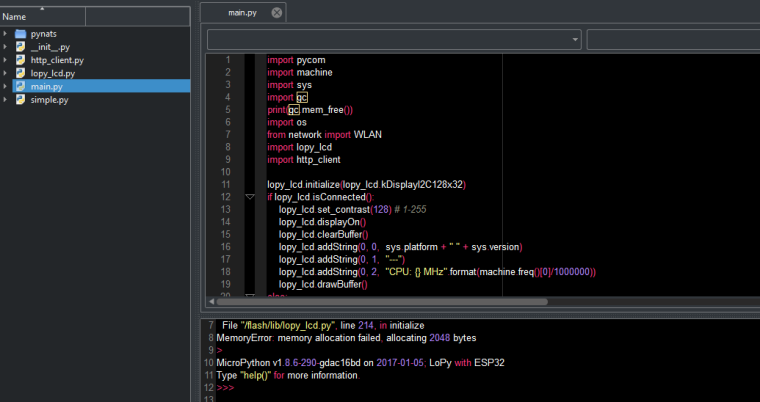
In Future,I need to use some mqtt library feature as well.How can i sort out this issue ? Please advice.
Thanks & regards,
Hari -
The new release has cut back memory even more. Two options:
a) go back to version 1.0.0.x
b) use pre-compiled code.
Option b is only helpful if you get the memory error during import.
It is a little bit tricky. It requires you to build your own code from the github repository, by downloading and installing pycom-micropython and pycom-esp-idf. The respective directory is pycom-micropython/esp32. The make command would be:
make BOARD=LOPY
That is best done on a linux system. Once you managed to install the files and be able to create a build, add the following line to esp32/mpconfigport.h:
#define MICROPY_PERSISTENT_CODE_LOAD (1)
Then build the image again, and flash it to LoPy with
make BOARD=LOPY flash
Don't forget to connect GP23 and GND before flashing.
You then have to create the cross-compiler, which resides on
pycom-micropython/mpy-cross, just with a make command in the directory.
You the can do a cross-compile with:
./mpy-cross your_code.py
which creates a file named your_code.mpy
Load that to your LoPy (e.g. using ftp or FireFTP), and import it like a normal Python source script. The difference is, that the compile step is performed on you PC and does not require RAM on you LoPy, which is normal exhausted first. -
Thanks a lot @robert-hh I will give it a spin.
And one more question - I have pledged Fipy in Kickstarter and if tte Lopy itself is going out of memory then how will be Wifi,Bluetooth,Lora,SigFox and LTE-M would be managed ?
I am asking this question out of curiosityMany Thanks,
Hari -
Hello Hari,
that's a good question. I'm a user like you, so I cannot tell. But given the rate memory is used for the firmware, we'll end up with a negative amount of free memory :-) -
@mkharibalaji, the FiPy comes with extra 4 megabytes of RAM to handle the extra requirements having 5 networks impose. Right now the LoPy available RAM is low compared to what is expected, but this situation should improve in future versions of the firmware.
-
That sounds great. Hopefully, some of that stays available for user code.
-
@abilio My company is hoping to use your LoPY OEM module. However, even after the firmware has matured, it looks like RAM will be a problem for at least one of our use cases. Offering an OEM module with increased RAM (like the FiPy) would be a really important feature for us. Is this a possibility? Thanks!
-
@leelive
I am also interested because i still play for fun with different sensors
but RAM limit cause stop in main developmentUPDATE @administrators
I see now on web that info:
Contact us on sales@pycom.io for volumes above 100 units.
does it mean that it will be also available in single unit sales?
I suppose that yes - minimal 10units?previously there was only shipping above 500unitsYou really should inform us somehow about such changes in shipping :)
errata
i see that you inform about this on 16 january
i have email in spam folder (unknow reason) -
@robert-hh
Thanks Robert, I have managed to duplicate this method and thus can continue development for a little longer with the ram savings achieved.Do you have similar instructions for compiling one's own *.py files alongside micropython thus embedding them into the firmware image such that they run from flash and are not loaded to ram, thus saving even more ram?
-
@shaun: That method is called frozen bytecode and exists in the micropython.org set of implementtaions. It is already impemented in their esp32 branch. And since pycom.io and micropython.org will join their development, There is a good chance that it will be provided for LoPy too. The basic mechanisms are already there.
The advantage is that the bytecode will then reside in flash, and much lager code is possible. At the downside, developemnt will required a full flash for every test iteration. -
@robert-hh
Thanks for your reply, Robert.Yes, I understand the mechanism, I think.
I have an LCD module containing many font tables and bmp images stored as bytes() data.
This module is debugged and working, but all that const data is consuming many kB of ram when it should stay in flash.I was thus hoping it was a simple case of setting a #define FROZEN in a config file and then placing my lcd.py script into a "/frozen_mod/" folder for example, and compiling it into the micropython image to reside and run from flash.
-
That's how it works with the micropython.org build. You simply put your files into a dicrectory (default name 'modules') and create the firmware image with make. Then these files will by compiled as part of the make process and move into an embedded file like memory area, which is scanned to by the VM when it performs an import statement. For your code, you'll see no difference. Only these frozen files are not visible e.g. in a listdir() call. It did not look yet for the hooks of that mechanism in the code. You could give it a try by putting some scripts in esp32/modules and call:
make FROZEN_MPY_DIR=modules
mpy-cross must be in PATH for that. -
That seemed to work; (Compiler output)
MPY modules/keypad.py
MPY modules/crc.py
MPY modules/tw.py
MPY modules/OLED.py
Creating build/LOPY/release/frozen_mpy.c
CC build/LOPY/release/frozen_mpy.cBut...after deleting the *.mpy files that the above modules used to reside in, I get;
File "main.py", line 6, in <module>
ImportError: no module named 'keypad'
MicroPython v1.8.6-412-gf55ba50-dirty on 2017-02-10; LoPy with ESP32And if I remove the import statement I get;
File "main.py", line 9, in <module>
NameError: name 'keypad' is not definedSo, if the modules are indeed frozen into the image, do I have to access them in a different way?
-
@Shaun: Did you verify that the module frozen-mpy.o is the loaded into the image? It should be in the loader map file. If not, itÄs not in the image. If yes, it still might not be searched for in the exec() function. I try to find that myself tonight. That feature should better be in the master branch, because it's very useful especially for large data tables like fonts. B.t.w.: Do you know the work of @pythoncoder about fonts? https://github.com/peterhinch/micropython-font-to-py
-
@robert-hh
No, frozen-mpy.o does not appear in the application.map file, so it does not seem to be linked in. -
At first glance, everything should be there. Next step: I will try to add these to lines to mpconfigport.h:
#define MICROPY_MODULE_FROZEN_MPY           (1)
#define MICROPY_QSTR_EXTRA_POOL             mp_qstr_frozen_const_pool
That activates the required code in pyexec.c. Maybe then, a load error pops up, and I'll seet further.
-
@Shaun: This one worked for me:
In mpconfigport.h, goto the line
#define MICROPY_MODULE_FROZEN (0)and change it to the three lines:
#define MICROPY_MODULE_FROZEN (1)
#define MICROPY_MODULE_FROZEN_MPY (1)
#define MICROPY_QSTR_EXTRA_POOL mp_qstr_frozen_const_poolThen, put your python code like before into the directory modules and run:
make FROZEN_MPY_DIR=modules BOARD=LOPY -
@robert-hh
I duplicated the steps you have listed and all appeared to work correctly.
The *.py files were converted to *.mpy files and then frozen and compiled into an object file, frozen_mpy.o
That file has been linked into the final image and the module does not give an import error, so is very much part of the image.But I get errors like;
File "main.py", line 28, in <module>
TypeError: 'int' object is not callable
MicroPython v1.8.6-412-gf55ba50-dirty on 2017-02-10; LoPy with ESP32and if I use dir(my_module) the listed content is not correct.
It is as if the frozen module content is in some way corrupted.
-
Hello @Shaun, That's strange. I used that method to embed two large scripts, a text editor and a set of unix--shell-like commands, which I typically have on all boards, and these work fine.
I'm using the latest available Lopy repository form this place: https://github.com/pycom/pycom-micropython.>>> os.uname() (sysname='LoPy', nodename='LoPy', release='1.5.0.b2', version='v1.8.6-437-gea056e6-dirty on 2017-02-10', machine='LoPy with ESP32')I guess you do that too. Did you use mpy-cross from the same build? I never had experienced that it make a difference, but you never know. Maybe it's a size issue. Did you try first with smaller files?
Although, the code I have embedded totals to about 750 lines, so it is not tiny. -
@robert-hh
I did have an issue compiling mpy-cross initially. (make -C mpy-cross)In file included from ../py/parse.h:32:0,
from ../py/scope.h:29,
from ../py/emit.h:31,
from ../py/emitnative.c:50:
../py/obj.h:33:22: fatal error: esp_attr.h: No such file or directory
compilation terminated.To fix this I ended up manually copying the
~/pycom-esp-idf/components/esp32/include/esp_attr.h
file into
~/pycom-micropython/py/esp_attr.hPerhaps something is not correct?

Hello! It looks like you're interested in this conversation, but you don't have an account yet.
Getting fed up of having to scroll through the same posts each visit? When you register for an account, you'll always come back to exactly where you were before, and choose to be notified of new replies (either via email, or push notification). You'll also be able to save bookmarks and upvote posts to show your appreciation to other community members.
With your input, this post could be even better 💗
Register Login