Unable to assert location Helium Hotspot
-
I managed to register my Hotspot (Warm Bamboo Halibut) but have been unable to assert a location and it appears not that the hotspot DOES NOT enter pairing mode after a reboot/re-power. Consequently it is totally inoperative.
So stuck. The app reports "No Hotspots Found".
Even the LEDs inside are not really that visible. But after boot I can see (through the case) a green LED and behind it a red LED to the left of the USBC input. On the opposite side of the case, a green LED is visible.
Are there any troubleshooting steps I can take?
I have a feeling it has died!
-
Hi!
Let's hope it's not bricked but because of the very basic information given in https://docs.pycom.io/gettingstarted/registration/lora/helium_hotspot_registration/ I can only describe what I did to get the first of three Pycom hotspots running using an Android smartphone. The quintessence is try to pair very often :(
I registered a Helium Hotspot today but it was not an easy task as compared with a competitor's hotspot, which I had running after 10 minutes. First of all there no mention, that the Maker App for Androig (what a name, it took me some time to find it after installation) calls a browser to handle the communication with Helium and that the browser must be Chrome. Neither Firefox, nor Samsung Internet work and I found that out by chance and only after days!
Then you'll have to wait until all LED you see are rather stable before trying to pair the smartphone with the hotspot using BLE. For unknown reasons, pairing seems to be a matter of luck, as it didn't work in every occasion and I had to try very, very often. Somehow disabling WiFi and not having other Bluetooth devices connected on the phone seems to help a bit but there's no hint in the documentation, so it may have been just a coincidence. Anyway after each power-off/power-on cycle, I saw the hotspot after a number of tries in the app.
Quite a time later, the hotspot was connected to WiFi as I saw by scanning the network (look for a Raspberry Pi device) but every time I tried to assert the location (after numerous pairing tries), the app crashed. So I gave up and added the hotspot to the block chain first before using the Helium app to assert the location.
It then took about 30 min before the hotspot showed up in the Helium app, which is normal and then another 30 min before the location was updated.
With 40+ years of experience in electronics, computers and networks of all kind, I must admit that I was disappointed by the setup process. It's a new product, I know that, but why isn't a reliable app available on the Play Store, for a product that I had to pay 350 Euro (incl. shipping fees and taxes because it was send from the UK) and why is pairing so unreliable?
I also miss a documentation of the hotspot (the one available is laughable). For example there are two buttons and a couple of LED: what are they for? Why can't I push a button, get BLE running and have an LED signaling that?
Anyway, the issues I mentioned can be mended with updates on the wiki, of the firmware and the Android app, so let's hope we'll see something in the next weeks.
-
@Dimitrios-Bogiatzoules Thanks!
Yes, it does seem to be a pretty poor implementation at this stage and the documentation is practically not there. Quite disappointing as not at all cheap!
I am using the PycomHeliumApp on IoS. I have tried about a dozen times to scan for the hotspot, and "No Hotspots Found" at every attempt.
If I were to use a bluetooth scanner app, just to see if the Hotspot is actually there at all, I wonder what I am looking for?
I'll try android too, just to eliminate IoS and the IoS app.
But I still have a sinking feeling :-(
-
@patmolloy Do you see it on the Helium App? Then you can assert the location there without the need of pairing the hotspot with your smartphone.
-
@patmolloy I installed the second of my Hotspots today and it went rather smooth. As far as I can tell, the hotspot was ready for pairing when the bright red LED on the left side of the USB C port went out.
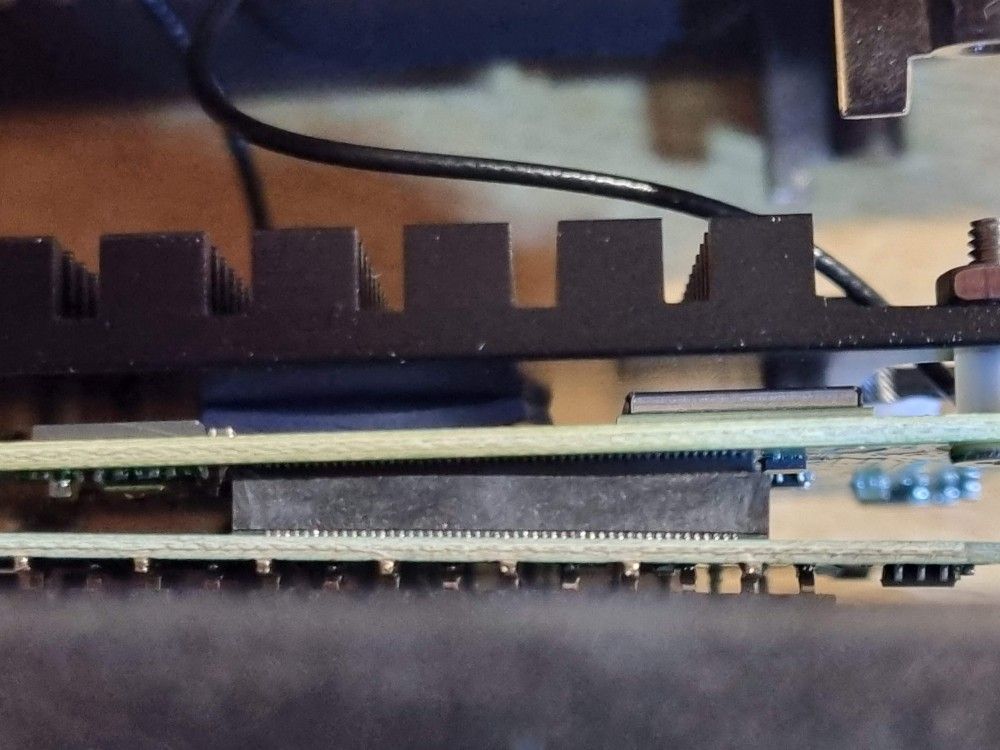
The third one wasn't booting at all and I never saw any LED other then the green on the left side of the USB port. I suspected a mechanical issue as from what I saw from the outside, the PCB stack seems fragile. I then opened the casing and was proven right. The CM4 had a strange angle and after I pushed it gently back, the hotspot booted normally and is now running happily. Again, it's quite a disappointment to see how unsafe everything is put together. The coaxial cables are very short, so one must be very careful not to destroy them.
Here's a snapshot before pushing the CM4 back in its socket:
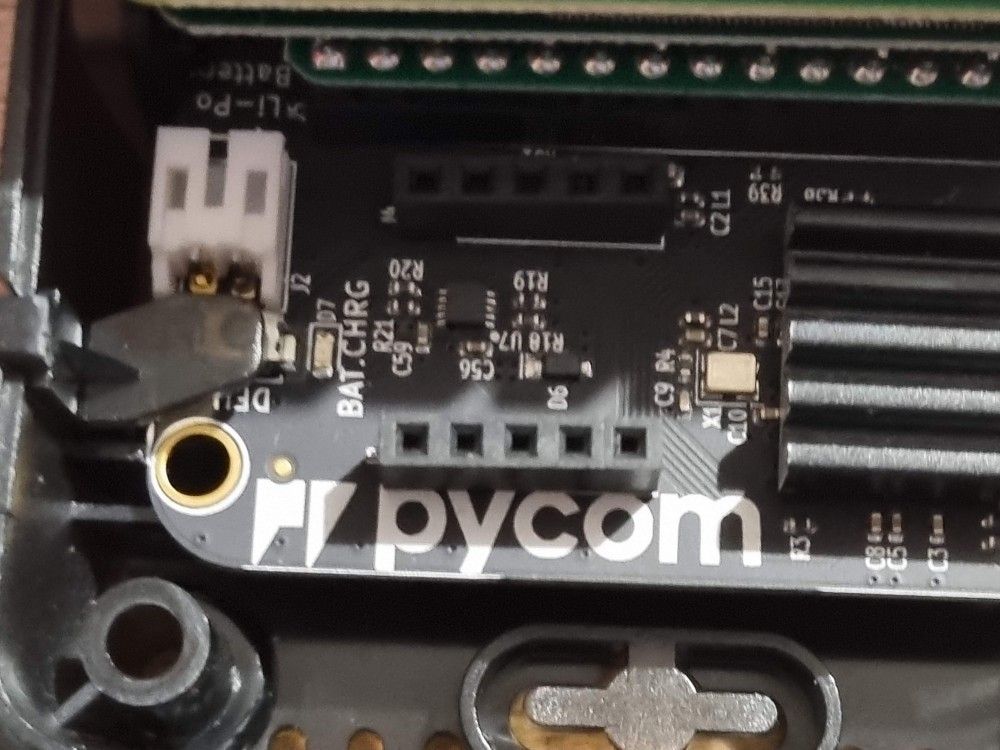
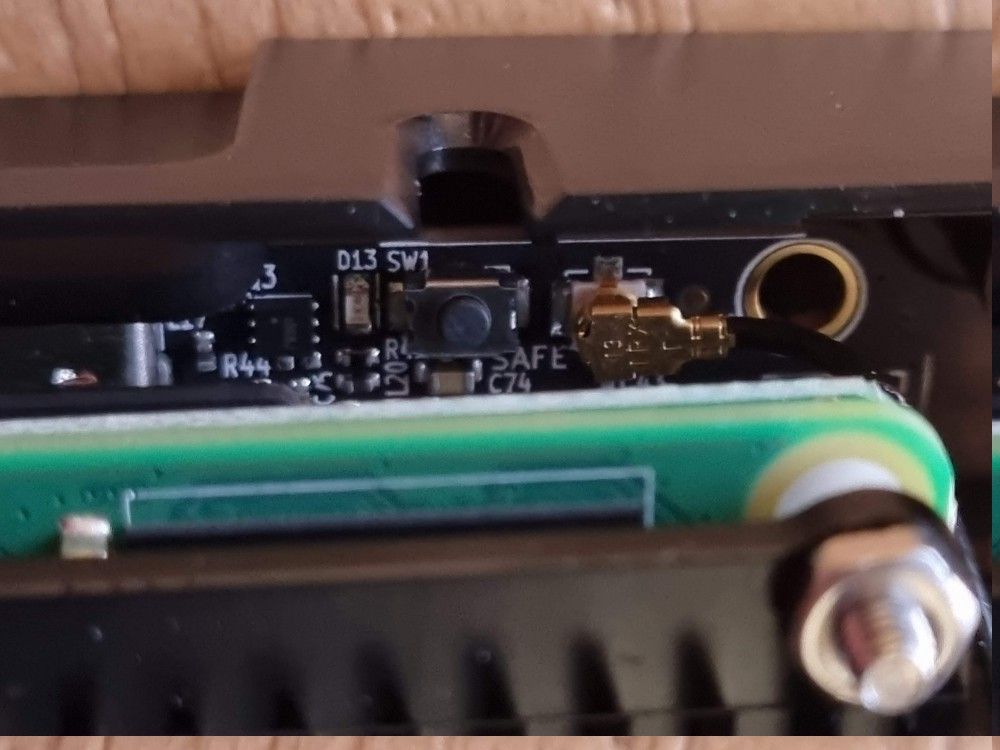
And here are the descriptions of the two buttons.
DFU:
SW1
-
@Dimitrios-Bogiatzoules Thank you for this. Mine too was not seated all the way and was crooked when I opened it up. Squeezed it tight and everything is working. Again thank you.
-
@Dimitrios-Bogiatzoules I had the same issue here. That case obviously doesn't stop the boards from coming apart and the whole thing doesn't survive shipping obviously. For the amount of money I would have expected a better quality.
-
@Dimitrios-Bogiatzoules said in Unable to assert location Helium Hotspot:
So I gave up and added the hotspot to the block chain first before using the Helium app to assert the location.
How did you do that exactly?
My board was also loose so fixed it and can now connect to it via bluetooth but when im trying to add it in the Helium App and press confirm, nothing happens. Then i can redo all the steps. -
@Emil-Larsson after setting chrome as the standard browser in Android, I used the Maker App to find and pair the hotspot with the smartphone. After that I the only button I hit was add to the block chain and let out all other steps as location et cetera (there was a small link below the buttons) and confirmed that I wanted it to be added. Then I had to wait between 5 and 30 min until it was approved and visible in the Helium Hotspot app. There you hit a gear symbol when the data of the miner are shown and there you can change antenna and location data.
-
Hi!
Thank you Dimitrios for your helpful tips. I have something to add though, something that cost me a lot of time. When you add the hotspot from the awful Maker App, you select the wifi network and then you have to SKIP the location part in order to get to the actual registration of the miner. I kept getting crashes at the location part and couldn't figure out how to actually pair the miner to my wallet.
-
@Dimitrios-Bogiatzoules do these two buttons have to be pushed in order for it to work properly, when we fold them back do you think this plays a role if the plastic is not on it?
-
@Josip-Boras said in Unable to assert location Helium Hotspot:
@Dimitrios-Bogiatzoules do these two buttons have to be pushed in order for it to work properly, when we fold them back do you think this plays a role if the plastic is not on it?
To be honest, I have no idea if the buttons are active. I wish there was a schematic somewhere or at least a documentation. Anyway, I'd put the plastic levers back, it's not so difficult ;-)
Hello! It looks like you're interested in this conversation, but you don't have an account yet.
Getting fed up of having to scroll through the same posts each visit? When you register for an account, you'll always come back to exactly where you were before, and choose to be notified of new replies (either via email, or push notification). You'll also be able to save bookmarks and upvote posts to show your appreciation to other community members.
With your input, this post could be even better 💗
Register Login