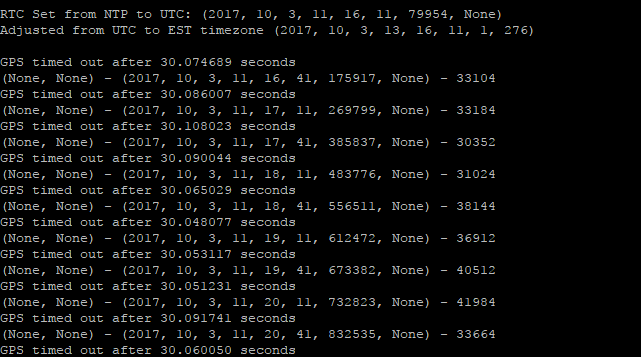
Pytrack example code from github not working
-
Hi @Movsun , i am new to the pytrack device. Currently, i am trying out to get the latitude and longitude as what you have done. May i know how you work on it? How can i upload the libraries from github to the device? Thank You.
-
@mj this depends on zour IDE. If you use the Atom plugin, you simply place the lib in your project folder and it will be uploaded to your LoPy, if your are connected to the REPL and press the sync button.
But you can use FTP as well. In this case you upload the library files into the /flash[/lib] folder.
-
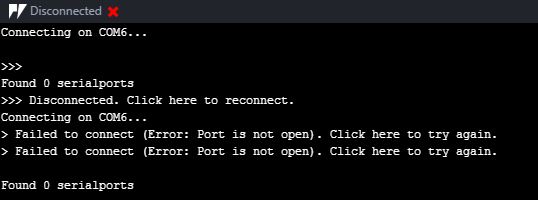
Thanks @crumble . By the way i facing the problem while connecting my pytrack. i have updating my firmware. When i wanna connect my pytrack i try to get the serial port but unsuccessful it show up the error. May i know how to fix it ?
-
@mj some statementens seem to be unbreakable. For example: waiting blocked for LoRa messages. In this case you can only hope to replug the Lopy and restart Atom as long as you manage to break the program in the small runtime before it reaches the main loop with the wait statement. But you can try to upload a boot.py/main.py version with FTP and restart the LoPy.
My sender has a switch which breaks the main loop. The sender will than send a message to the receiver, which stop its main loop. So both LoPys will be in a state where I can reconnect.
-
You can also alter the timeout GPS to 60 seconds to allow more time to acquire a GPS signal.
-
@movsun Hi, can u share how u work with the pytrack and get the latitude and longitude data? i have pytack with lopy and another one is lopy with expansion board.
appreciate for your sharing and help. -
I was wondering if anyone in this thread would be able to share their successful code for this example? I have run the example code without any alterations and I'm still in the 70's also not getting any coordinates (even after sitting outside for awhile). I am also running into an error after about 6 or more attempts:
Traceback (most recent call last):
File "<stdin>", line 36 in <module>
File "/flash/lib/L76GNSS.py", line 56, in coordinates
MemoryError: memory allocation failed, allocating 3991 bytes -
@dylan Well I stood out in the field for awhile longer this time and successfully got coordinates, very exciting, I am however still in 1970, but that's not really an issue.
-
@dylan Well I stood out in the field for awhile longer this time and successfully got coordinates, very exciting, I am however still in 1970, but that's not really an issue.
The time of the example is set with NTP over WiFi. There is no code to get the time from GPS. The sentence used by the code shall contain a UTC time information. But I have not seen it yet. Maybe because I was indoor.
-
@crumble You are correct the code gets the time from a NTP server via WiFi but the example does not connect to any WiFi networks with internet access so this fails hence the time remains at 1970

Hello! It looks like you're interested in this conversation, but you don't have an account yet.
Getting fed up of having to scroll through the same posts each visit? When you register for an account, you'll always come back to exactly where you were before, and choose to be notified of new replies (either via email, or push notification). You'll also be able to save bookmarks and upvote posts to show your appreciation to other community members.
With your input, this post could be even better 💗
Register Login