Forum top middle menu
-
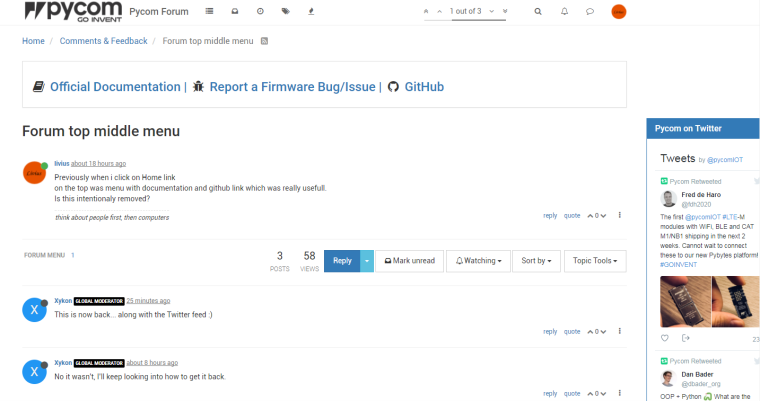
Previously when i click on Home link
on the top was menu with documentation and github link which was really usefull.
Is this intentionaly removed? -
No it wasn't, I'll keep looking into how to get it back.
-
This is now back... along with the Twitter feed :)
-
@xykon
Thank you :)If i can propose something. Please consider changing:
twitter div on desktops asfloat: right; margin-right: -300px;and div with forum content as only
class="topic col-sm-12"instead of current
topic col-lg-9 col-sm-12result will be - maybe not visible on screenshot but content will be wide as page with twitter pinned on right frame (wider messages content area) - click on image to see it better
something like on this page where ads are outside of content:
http://konwertuj.com/KonwerterListaWiosek.aspx -
I can look into this but the Twitter feed is running as a widget in the "Global Sidebar" of nodebb and I believe I'd have to modify the theme itself to change the way the sidebar is being displayed.
-
@xykon
i do not worked with nodebb, but if you can change class for forum content
then for twitter simply add css like thisdiv.col-lg-3.col-sm-12 { float: right; margin-right: -300px; }this is only one element with this class combination on the page, then style will apply only to this twitter sidebar
i do not know nodebb but maybe it can generate automatically id for all elements?
Then life will be much easier ;-)
Hello! It looks like you're interested in this conversation, but you don't have an account yet.
Getting fed up of having to scroll through the same posts each visit? When you register for an account, you'll always come back to exactly where you were before, and choose to be notified of new replies (either via email, or push notification). You'll also be able to save bookmarks and upvote posts to show your appreciation to other community members.
With your input, this post could be even better 💗
Register Login