Connecting to Eduroam
-
I have been trying to figure out how to connect to Eduroam on my nano-gateway and still having some trouble. I have used all the examples in the WLAN docs but I believe I need to change stuff in the main.py as well as the config.py. Was hoping there was something as straight forward as:
WIFI_SSID = 'eduroam'
WIFI_AUTH = 'username'
WIFI_PASS = 'pass'But it doesn't seem to be the case.
I've been searching for python examples but only found how to connect a Linux system. Eduroam is basically everywhere so I'm sure this answer will be well used.
Cheers,
Dylan
-
@dylan
Eduroam is a WPA2 Enterprise network. You need to change the WLAN initialisation to it, see the Connecting with EAP-PEAP or EAP-TTLS example:https://docs.pycom.io/chapter/tutorials/all/wlan.html
I think for Eduroam your username and the identity are your e-mail address. You shouldn't need to have the ca_certs option.
As a quick test change line 207 in nanogateway.py (under _connect_to_wifi function) from
self.wlan.connect(self.ssid, auth=(None, self.password))to:
self.wlan.connect(ssid='eduoram', auth=(WLAN.WPA2_ENT, 'youremail', 'password'), identity='youremail')Of course in this replacing the placeholder fields your e-mail and password respectively.
I not sure this will work as I've not used eduroam in a few years so any feedback would be appreciated.
-
@jmarcelino thanks for the reply, I suspected it had something to do with the WPA2 Enterprise network just no idea how to implement it, cheers for the help. I am still having trouble with what placeholders to put in? I put the WPA2 Enterprise stuff (wlan.connect etc) into the config file, but I believe I need to change stuff in the main too, sorry for lack of explanation, gotta go out for a bit and wanted to get this post out.
-
@dylan
You need to change nanogateway.py, changing config.py won’t do anything.For a quick test just put the values directly on the self.wlan.connect(...) call , if it works we’ll change it to pick them up from config.py
-
@jmarcelino I found where I made my mistake earlier, the password is case sensitive haha. Its connected and working well.
Thanks for the help
-
@jmarcelino
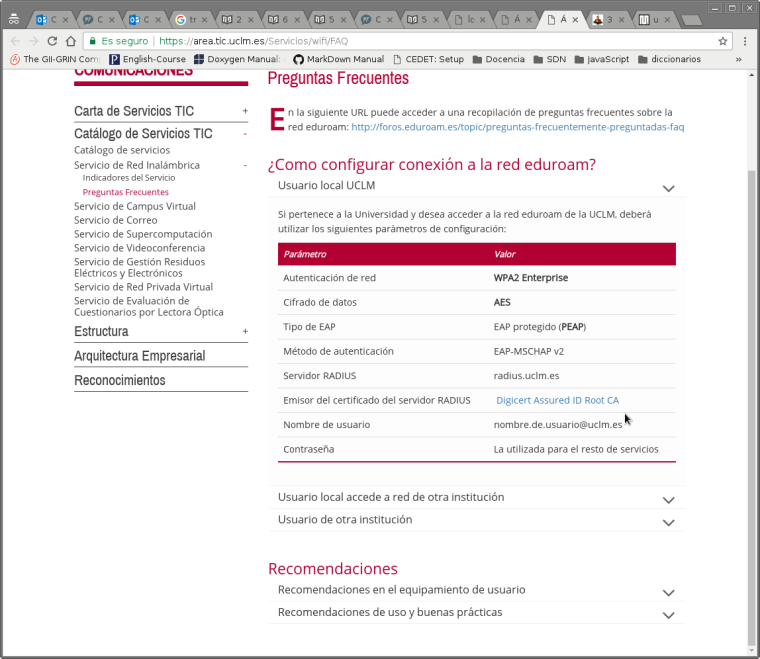
I have followed the section "Connecting with EAP-PEAP or EAP-TTLS" of https://docs.pycom.io/chapter/tutorials/all/wlan.html, and your comments @jmarcelino , but I can't connect my LoPy to Eduroam. Is it possible that the authentication method will be important? In my university the authentication method is EAP-MSCHAP-V2, and my question is: Is this method supported by LoPy? -
@franman
How your connection looks like?
I suppose you do not provide any cert as it is not needed on client side forEAP-MSCHAP-V2
and are you sure that it is notPEAP-EAP-MSCHAPv2? -
@livius I try connect with the following command:
wlan.connect(ssid="eduroam",auth=WLAN.WPA2_ENT,EDUROAM_USER,EDUROAM_PWD),identity=EDUROAM_IDENTITY,timeout=5000)
Where:
- EDUROAM_USER = my email address
- EDUROAM_PWD = my eduroam passwd
- and EDUROAM_IDENTITY = my email address too.
And yes, as the document to configure eduroam in my university says, the authentication mechanism is EAP-MSCHAP-V2.(an screenshot of the web, unfortunally in spanish, is attached)
-
It seems as some of you got it to work. Can you please provide a short guide with some code that worked?
Thanks
-
@thomand1000 Unfortunately I didn't get it entirely fixed, the best theory is that the Eduroam has a UDP timeout feature, I did find a work around that has been working consistently, it gives a maximum of about 30 seconds downtime every 31minutes.
The few things I changed are in the nanogateway.py file for the gateway example:
After 1900 seconds the message "Failed to pull downlink packets from server" would occur so I put a machin.reset() in:
def _pull_data(self):
    token = uos.urandom(2)
    packet = bytes([PROTOCOL_VERSION]) + token + bytes([PULL_DATA]) + ubinascii.unhexlify(self.id)
    with self.udp_lock:
        try:
            self.sock.sendto(packet, self.server_ip)
        except Exception as ex:
            machine.reset()
            self._log('Failed to pull downlink packets from server: {}', ex)
And every 4-5th restart it would just not connect so I did a simple timer reset in the wifi connection:
def _connect_to_wifi(self):
    count = 0
    self.wlan.connect(ssid='eduroam', auth=(WLAN.WPA2_ENT, 'Username', 'Password'), identity='Username', timeout = 30)
    while not self.wlan.isconnected():
        utime.sleep(1)
        count = count + 1
        print(count)
        if count >= 30:
            machine.reset()
    self._log('WiFi connected to: {}', self.ssid)
Hopefully one day I'll be able to get the UDP timeout thing properly fixed, but they don't change things like this in a hurry for a student haha.

Hello! It looks like you're interested in this conversation, but you don't have an account yet.
Getting fed up of having to scroll through the same posts each visit? When you register for an account, you'll always come back to exactly where you were before, and choose to be notified of new replies (either via email, or push notification). You'll also be able to save bookmarks and upvote posts to show your appreciation to other community members.
With your input, this post could be even better 💗
Register Login