New firmware release v1.14.0.b1 (Dual core support and CAN bus)
-
Any plans to update documentation on using the CLI version of the updater tool? Maybe I'm just using it wrong:
.\pycom-fwtool-cli.exe -f "C:\Users\xxxx\Code\Pycom\pycom-microp
ython-sigfox\esp32\build\LOPY_915\release\appimg.bin" -p COM3 --pypic flash
Connecting.....
Uploading stub...
Running stub...
Stub running...
Changing baud rate to 115200
Changed.
Exception: Timed out waiting for packet content, on line 204
Thanks!
-
For lopower consideration, to run only on one core, what we have to configure in the build ?
-
Still persists the pic build issue
LINK build/LOPY_868/release/application.elf text data bss dec hex filename 1050027 289840 54912 1394779 15485b build/LOPY_868/release/application.elf IMAGE build/LOPY_868/release/lopy_868.bin esptool.py v2.1 Signing OTA image Entering flash mode Traceback (most recent call last): File "tools/pypic.py", line 187, in <module> sys.exit(main(sys.argv[1:])) File "tools/pypic.py", line 175, in main pic = Pypic(args.port) File "tools/pypic.py", line 77, in __init__ self.serial = serial.Serial(port, baudrate=115200, bytesize=serial.FIVEBITS, timeout=0.25) File "D:/ProgramFiles/msys32/mingw32/lib/python2.7/site-packages/serial/serialwin32.py", line 31, in __init__ super(Serial, self).__init__(*args, **kwargs) File "D:/ProgramFiles/msys32/mingw32/lib/python2.7/site-packages/serial/serialutil.py", line 240, in __init__ self.open() File "D:/ProgramFiles/msys32/mingw32/lib/python2.7/site-packages/serial/serialwin32.py", line 78, in open self._reconfigure_port() File "D:/ProgramFiles/msys32/mingw32/lib/python2.7/site-packages/serial/serialwin32.py", line 222, in _reconfigure_port 'Original message: {!r}'.format(ctypes.WinError())) serial.serialutil.SerialException: Cannot configure port, something went wrong. Original message: WindowsError(87, 'The parameter is incorrect.') make: *** [application.mk:458: flash] Error 1 -
@colateral said in New firmware release v1.14.0.b1 (Dual core support and CAN bus):
self.serial = serial.Serial(port, baudrate=115200, bytesize=serial.FIVEBITS, timeout=0.25)
Can you please try to replace above line in tools/pypic.py with:
self.serial = serial.Serial(port, baudrate=115200, bytesize=serial.FIVEBITS, timeout=0.25 exclusive=True)P.S. I made a small edit after I posted this originally.
-
release v1.14.0.b1 is crashing during boot process on one of my LoPy4 (no software loaded). At least two other LoPy4 are working with new release v1.14.0.b2.
With v1.9.2.b2 (original hardware on delivery) the failed LoPy4 is working. -
@brotherdust said in New firmware release v1.14.0.b1 (Dual core support and CAN bus):
Any plans to update documentation on using the CLI version of the updater tool?
I will provide documentation for the CLI tool with the next release as I'm currently re-designing the command line parameters.
If you want to flash your board after building it from source please use
make flashinstead. -
When framebuf will be updated to support all formats?
now it coverMVLSB,RGB565,GS4_HMSB
but official micropython coverMVLSB,RGB565,GS2_HMSB,GS4_HMSB,GS8,MHLSB,MHMSB -
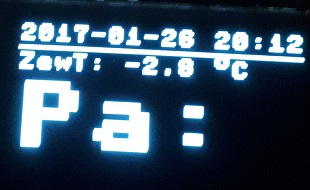
if someone is interested i have added simple font size scaling to framebuf
https://github.com/pycom/pycom-micropython-sigfox/pull/131
result on small oled
-
@livius That's nice. You may however also have a look at the work of Peter https://github.com/peterhinch/micropython-font-to-py
It deals a lot with fonts, and it is well suited to large & nice fonts and use it with the framebuffer module. -
@robert-hh
Yes, i have seen it before. Great work :)
But it require to store somewhere font in particular size.
This is simple alternative.


Hello! It looks like you're interested in this conversation, but you don't have an account yet.
Getting fed up of having to scroll through the same posts each visit? When you register for an account, you'll always come back to exactly where you were before, and choose to be notified of new replies (either via email, or push notification). You'll also be able to save bookmarks and upvote posts to show your appreciation to other community members.
With your input, this post could be even better 💗
Register Login