ABP keys (nwk_swkey, app_swkey)
-
After trying OTAA unsuccessfully, I am trying ABP now. I found some example code that uses nwk_swkey and app_swkey, but no explanation on how to get/generate these keys. Also, I am assuming that dev_addr is the same as the OTAA device address?
-
@zappfinger
Those keys including dev_addr come from and must match what’s on your Network ServerDev_addr is not the same as Dev EUI.
To relate to WiFi think of Dev EUI as your WiFi adapter MAC address and Dev Addr as your assigned IP.
-
@jmarcelino Thanks, but it is not clear to me. For OTAA activation I have these fields on the Things Network:
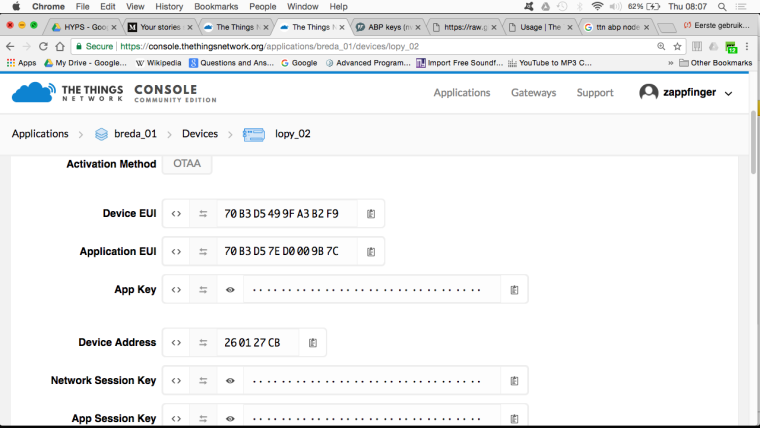
Activation mode: OTAA Do I have to change this to ABP?
Device EUI, Application EUI : do I have to use any of these in ABP?
Device address: my question was about this field not Device EUI....Can anyone please provide all the steps needed for ABP acivation?
-
@zappfinger
Go into the Settings tab for your device, change "Activation method" to ABP and everything will become clear :-)
Once the fields are generated in the TTN console copy them over to your lora.join(...) call.
-
@jmarcelino Ok, I followed these steps. The application is happily sending data, but nothing gets received on the TTN page...
Also, what frequency should I use for the Netherlands? I have tried 868100000, 868300000 and 868500000.
-
@zappfinger Got it! I moved my device closer to a window and now data arrives at the TTN site. We live in an apartment with several floors above us, so that was probably too big a barrier for the signal...
-
@jmarcelino One more 'beginners' question: how do I read data back from TTN?
Hello! It looks like you're interested in this conversation, but you don't have an account yet.
Getting fed up of having to scroll through the same posts each visit? When you register for an account, you'll always come back to exactly where you were before, and choose to be notified of new replies (either via email, or push notification). You'll also be able to save bookmarks and upvote posts to show your appreciation to other community members.
With your input, this post could be even better 💗
Register Login