SiPy -> AWS Device Example - CA file not found
-
Hi,
Im following the official tutorial here:
https://docs.pycom.io/chapter/tutorials/all/aws.html
I have setup the AWS device and downloaded the certificates, then placed them into ther /cert folder but I am getting the error:
Socket create error: CA file not found
Socket send error 128
My certificates have a different naming convention to those in the example.
The example is:
# AWS general configuration
AWS_PORT = 8883
AWS_HOST = 'aws_host_url'
AWS_ROOT_CA = '/flash/cert/aws_root.ca'
AWS_CLIENT_CERT = '/flash/cert/aws_client.cert'
AWS_PRIVATE_KEY = '/flash/cert/aws_private.key'
My certificates are called:
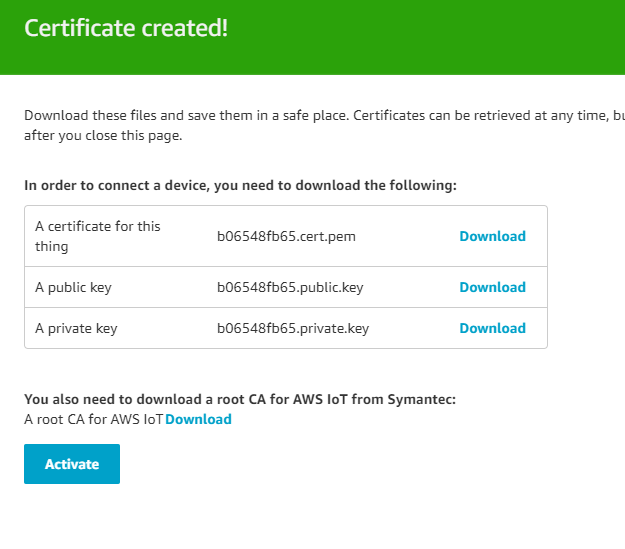
and my code is:
# AWS general configuration
AWS_PORT = 8883
AWS_HOST = 'xxxxxxxx.iot.eu-west-1.amazonaws.com'
AWS_ROOT_CA = '/flash/cert/VeriSign-Class 3-Public-Primary-Certification-Authority-G5.pem'
AWS_CLIENT_CERT = '/flash/cert/b06548fb65-public.pem.key'
AWS_PRIVATE_KEY = '/flash/cert/b06548fb65-private.pem.key'
Please can someone help, i'm out of ideas.
Thanks,
Jon
-
@jonnyboy said in SiPy -> AWS Device Example - CA file not found:
file not found
Hi,
Can you confirm that the certificate files were actually pushed to your device? You can do this by running the following in the REPL:import os os.listdir("/flash/cert/") -
This post is deleted! -
Hi,
Yes, they should be please see screenshot of FTP connection to /flash/cert
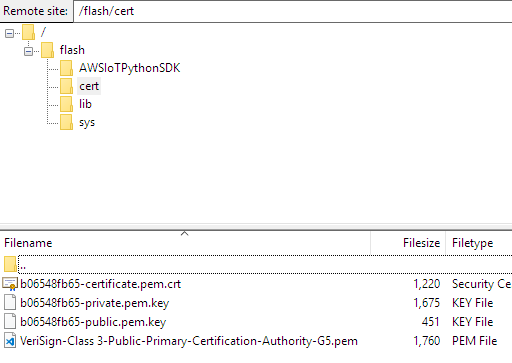
Thanks
-
@jonnyboy said in SiPy -> AWS Device Example - CA file not found:
CA file not found
Can you try formatting the file system and re-uploading the files again, you can do this by running the following from the REPL:
import os
os.mkfs('/flash')
It could be the the file system has become corrupt, it might be worth trying to upload the files via USB if at all possible.

Hello! It looks like you're interested in this conversation, but you don't have an account yet.
Getting fed up of having to scroll through the same posts each visit? When you register for an account, you'll always come back to exactly where you were before, and choose to be notified of new replies (either via email, or push notification). You'll also be able to save bookmarks and upvote posts to show your appreciation to other community members.
With your input, this post could be even better 💗
Register Login