LoRaWAN ADR howto

-
ADR (Adaptive Data Rate) is one of the most important feature of LoRaWAN. In production environment with large number of devices it is a must have feature and if enabled, dramatically can increase network performance and also helps to reduce power consumption of devices.
ADR must be enabled in the device, by default it is disabled. Its status is shown in the network server:

When enables, Network Server send a MAC command to the device which contains the new DR value based on radio frequency parameters and a list of multi SF channels to use for ADR. This procedure requires that all channels on this list must be configured in LoPy, otherwise LoPy sends an error message to the LoRaWAN Network Server and do not change DR. Normally in EU production networks using the Semtech 8-channel frequency plan, while LoPy has only the 3 three mandatory channels enabled. Using ABP join, device has no information about the server/gateway channel plan, you must setup a matching channel set yourself. For an EU863-870 network add these lines to your program:
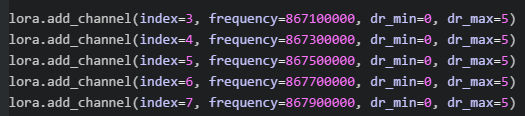
Now ADR will work. It is tested, LoPy was set to SF7 in a short time when configured to SF12, placed next to a GW, see RSSI/SNR on the first picture.
Test was done with a LORIOT Network Server using 1.7.8.b1 PyCom firmware. For US915 and other regions, check band plan of your network and configure multi SF channels accordingly.
Please note, LoRaWAN Specification doesn't describe how to calculate DR, it is up to the Network Server implementation and may vary server by server. It may require fine tuning of min/max DR settings for a specific device.
Next we will test ADR with OTAA.
-
It is worth noting that LoPy node with multi-frequencies and ADR needs a proper LoRaWan gateway (with multi-frequencies and multi-SF).
Not the LoPy LoRaWan nano-gateway which isn't certified as LoRaWan gateway.


Hello! It looks like you're interested in this conversation, but you don't have an account yet.
Getting fed up of having to scroll through the same posts each visit? When you register for an account, you'll always come back to exactly where you were before, and choose to be notified of new replies (either via email, or push notification). You'll also be able to save bookmarks and upvote posts to show your appreciation to other community members.
With your input, this post could be even better 💗
Register Login