Pymakr will not connect - inconsistent following firmware 0.9.3.b2
-
@Ralph hi again, I tried connecting over USB and kept a screen session open to the serial port and this is what I got when I try to connect via Pymakr:

Same error messages obtained in the Pymakr: QStackedWidget Warning, the popup window, though looking at the timestamp, I think it was from yesterday.
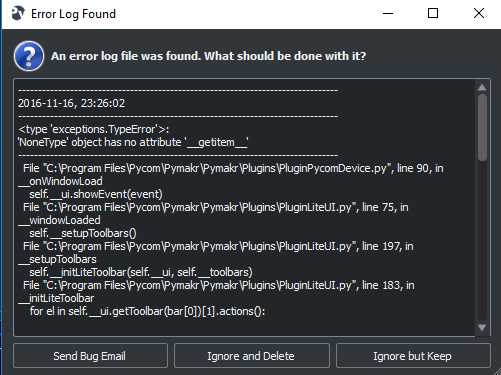
In addition to those, another pop-up message appears:

I've checked my device manager and it recognises whatever's plugged into COM3 as an FTDI device. I'm probably doing something wrong here - I have not come across anyone else having the same issues as I am :(
I will just wait for the next release and hopefully it would work out - unless you have other suggestions that I should try? Really appreciate your immediate response.
-
@kwix
i have exactly the same - you are not alone -
This post is deleted! -
@Ralph Can I ask exactly when the next release will be available? Also, forgot to mention the versions I'm using:
LoPy 0.9.3.b2
Windows 10
Pymakr 1.0.0.b6
Device:COM3@livius that's nice to know! though I meant in general...or most people are just not using Windows. Will attempt to use Mac OS X, hoping I get somewhere.
-
still can not connect to WiPy2 throught CMM by pymakr with current firmware 0.9.5.b1
i work on Windows platform (Windows 10) -
@Ralph @daniel Hi guys, just a quick note of thanks. Following the release of firmware 0.9.5.b1, I can now happily connect to the LoPy's using WiFi and Com (using Windows 7).
Look forward to receiving the new PyMakr which will hopefully get rid of the message related to not being able to contact the PyCom servers within the last 7 days (on startup).
Also thank you @LoneTech for sorting the pin issues (32 and above), that work was much appreciated!
We can at least get on with some testing of the boxes.
-
@Ralph ditto - upgraded to latest firmware 0.9.5b1 and it works on Windows 10 but only if connected via wlan. Thank you for your help - really appreciate your immediate responses.
I've also tried serial connection via putty and Pymakr - it does not work for me and I get the same issues as before (i.e. QStackedWidget warning message, last 7 days error message and error communicating with LoPy).
-
I'm also having this problem on Linux and W10.
I received my LoPy's the other day, they worked fine for about a day then they stopped accepting connections.
I've never been able to connect to them via ssh, telnet or COM on Linux or W10.
I can connect to the LoPy AP, and the Pymakr will connect, however it will not let me sync my code to the LoPy.
-
Hi-
I just received my WiPi 2.0 the other day and immediately upgraded the firmware (as I usually do with such things). Now I'm able to telnet into it just fine, and I can use Putty to get a serial console, however Pymakr fails as many others have said.My boot.py is set to default. Nothing has been changed from factory except that I updated the firmware out of the box.
Here is my boot.py:
import os
from machine import UART
uart = UART(0, 115200)
os.dupterm(uart)
Any word from Pycom about this? I'm thinking about trying to reach support or going on Github and posting a bug for Pymakr if I can't find one yet.
-
i am able to connect to my WiPy 2 by COM port by newest Pymakr 1.0.0.b7 :)
-
Lucky you.
-
-
@abilio when was that released? I downloaded the latest version yesterday and installed using the firmware update tool provided with Pymakr. The very first thing I did was update the firmware. All issues were with this version.
-
@abilio updated to latest 0.9.6.b1a and pymakr 1.0.0.b7
Can't connect to LoPy on COM on either Linux or Windows. CAN connect over LoPy AP WIFI on Linux!!
Cannot telnet to the LoPy, however I don't need that functionality. Last firmware released at least let me ftp to it, but I could only copy code to my PC, not put files onto the LoPy.Anyway, code synced and updated to the LoPy!! I'm happy with this as a start, thank you and the team for their hard work in getting this resolved.
I've connected the LoPy to my local wifi now, and can confirm, it works over WIFI, not just LoPy AP. Only Linux though.
I work with a local github server so this will do just fine.
-
@abilio Thanks for your response and for the Pycom team on working on the solution to the issues. I did the same thing (firmware upgrade to 0.9.6.b1, pymakr 1.0.0.b7) and I'm using Windows 10.
I am able to:
- FTP into LoPy with read and write access to the files (i.e. I can update my boot.py)
- telnet to LoPy via putty
- connect to LoPy via WLAN using another computer (Mac OS X)
I am not able to:
- connect to LoPy via serial port (using both PyMakr and putty). PyMakr shows the following, and it seems like it connects to it then drops off:
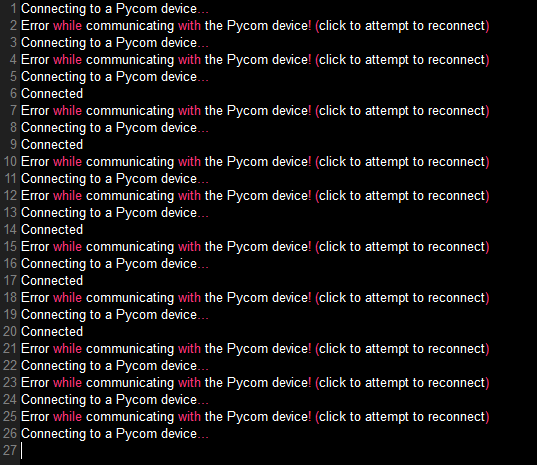
- connect to LoPy via wlan using Pymakr
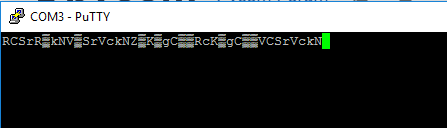
Also, I've kept the putty Window (serial) when I try connecting via my Mac (wlan) or Windows (PyMakr) and it prints the following during the attempts:
I've noticed in the new PyMakr, it has the Soft-reset settings as part of the configuration. Does this mean, the if machine.reset_cause() != machine.SOFT_RESET... is not needed for the boot.py? I've tried it with and without, and I have the same results. It should just work with this right?
import os
from machine import UART
uart = UART(0, 115200)
os.dupterm(uart)
Hello! It looks like you're interested in this conversation, but you don't have an account yet.
Getting fed up of having to scroll through the same posts each visit? When you register for an account, you'll always come back to exactly where you were before, and choose to be notified of new replies (either via email, or push notification). You'll also be able to save bookmarks and upvote posts to show your appreciation to other community members.
With your input, this post could be even better 💗
Register Login