Connect to Other Gateway
-
@raaden89 The idea of the LoRa networks is, that any node can connect to any gateway. But to get visible, you must register an application with your device at the TTN server.
The fact that you see a server at the TTN network map does is not a proof that it exists at that place. It is up to the gateway owner to provide that information, e.g. by attaching a GPS. -
@robert-hh said in Connect to Other Gateway:
@raaden89 The idea of the LoRa networks is, that any node can connect to any gateway. But to get visible, you must register an application with your device at the TTN server.
The fact that you see a server at the TTN network map does is not a proof that it exists at that place. It is up to the gateway owner to provide that information, e.g. by attaching a GPS.Well, to be precise devices (nodes) do not connect to gateways but to LoRaWAN Network Servers. Gateways are dumb devices, do not have knowledge of session keys, registration, DevAddr, etc., just forwarding any packet heard with proper LoRa format to their own LoRaWAN server (a GW is connected to one server).
-
thanks for the answers. So that means that if i see a gateway in the map maybe the gateway does not exist?
i see this near me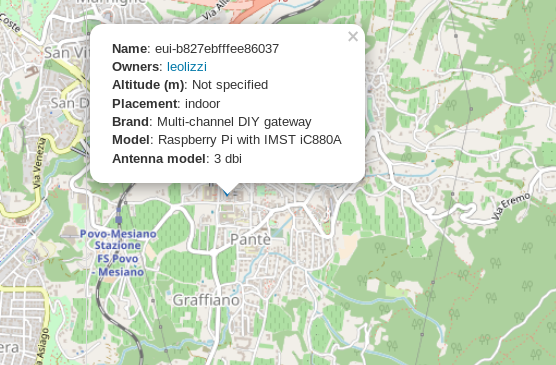
I don't see any info about if it's working or not..
But in ttnmapper i see the node and that is working is it valid?thanks a lot
Andrea -
@raaden89 Yes. It may be working. But you will not get any connection until you registered you node, as written here:
https://docs.pycom.io/chapter/tutorials/lora/lorawan-nano-gateway.html
You have to register yourself first, and then an application, and within that application your device. Once you have done that, you can join and sedn data, which you can see at the ttn server. -
@robert-hh thanks for your reply. I registered my ttn application and my device following tutorial for register a node.
You linked me the nano gateway tutorial, but i use the nano node
https://docs.pycom.io/chapter/tutorials/lora/lorawan-otaa.html
is it correct? as i told in ttnmapper i see the node near me working but i tried both OTAA and ABP but it's not able to connect.
I use the code that i link up.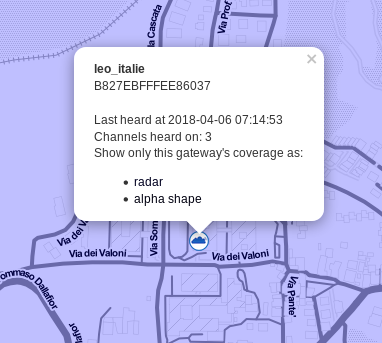
-
@raaden89 The tutorial also includes the instructions for the node, you just have to scroll down to almost at the end of the page. You have to enter the EUI of your device, and the APP EUI and APP key, which was assigned when creating the application.
-
@robert-hh I did, i try even adding channel 3 (i see it in ttnmapper) but nothing.. You think that i have to try ABP instead of OTAA?
-
@raaden89 ABP is more robust, since it does not need the downlik message from the host. It requires to copy the device ID, App SK and NWSK manually from the server into your script.
-
Hi @raaden89
Be aware that the reported location of the gateways is TTN may have nothing to do with the reality. These are almost all user reported locations (it's still rare for gateways to have GPS) and most often users will forget to update them, register the wrong one etc.
Your best bet is to get in touch with the TTN community for your area.
https://www.thethingsnetwork.org/community/trento/ or indeed contact the owner of the gateway: https://www.thethingsnetwork.org/u/leolizzi
-
@jmarcelino
OK, i contact the owner of the gateway to see if it's possible to connect to that gateway.
Thanks for all informations!we can close the post ;)


Hello! It looks like you're interested in this conversation, but you don't have an account yet.
Getting fed up of having to scroll through the same posts each visit? When you register for an account, you'll always come back to exactly where you were before, and choose to be notified of new replies (either via email, or push notification). You'll also be able to save bookmarks and upvote posts to show your appreciation to other community members.
With your input, this post could be even better 💗
Register Login