Welcome to the Pycom forum Forum
    • \[\[global:header.categories\]\]
    • \[\[global:header.recent\]\]
    • \[\[global:header.tags\]\]
    • \[\[global:header.popular\]\]
    • Login

    Explore Pybytes | Official Documentation | Report a Firmware Bug/Issue | GitHub

    Cellular radio firmware release (SQN3330) for both Cat-M1 and NB-IoT

    Scheduled Pinned Locked Moved Announcements & News
    firmware
    48 Posts 18 Posters 17.2k Views 22 Watching
    Loading More Posts
    • Oldest to Newest
    • Newest to Oldest
    • Most Votes
    Reply
    • Reply as topic
    Log in to reply
    This topic has been deleted. Only users with topic management privileges can see it.
    • V Offline
      vigmeister @daniel
      last edited by vigmeister

      @daniel FWIW I seem to have run into exactly the same symptoms as @nathanh If and when a resolution is found, I would appreciate if you post it here. I would also not mind getting in on the debugging action if that would help.

      V 1 Reply Last reply Reply Quote 0
      • V Offline
        vigmeister @vigmeister
        last edited by

        @daniel @nathanh Additional hint from my observation. I looked at the TX buffer of the serial interface by inserting s.wait_tx_done(5000) after the s.write("ATE0\r\n") line in sqnsupgrade.py and I get "False" as the response. Will try moving downstream in the sqnsupgrade.py code later in the day and share my findings.

        V 1 Reply Last reply Reply Quote 0
        • V Offline
          vigmeister @vigmeister
          last edited by

          I tinkered a bit further and by setting the default timeout to 2000 instead of 20000 in sqnsupgrade.read_rsp , I was able to get my FiPy to get further along, but ran into @bali ‘s issue of AT+SMSWBOOT=3, 0 failed!

          Looks like the issues are roughly the same, but that @nathanh and I have unstable REPL on top :/

          1 Reply Last reply Reply Quote 0
          • K Offline
            kevin
            last edited by

            Same issue here, failing with "AT+SMSWBOOT=3,0 failed!" (full log is below). If/when this issue is resolved, please post the details here.
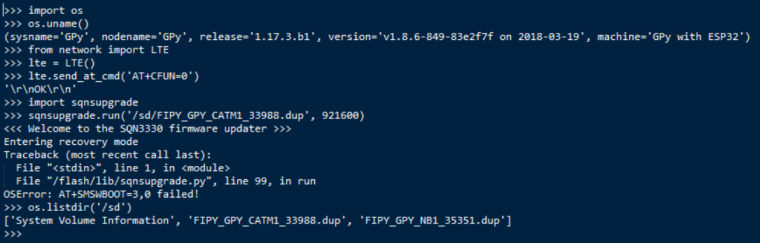
            0_1522796676730_upgrade_failure.png

            K 1 Reply Last reply Reply Quote 0
            • I Offline
              IOAg @nathanh
              last edited by

              @nathanh Hi, were you able to recover FiPy at the end?

              N 1 Reply Last reply Reply Quote 0
              • N Offline
                nathanh @IOAg
                last edited by nathanh

                @ioag said in Cellular radio firmware release (SQN3330) for both Cat-M1 and NB-IoT:

                @nathanh Hi, were you able to recover FiPy at the end?

                Nope, @daniel asked me to send my unit back.

                I tried to reload the actual Pycom firmware back onto it hoping that might reset the entire device and only made it worse, I can't event load the device now, REPL just shows un-ending loops of flash errors when I turn it on.

                1 Reply Last reply Reply Quote 0
                • K Offline
                  kevin @kevin
                  last edited by

                  Update on my issue: I found that AT^RESET was required after flashing the board with new FW, and before attempting the sqnsupgrade procedure. After that, the upgrade seems to have completed successfully.

                  V T 2 Replies Last reply Reply Quote 0
                  • V Offline
                    vigmeister @kevin
                    last edited by

                    @kevin Thanks for sharing progress! I tried the same on the FiPy. I was able to keep the REPL alive until the AT^RESET command was sent (using uart.write() ), but no dice. Still stuck with the same symptoms.

                    K 1 Reply Last reply Reply Quote 0
                    • K Offline
                      kevin @vigmeister
                      last edited by

                      @vigmeister Sorry it did not resolve your upgrade issue as well. Just fyi, I used the lte library to send the AT command from REPL:

                      >>> from network import LTE
                      >>> lte = LTE()
                      >>> lte.send_at_cmd('AT^RESET')
                      

                      Probably doesn't make any difference though.

                      1 Reply Last reply Reply Quote 0
                      • C Offline
                        cssmacs01 @daniel
                        last edited by

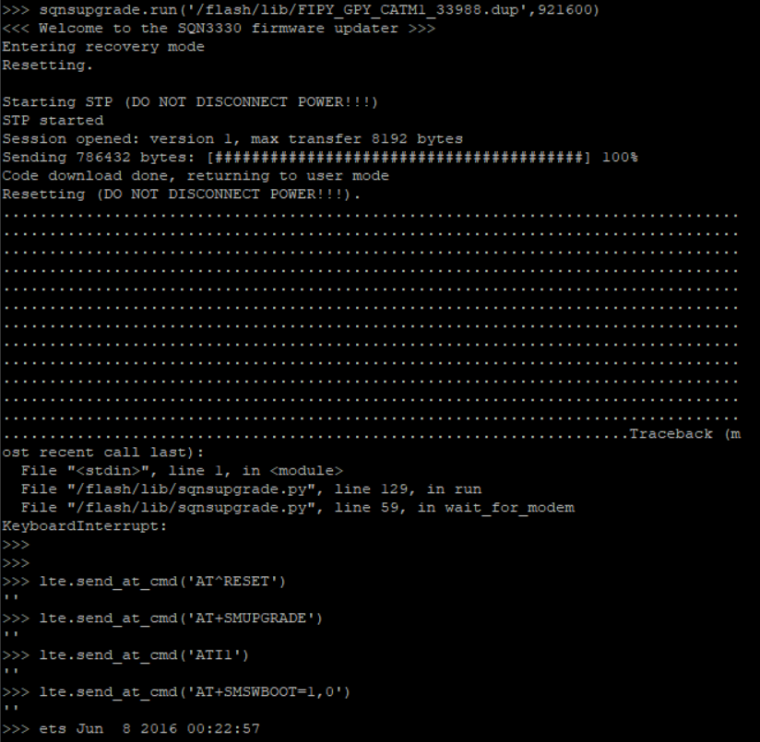
                        @daniel I need some help here to see if my devices are bricked. I attempted to update the cellular radio firmware and it was taking a realllllyyyyyy long time to reset so I CTRL+C and now all my AT+cmds are Errors. How do I get back online?
                        0_1523402217665_72f1f079-2a23-4ef0-87e6-af6b828c462a-image.png

                        C 1 Reply Last reply Reply Quote 0
                        • C Offline
                          cssmacs01 @cssmacs01
                          last edited by

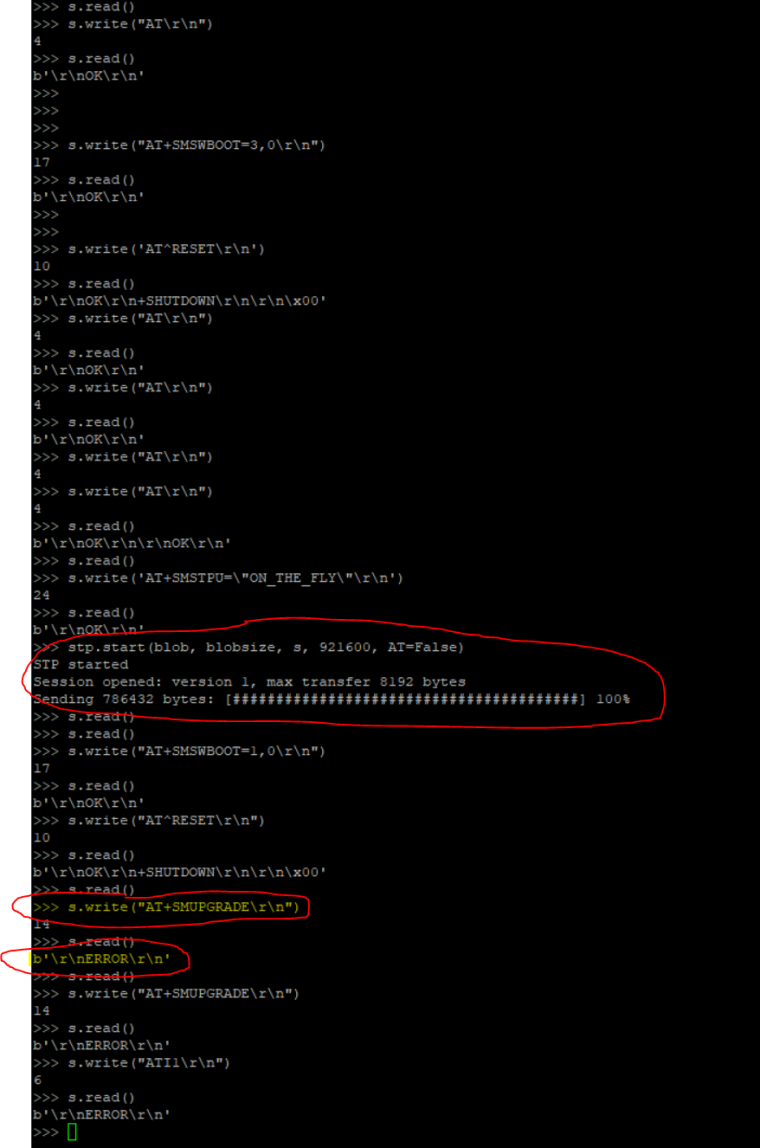
                          @cssmacs01 .....addtional information. I've gone through the code line by line and manually sent the AT CMDS through UART and it all works up until AT+SMUPGRADE and then it errors. Feels like the two devices I got from Digi-key are bad or I'm missing something.
                          0_1523410857209_297f4634-835b-41ff-b90a-d08b1a42b7c2-image.png

                          N 1 Reply Last reply Reply Quote 0
                          • N Offline
                            nathanh @cssmacs01
                            last edited by

                            @cssmacs01 Just looking at your output there (and maybe I am reading it incorrectly), but are you sure you have the right firmware file because a) you were able to save it onto the flash and load it from there (and I thought it was too big hence needing the SD card) and it is only reporting the size of around ~780k vs the ~5.4mb that it should be.

                            C M 3 Replies Last reply Reply Quote 0
                            • C Offline
                              cssmacs01 @nathanh
                              last edited by

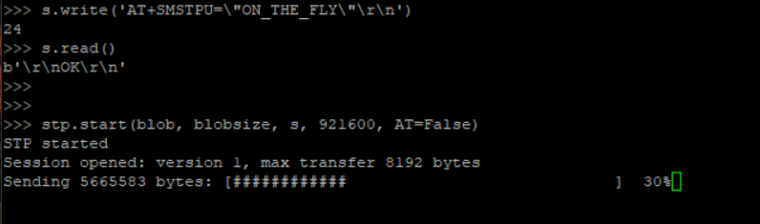
                              @nathanh Yes sir! For so much of my night I wasn't able to mount the SD, so that's why I went that route. I just finally mounted and it's transferring 5.5megs. Cross fingers!
                              0_1523412444484_0e12ca15-bd4b-4afa-84ce-141494ba2d94-image.png

                              1 Reply Last reply Reply Quote 0
                              • C Offline
                                cssmacs01 @nathanh
                                last edited by

                                @nathanh You think I'm good?

                                0_1523413796777_939d93d5-5512-4a66-b422-20c019e00c51-image.png

                                N 1 Reply Last reply Reply Quote 0
                                • N Offline
                                  nathanh @cssmacs01
                                  last edited by

                                  @cssmacs01 Still looks like you got something odd happening there but interesting that it states your version to be the latest... Guess this is one for the @administrators to comment on.

                                  1 Reply Last reply Reply Quote 0
                                  • M Offline
                                    micksta @nathanh
                                    last edited by micksta

                                    @nathanh

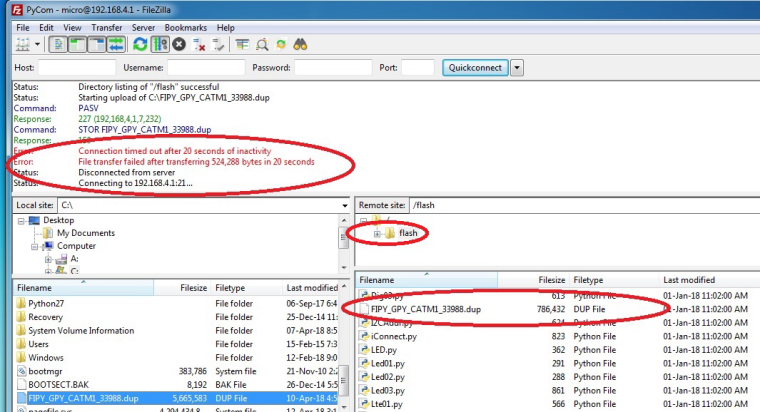
                                    2 cents worth, used fileZilla and had a similar problem trying to transfer the upgrade ~5.4mb file. Would only transfer 786432 bytes (20 seconds ish) before timing out and closing the connection. So wrote part file only! - Fix for me was to mount card-folder (/sd) using script via serial REPL console, then use fileZilla (via wifi connection) to write entire 5.4mb file (to /sd path).
                                    0_1523513947902_FTP01.jpg

                                    ---- Script I used ----

                                    from machine import SD
                                    import os
                                    import time
                                    import gc

                                    sd = SD()
                                    os.mount(sd, '/sd')

                                    #check the content
                                    os.listdir('/sd')

                                    #found this helps with NOT SHUTTING down Link after 20-30 Seconds, used filezilla while this was running to upload file

                                    xx = 1
                                    while xx < 40:
                                    print('Going to sleep')
                                    time.sleep(5) # in seconds
                                    print('waking up')
                                    print(str(xx))
                                    xx += 1

                                    os.unmount('/sd')
                                    gc.collect()

                                    1 Reply Last reply Reply Quote 0
                                    • T Offline
                                      tealbrains @kevin
                                      last edited by

                                      @kevin Thanks, that fixed it.

                                      1 Reply Last reply Reply Quote 0
                                      • F Offline
                                        flo242
                                        last edited by

                                        @daniel

                                        I seem to have run into an unrecoverable problem while trying to upgrade the modem with the latest CAT-M1 firmware (it had the stock firmware, no previous upgrade yet). I wanted to try NB-IoT, so I followed the instructions to first upgrade to the latest CAT-M1 firmware before flashing the NB-IoT firmware. I was using Pysense (firmware pysense_0.0.8.dfu) and FiPy (firmware 1.17.3.b1), connected via serial. No SIM card was inserted, because in my first try it caused the modem to not accept the initial AT+SMSWBOOT=3,0 command to enter the recovery mode.

                                        >>> import sqnsupgrade
                                        >>> sqnsupgrade.run('/sd/FIPY_GPY_CATM1_33988.dup', 921600)
                                        <<< Welcome to the SQN3330 firmware updater >>>
                                        Entering recovery mode
                                        Resetting..
                                        ..
                                        Starting STP (DO NOT DISCONNECT POWER!!!)
                                        STP started
                                        Session opened: version 1, max transfer 8192 bytes
                                        Sending 5665583 bytes: [########################################] 100%
                                        Code download done, returning to user mode
                                        Resetting (DO NOT DISCONNECT POWER!!!).
                                        ......................................................................................................................................................................................................................................................................................................................................................................................................................................................................................................................................................................................................Traceback (most recent call last):
                                          File "<stdin>", line 1, in <module>
                                          File "/flash/lib/sqnsupgrade.py", line 129, in run
                                          File "/flash/lib/sqnsupgrade.py", line 59, in wait_for_modem
                                        KeyboardInterrupt:
                                        >>>
                                        >>> from network import LTE
                                        >>> lte = LTE()
                                        >>> lte.send_at_cmd('AT')
                                        ''
                                        

                                        After waiting almost 5 minutes there was no hope that it would ever finish, and after CTRL-C the modem didn't reply anymore. After a hard-reset I also can no longer create an LTE object, it just sits there forever. Obviously I am unable to retry the firmware upgrade since the modem doesn't respond anymore, what other options are left?

                                        Thanks in advance!

                                        T J 2 Replies Last reply Reply Quote 0
                                        • T Offline
                                          tealbrains @flo242
                                          last edited by

                                          @flo242 Have you tried a "safe boot"?

                                          F 1 Reply Last reply Reply Quote 0
                                          • F Offline
                                            flo242 @tealbrains
                                            last edited by

                                            @tealbrains Since I ran out of other options I even tried Safe-Boot but as expected it didn't revive the bricked modem (the FiPy itself works without any problem).

                                            1 Reply Last reply Reply Quote 0

                                            Hello! It looks like you're interested in this conversation, but you don't have an account yet.

                                            Getting fed up of having to scroll through the same posts each visit? When you register for an account, you'll always come back to exactly where you were before, and choose to be notified of new replies (either via email, or push notification). You'll also be able to save bookmarks and upvote posts to show your appreciation to other community members.

                                            With your input, this post could be even better 💗

                                            Register Login
                                            • 1
                                            • 2
                                            • 3
                                            • 2 / 3
                                            • First post
                                              Last post

                                            Pycom on Twitter

                                            Pycom