Pytrack and.or Deep Sleep break terminal output ?
-
Guy,
I'm trying a new tracker code with Lopy and Pytrack + sleep and wake interrupt, but I'm suck with console output problem, so I restarted from library example code
accelerometer_waketo reproduce the issue.I modified a little to have some print and wait to be able to connect terminal (because deep sleep shut down usb device seen in windows)
Here the code
import machine
from machine import UART
from pytrack import Pytrack
from LIS2HH12 import LIS2HH12
from network import Bluetooth
from network import WLAN
import pycom
import time
import os

uart = UART(0, 115200)
os.dupterm(uart)

WLAN().deinit()
Bluetooth().deinit()

# Wait for terminal to connect
print("Wait for sync ", end='')
for x in range(0, 10):
    print("#", end='')
    time.sleep(1)
print(" OK!", flush=True)

rst = machine.reset_cause()
print("starting, Reset=", rst)

pycom.heartbeat(False)
print("stage 1", flush=True)

py = Pytrack()
print("stage 2", flush=True)

print("Wakeup reason: ", flush=True)
print(py.get_wake_reason())
print("; Aproximate sleep remaining: ", flush=True)
print(py.get_sleep_remaining())
print(" sec", flush=True)

# enable wakeup source from INT pin
py.setup_int_pin_wake_up(False)

# enable activity and also inactivity interrupts, using the default callback handler
py.setup_int_wake_up(True, True)

acc = LIS2HH12()
# enable the activity/inactivity interrupts
# set the accelereation threshold to 2000mG (2G) and the min duration to 200ms
acc.enable_activity_interrupt(2000, 200)

# wait 15 second before deep sleep to be able to upload
print("Wait for update ", end='', flush=True)
for x in range(0, 15):
    print(".", end='', flush=True)
    time.sleep(1)
print(" OK!", flush=True)

# go to sleep for 30 seconds max if no accelerometer interrupt happens
print("Go to deep sleep...")
py.setup_sleep(30)
py.go_to_sleep()
The fact is that the program works pretty fine (I know this because 15 seconds after printing stage 1 the device goes to deep sleep (windows beep) and wake up after 30s of deep sleep (windows beep agin and device shows up in device manager), Then I reconnect and got display until stage 1 again
Here the output of terminal (I manually disconnect when entering deep sleep and reconnect after deep sleep wake)
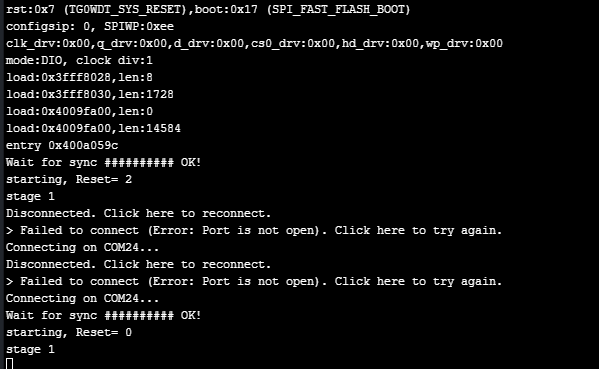
What I am missing ? Looks like some system call break the dupterm, I tried to reset console after stage 1 but same things.
py = Pytrack()
uart = UART(0, 115200)
os.dupterm(uart)
print("stage 2", flush=True)
I'm using latest firmware as today 1.17.3.b1 and latest pymakr but also tried with another terminal, same thing
Any idea of what's going wrong there ?
-
Is the Pytrack firmware upgraded to the latest version?
-
@jcaron sorry forgot to mention, it's 0.0.8, looks like the latest?
-
@charly86 I believe so, yes. What do you have in your boot.py? Have you tried clearing the filesystem completely and re-uploading all the files? Sometimes you end up with old files which result in weird stuff like this.
Have you tried adding a pause just after the stage 1 print + another print before instantiating the Pytrack object? Just to see if it's timing-related or directly related to the connection to the Pytrack...
-
@jcaron I do not have
boot.pyfor this sample issue (I wanted the sample to be simple)has suggested, I've done the changes, same thing.
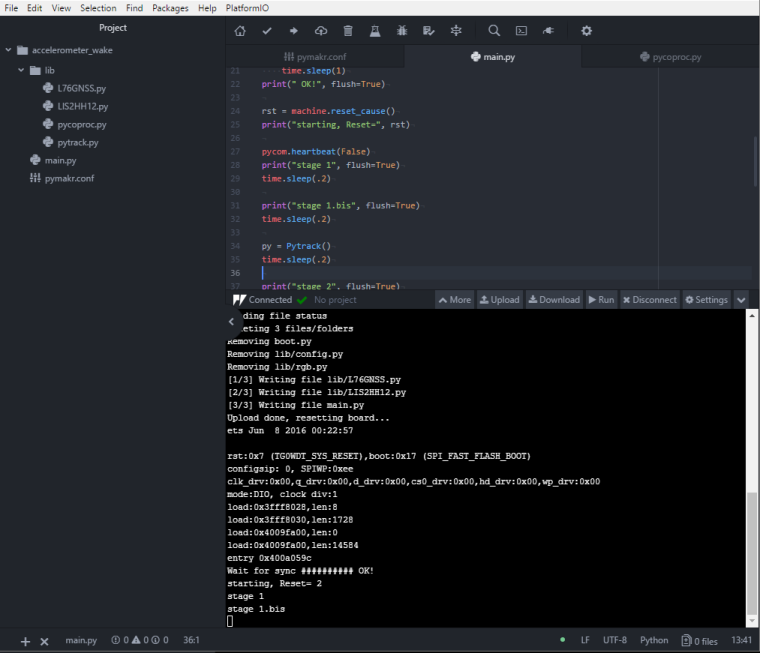
-
I took a new Fresh Lopy / Pytrack, updated firmware on both devices and flashed same code
Same result
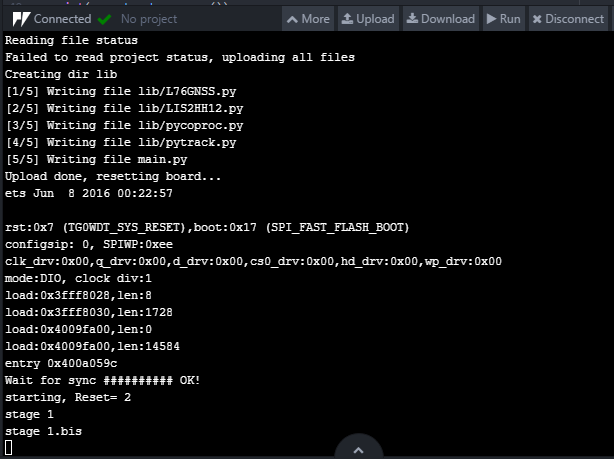
-
-
-
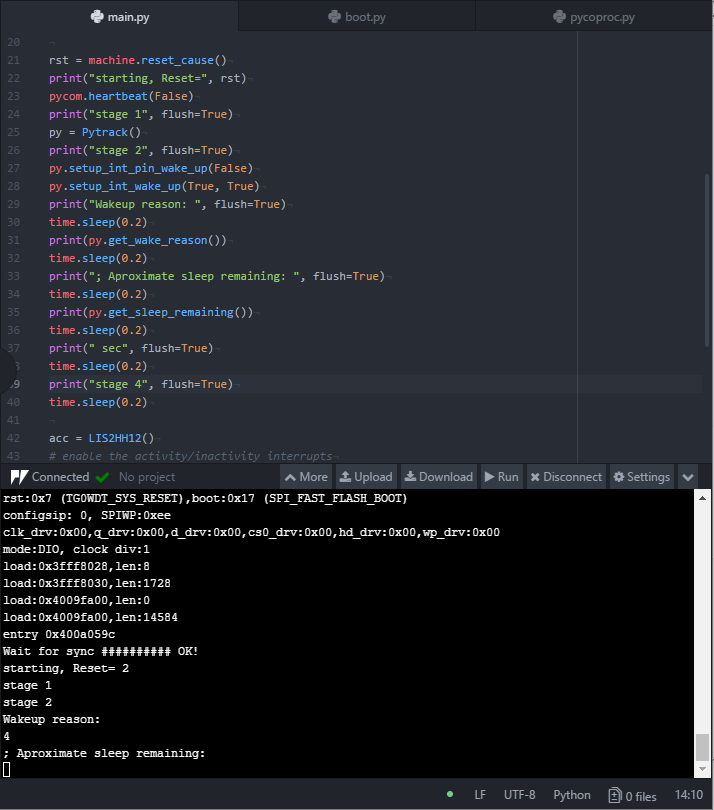
@jcaron I think I got it
The
calibrate_rtc()in librarypycoprocbreak the console output, if I comment this call fromget_sleep_remaining()No problemConnecting on COM24... # OK! starting, Reset= 0 stage 1 stage 2 Wakeup reason: 4 ; Aproximate sleep remaining: calibrate_rtc 0 sec stage 4 Wait for update .............may be the deal is out there
def calibrate_rtc(self):
        # the 1.024 factor is because the PIC LF operates at 31 KHz
        # WDT has a frequency divider to generate 1 ms
        # and then there is a binary prescaler, e.g., 1, 2, 4 ... 512, 1024 ms
        # hence the need for the constant
        self._write(bytes([CMD_CALIBRATE]), wait=False)
        self.i2c.deinit()
        Pin('P21', mode=Pin.IN)
        pulses = pycom.pulses_get('P21', 100)
        self.i2c.init(mode=I2C.MASTER, pins=(self.sda, self.scl))
        idx = 0

Hello! It looks like you're interested in this conversation, but you don't have an account yet.
Getting fed up of having to scroll through the same posts each visit? When you register for an account, you'll always come back to exactly where you were before, and choose to be notified of new replies (either via email, or push notification). You'll also be able to save bookmarks and upvote posts to show your appreciation to other community members.
With your input, this post could be even better 💗
Register Login