Simple Pin control issue
-
hi,
I just want to control an K thermometer with pin P4 (CS= chip select) and get data with P10 & 14 , so I wrote for my SipY on v3 expansion board :import pycom import machine from machine import SPI pycom.heartbeat(False) print(machine.unique_id()) # configure the SPI master @ 9600 # this uses the SPI default pins for CLK, MISO (``P10``, ``P14``) spi = SPI(0, mode=SPI.MASTER, baudrate=9600, polarity=0, phase=1, bits=12, firstbit=SPI.MSB) # penser plus tard à mesurer D2 # initialiser CS sur P4 à 1 from machine import Pin cs = Pin('P4', mode = Pin.OUT) cs.value(1)and I get at "run" an error after the machine Id :
b'$\n\xc4\x00V\x86'
Traceback (most recent call last):
File "<stdin>", line 14, in <module>
ValueError: invalid argument(s) value
and line 14 is just : cs = Pin('P4', mode = Pin.OUT)I do not understand , I just copied & adapted the documentation :
https://docs.pycom.io/chapter/firmwareapi/pycom/machine/Pin.htmlwhere is my mistake please in Pin control ?
thanks by advance
William -
This post is deleted! -
@prx Just saw something else: the parameter bits could be wrong. from the documentation:
"bits is the width of each transfer, accepted values are 8, 16 and 32."
Error messages are sometimes off by one line.
If the device you try to talk to is a max6675, then the data size is 16 bits. If the device is just sending 12 bits, read 16 and ignore 4.
And about the data rate: according to the data sheet the max6675 can be clocked up to 5 MHz. So no need to use 9600.
Edit: 5 MHz do not work (skips a bit), but 1 MHz do, -
@prx With my MAX6675 here, i extended your script to prin values:
import pycom import machine import ubinascii from machine import SPI, Pin pycom.heartbeat(False) print(ubinascii.hexlify(machine.unique_id())) # configure the SPI master @ 9600 # this uses the SPI default pins for CLK, MISO (``P10``, ``P14``) spi = SPI(0, mode=SPI.MASTER, baudrate=10000, polarity=0, phase=1, bits=8, firstbit=SPI.MSB) # penser plus tard à mesurer D2 # initialiser CS sur P4 à 1 cs = Pin('P4', mode = Pin.OUT) cs.value(1) def run(): cs.value(0) data= spi.read(2) cs.value(1) value = (data[0] * 256 + data[1]) >> 4 print("Temperature: ", value/4) run() -
Thank you @robert-hh , I passed the "line 12" problem and will work on the following and post the result - yes it is a Max6675 for the moment. Thank you.
-
hi @robert-hh ,
I get 0 as temp , and data, event in 16 or 8 bits (SPI)
I write the following code :import time import pycom import machine import ubinascii from machine import SPI, Pin pycom.heartbeat(False) print(ubinascii.hexlify(machine.unique_id())) # this uses the SPI default pins for CLK, MISO (``P10``, ``P14``) spi = SPI(0, mode=SPI.MASTER, baudrate=10000, polarity=0, phase=1, bits=16, firstbit=SPI.MSB) # penser plus tard à mesurer D2 # initialiser CS on P4 to 1 from machine import Pin cs = Pin('P4', mode = Pin.OUT) cs.value(1) def run(): time.sleep(.0500) cs.value(0) data= spi.read(1) #time.sleep(.500) cs.value(1) #value = (data[0] * 256 + data[1]) >> 4 #print("Temperature: ", value/4) print(data[0]) while True: run()but on P14 i get an answer signal see picture (DSO) !
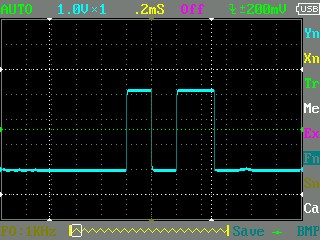  Vmax =3.16V : so Miso port do not read it.
 Vmax =3.16V : so Miso port do not read it.
My Pin connexion on Max6675 is :- Vcc= 3V3 (3ed pin on the top right)
- gnd
- SCK on P10
- CS on P4
- SO on P14 (Miso)
thank you by advance
Wiliam
-
@prx You should use: spi.read(2), but still the value should be > 0
Edit: P4 is the 5th Pin from the edge. The first one is reset, not P0. I use to stumble about that. -
@robert-hh
Thanks, yes P4 (CS) is the right pin, otherwise I would not have the reply I put you the signal as screen copy; I test also with read(2) : same result : 0 , I am not sure of a/ 10000 = 10 Mkz or 1 Mkz ? and b/threshold of the signal on Miso : I have this evening a max voltage at 3.2V : is the signal considered at "1" with 3.2V on SipY Miso pin? -
The same installation with 3.3V in Vcc was working on Arduino last week and gave me temperature's answer quickly.
best regards
William -
This post is deleted! -
@prx the frequency is given in Hz. Ans it does not matter whether the voltage is 3.2 or 3.3. The switch point is at about 1.6V. Vcc should be 3.3V. I had a max5595 running fine wirh your code.
-
Solution is here https://forum.pycom.io/post/21808 (bug in doc / Pin maps)

Hello! It looks like you're interested in this conversation, but you don't have an account yet.
Getting fed up of having to scroll through the same posts each visit? When you register for an account, you'll always come back to exactly where you were before, and choose to be notified of new replies (either via email, or push notification). You'll also be able to save bookmarks and upvote posts to show your appreciation to other community members.
With your input, this post could be even better 💗
Register Login