GPy with Hologram SIM
-
Ok, I'm back to try to see if things have gotten any better since my last tests.
I've upgraded the GPy firmware and the modem firmware to the latest stable version.
I'm trying to run the example CAT-M1 test program from the documentation. I added a few print statements to see what is happening. I have a Hologram SIM.
It works the first time I run the program. It crashes if I run the program a second time.
import socket import ssl import time from network import LTE print('new LTE') lte = LTE() # instantiate the LTE object print('attach') lte.attach() # attach the cellular modem to a base station while not lte.isattached(): print('attaching...') time.sleep(0.25) print('connect') lte.connect() # start a data session and obtain an IP address while not lte.isconnected(): print('connecting...') time.sleep(0.25) print('receiving data') s = socket.socket() s = ssl.wrap_socket(s) s.connect(socket.getaddrinfo('www.google.com', 443)[0][-1]) s.send(b"GET / HTTP/1.0\r\n\r\n") print(s.recv(128)) s.close() lte.disconnect() lte.dettach()Here's the error output on the second run:
new LTE ╝Traceback (most recent call last): File "<stdin>", line 8, in <module> OSError: the requested operation failed ╝> Pycom MicroPython 1.18.1.r1 [v1.8.6-849-b0520f1] on 2018-08-29; GPy with ESP32 Type "help()" for more information.``` -
You are probably needing to detach and reset the modem at the beginning of your code in order to get stability. The modem runs independant of the processor so the state will survive a board or system reset.
-
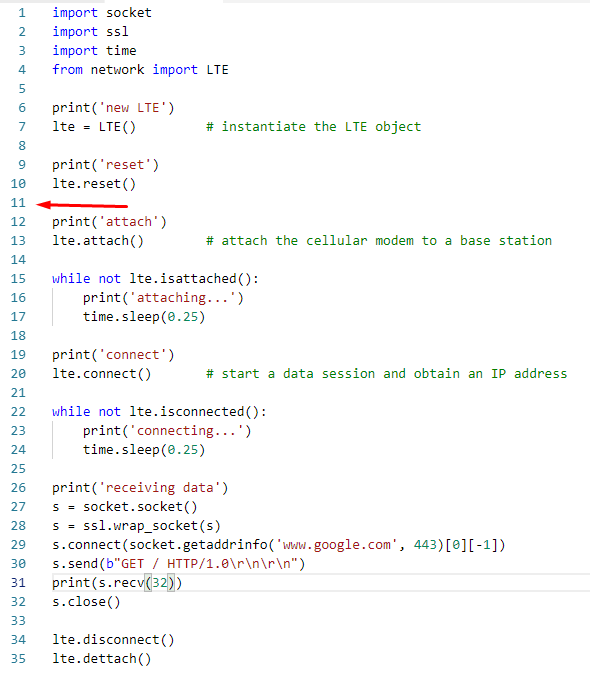
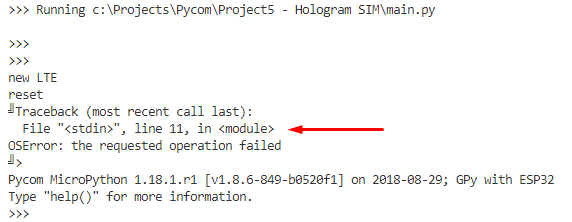
I added an lte.reset() call at the start and now the program crashes on a blank line the second time it is run. Again it works fine the first time the program is run.
Hello! It looks like you're interested in this conversation, but you don't have an account yet.
Getting fed up of having to scroll through the same posts each visit? When you register for an account, you'll always come back to exactly where you were before, and choose to be notified of new replies (either via email, or push notification). You'll also be able to save bookmarks and upvote posts to show your appreciation to other community members.
With your input, this post could be even better 💗
Register Login