Is my GPY Bricked??
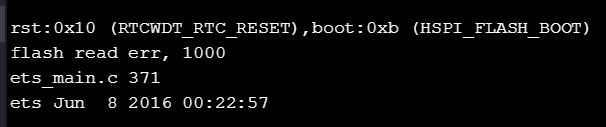
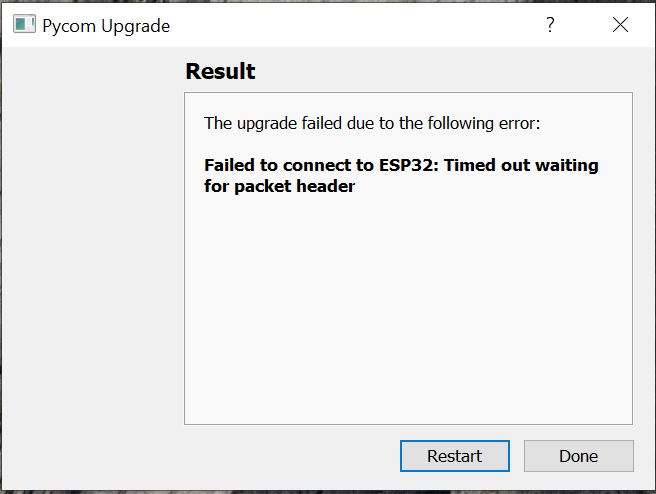
-
@paul-thornton 'Interesting' is not the word I was using at the time. It has happened again since but I can't replicate the issue by design.
A few other odd things are happening with this particular GPY so it would be useful to re-flash the firmware, but the Update Tool won't allow that to happen. Is it not possible to re-flash with the same version of firmware? And is it possible to download the firmware files for manual installation - the utility allows it but where do I get the files from?
The responses to trying to update the firmware are as per the original message. The 'flash read err' message shows up AFTER I have tried to do an update.
Now registered on this forum as Steve Williams (due to an email address change) - stevo7452@gmail.com
-
@stevo52 said in Is my GPY Bricked??:
Is it not possible to re-flash with the same version of firmware?
You can re-flash any firmware version. The bootloader doing that does not know what it is loading.
And is it possible to download the firmware files for manual installation - the utility allows it but where do I get the files from?
Older versions are available here as tar packages: https://software.pycom.io/downloads/GPy.html. The most recent versions are not. There was an indication that Pycom will change that.
Besides that, either your GPY/expansion combo has a hardware problem, or the flash content is somewhat disarranged. In the latter case a full erase with esptool.py and re-flash will help.
-
@robert-hh It's odd that's for sure but I can't do any sort of flash using the Upgrade Tool. I did find the older firmware versions earlier today but can't flash those either :-)
I'll see what I can do with esptool.py but haven't used that before, can I run that from Atom?
I suspect I have an issue with the GPY. You might recall I have being testing timers and threads. I have encountered odd problems with those too.. using a simple set of codes, I am starting a new thread, which triggers a 15 sec timer, which in turn prints some details to the REPL.
In main.py:
# Start with importing required core modules etc.
import gc, audfuncs, cfgfuncs, hkpfuncs, netfuncs, rtcfuncs, senfuncs, pwrfuncs
import _thread
from utime import sleep

dosplthrd = 0                           # First Run of Base SLM thread

# # Next thread will run SLM sampling continuosly in background
if dosplthrd == 0:
    thrdSLM_id = _thread.start_new_thread(audfuncs.runaudSLM, ())
    if rvrb == 1: print("Initiate SLM Sampling",thrdSLM_id)
    dosplthrd = 1                 # SLM thread started
in audfuncs,py:
# Start with importing core modules for features, interfaces etc.
from pycom import rgbled
from utime import localtime, sleep, sleep_ms
import gc, uos, math, _thread
import cfgfuncs
from machine import I2C, Timer

class slmTMR:
    # Setup timer for collecting SLM data
    def __init__(self):
        self.cnttrg = 0
        self.__alarm = Timer.Alarm(self._slm_trig, 15, periodic=True)

    def _slm_trig(self, alarm):
        self.cnttrg += 1
        if rvrb == 1: print("SLM Sample", self.cnttrg, _thread.get_ident())
        audSLM()

def runaudSLM():
    runSLM = slmTMR()
    runSLM.__init__()

def audSLM():
    # Function to sample audio from mic/AGC via i2C adc, continuosly
    rgbled(0x0B0B0B)                            # Mid Red/Blue/Green
    # if rvrb == 1: print("SLM sample", slmtrg, _thread.get_ident())
    # add write to log file as activity record
    sleep(0.2)
    rgbled(0x000000)                        # Off

    return ""
Not overly complex I thought, but I get two funny results
-
No thread ID is generated (returns 'None') for the _thread.start_new_thread in main.py; but there is one (doesn't look right to me) in the audSLM print statement.
-
The slmTMR alarm returns the print statement twice in very close order then waits the set 15 seconds. There is an alarm counter in the slmTMR timer so I can see what is happening, there are no repeated numbers, so the alarm is actually triggering twice I think.
There might be more code there than I need, but I have been trying a few ideas to fix the issues. Note sure if you would have the time to run the code to confirm code/hardware issue? I don't have another GPY to try at the moment - will need to get one in next week if necessary (probably go with a FiPY if I need to). Hope there is enough info here.
Now registered on this forum as Steve Williams (due to an email address change) - stevo7452@gmail.com
-
-
@stevo52 No, you cannot use esptool.py with Atom. It is a python script for the PC's command line. And I do not know whether it works on Windows.
-
@stevo52 said in Is my GPY Bricked??:
No thread ID is generated (returns 'None') for the _thread.start_new_thread
Yes, that matches the code. The documentation is wrong.
-
@robert-hh Any pointers for doing this? If I do a full erase using esptool.py what will happen if I still have the same issues with the Pycom Firmware Update tool - next step will be a new FiPY?
Now registered on this forum as Steve Williams (due to an email address change) - stevo7452@gmail.com
-
@robert-hh OK, so I should use the _thread.get_ident() command instead?
Now registered on this forum as Steve Williams (due to an email address change) - stevo7452@gmail.com
-
@stevo52 You can do so. Only the scope is different. _thread.get_ident() is called within the thread, while returning the thread ID when creating would return it to the creating task. So furher actions depend on where you need it.
-
@stevo52 I never had the case that re-flashing did not work after a full erase, unless there is a hardware problem. That can be at any place between the ESP32 chip and you PC. This "failed to connect" message tells, that the expected ESP32 response is not seen by the loader, which can be cause by many reasons. You could verify, that, when you connect G23 to GND and push reset, you get something like the following message in Atom or Putty:
rst:0x1 (POWERON_RESET),boot:0x23 (DOWNLOAD_BOOT(UART0/UART1/SDIO_REI_REO_V2)) waiting for download -
@robert-hh said in Is my GPY Bricked??:
@stevo52 said in Is my GPY Bricked??:
Is it not possible to re-flash with the same version of firmware?
Older versions are available here as tar packages: https://software.pycom.io/downloads/GPy.html. The most recent versions are not. There was an indication that Pycom will change that.
Can confirm. How we deliver firmware files is something being actively worked on :)
-
@robert-hh Hi again.. with G23 to Gnd and pressing reset:
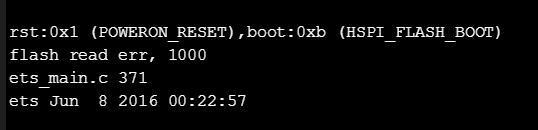
So not the same as what you suggested I might see..
I can upload files to the GPY and those then run, but some other things happen - like the timer triggering twice at the same time and odd, mixed up thread ID numbers.. it feels like there are two copies of the same code running at the same time if that makes sense..
I tried esptool and also pycom-fwtool-cli (pretty much the same tool I think) but no luck with a full erase, or a firmware upload using either. I think I will have to get a replacement GPY/FIPY.. or try removing the uP from the expansion board and trying to flash etc, via an FTDI cable. Running out of ideas with this one.
Now registered on this forum as Steve Williams (due to an email address change) - stevo7452@gmail.com
-
@stevo52 G23 (Board) is the same Pin as P2 (Module). Are you sure you connected GND to the right Pin?
-
@robert-hh You advised to connect to G23, that is what I connected to GND at the Expansion Board? Double/triple checked many times. But there is a lot of confusion around module and Expansion Board pin assignments.. What pin (all associated pin ID's would help) on the Exp Bd 3. should I be connecting to GND?
Now registered on this forum as Steve Williams (due to an email address change) - stevo7452@gmail.com
-
@stevo52 The pin which is labelled G23 on the expansion board and P2 in the pinout of GPy. It is the 4th pin from the edge at the opposite side of GND.
-
@robert-hh That is where I have connected.You could try to contact not at the expansion board, but directly at the module, top sort out any connection problems of the expansion boards.
Also, when the device is powered, pulling G23 low a few times should cause some flicker of the RGB LED. The led is too connected to G23/P2. If that does not happen, then there is a connection problem between the G23 pin and the module's internals. -
@robert-hh nearly missed this, it seems to be appended to my own reply to you..
"You could try to contact not at the expansion board, but directly at the module, top sort out any connection problems of the expansion boards.
Also, when the device is powered, pulling G23 low a few times should cause some flicker of the RGB LED. The led is too connected to G23/P2. If that does not happen, then there is a connection problem between the G23 pin and the module's internals.'Soldered a wire on to this point, and also one from ground, to a switch but no difference in what I am seeing when they are connected. Repeated grounf of G23/P2 does not cause any flicker of the LED that I can see.
But I am curious why I even need the G23 to Gnd jumper - hasn't the PIC on Exp Bd 3 taken that requirement away?
Are there any 'error code' sequences produced on the Expansion Board 'batt' led? On occassions I am seeing a continuous series of short flashes, or a sequence of 6 ~ 8 short flashes, a 2 sec gap the short flashes again? Haven't found any reference to these.
Now registered on this forum as Steve Williams (due to an email address change) - stevo7452@gmail.com
-
@stevo52 That's strange. I suggested that P2/GND connection to rule out any problem in the Expansion board. Since the RGB led works, there is no problem with the module-internal connection to GPIO2. Did you check, whether there is a 3.3v at the 3.3v output Pin of the GPY (next to GND)?
-
@robert-hh Hi, a number of sensors on the I2C buses are powered from that 3.3V Output pin without issue.. confirmed it with a DMM as well just to be sure..
-
@stevo52 Do you have anything else connected to the Expansion Board, especially on port P8? Do you have an SD card inserted in the expansion board?
-
@xykon I eliminated that scenario early on, the problem is the same with or without the SD Card. I removed the GPY from the expansion board and put it in a proto board (tried 3 different ones - different brands) and tried connecting with a USB to UART TTL RS232 cable - wire ends. That removed the expansion board completely but still no go as far as flashing goes but I can talk to the GPY and upload code files OK.
Now registered on this forum as Steve Williams (due to an email address change) - stevo7452@gmail.com

Hello! It looks like you're interested in this conversation, but you don't have an account yet.
Getting fed up of having to scroll through the same posts each visit? When you register for an account, you'll always come back to exactly where you were before, and choose to be notified of new replies (either via email, or push notification). You'll also be able to save bookmarks and upvote posts to show your appreciation to other community members.
With your input, this post could be even better 💗
Register Login