Can't get Join accept from Multitech gateway
-
Hi everyone
I'm new to Lopy and I was trying to join the network that is created by Multitech gateway with this code. In the gateway console I can see that the gateway did receive the Join Request and send back the Join accept but for some reasons the Lopy stuck inside the waiting for Joined flag loop. Here is my code :
from network import LoRa
import socket
import time
import binascii
import utime
import pycom

pycom.rgbled(0x007f00) # green

def select_subband(lora, subband):
    if (type(subband) is int):
        if ((subband<1) or (subband>8)):
            raise ValueError("subband out of range (1-8)")
    else:
        raise TypeError("subband must be 1-8")

    for channel in range(0, 72):
        lora.remove_channel(channel)

    for channel in range((subband-1)*8, ((subband-1)*8)+8):
        lora.add_channel(channel, frequency=902300000+channel*200000, dr_min=0, dr_max=3)

lora = LoRa(mode=LoRa.LORAWAN, adr=False, public=False, tx_retries=0,device_class = LoRa.CLASS_A,region=LoRa.US915)

sb = 7 #Change to desired conduit frequency sub-band

select_subband(lora,7)

app_eui = binascii.unhexlify('31 39 35 32 36 30 32 33'.replace(' ',''))
app_key = binascii.unhexlify('31 39 35 32 36 30 32 33'.replace(' ',''))
dev_eui = binascii.unhexlify ('70 b3 d5 49 94 54 a0 8f'.replace(' ',''))


#auth =(dev_eui, app_eui, app_key)


auth=(app_eui, app_key)


lora.join(activation=LoRa.OTAA, auth=auth, timeout=0 )

print("Joining...")

while not lora.has_joined():
    print('Not joined yet...')
    pycom.rgbled(0x00)
    time.sleep(0.1)
    pycom.rgbled(0xFF0000)
    time.sleep(2)
    #print('Not yet joined on frequency sub-band '+str(sb)+'...')
print('joined')
I wonder if anyone had this problem before?
Thank you
-
@tuanlinh1711 In which region are you? It seems to be us, but I cannot see the region setting, and the default is EU868. But then the frquency setting is inconsistent and should raise an error.
Edit: which firmware version are you using? -
@robert-hh
Hi, my Region is US915. I did add it but it still failed to receive the Join accept
edit:
sys.version
'3.4.0'
sys.platform
'FiPy' -
@tuanlinh1711 What is the result, when you push Ctrl-B in REPL or type:
import uos
uos.uname() -
@robert-hh
Hi, This is the result
(sysname='FiPy', nodename='FiPy', release='1.18.1.r10', version='v1.8.6-849-d53c7f3 on 2019-01-10', machine='FiPy with ESP32', lorawan='1.0.2', sigfox='1.0.1', pybytes='0.9.5')
Thank you -
try the code below..it works for me on Multitech Conduit
from network import LoRa import socket import time import ubinascii # Initialise LoRa in LORAWAN mode. # Please pick the region that matches where you are using the device: # Asia = LoRa.AS923 # Australia = LoRa.AU915 # Europe = LoRa.EU868 # United States = LoRa.US915 lora = LoRa(mode=LoRa.LORAWAN, region=LoRa.AU915) # create an OTAA authentication parameters app_eui = ubinascii.unhexlify('xxxx') app_key = ubinascii.unhexlify('xxxx') # join a network using OTAA (Over the Air Activation) lora.join(activation=LoRa.OTAA, auth=(app_eui, app_key), timeout=0) # wait until the module has joined the network while not lora.has_joined(): time.sleep(2.5) print('Not yet joined...') # create a LoRa socket s = socket.socket(socket.AF_LORA, socket.SOCK_RAW) # # selecting confirmed type of messages # s.setsockopt(socket.SOL_LORA, socket.SO_CONFIRMED, True) # set the LoRaWAN data rate print('set the LoRaWAN data rate') s.setsockopt(socket.SOL_LORA, socket.SO_DR, 5) print('coding_rate..') cr=lora.coding_rate() print(cr) # make the socket blocking # (waits for the data to be sent and for the 2 receive windows to expire) s.setblocking(True) # send some data s.send(bytes([0x01, 0x02, 0x03])) s.setblocking(False) #lmsg = ubinascii.unhexlify('Hello Lora') for counter in range(1,100): time.sleep(30) #sum = sum + counter s.send("hi LoRa #" + str(counter)) print("hi LoRa #" + str(counter)) # get any data received (if any...) data = s.recv(64) print(data) # # make the socket non-blocking # # (because if there's no data received it will block forever...) # s.setblocking(False) # # get any data received (if any...) # data = s.recv(64) # print(data) -
@misterlisty
Hi
Thank you for your help but I used that code before and it couldn't even send the join request. -
@tuanlinh1711 Can you post your gateway and LNS configuration?
Have you tried other sub-bands to see if the result is different?
-
@jcaron
Hi,
Here are my gateway configuration:
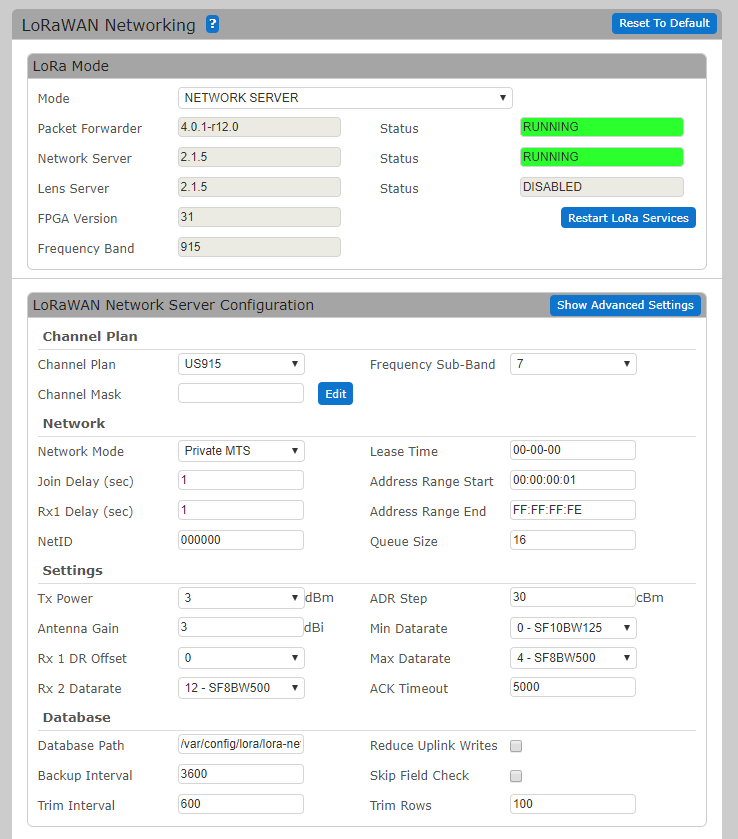
Key management:
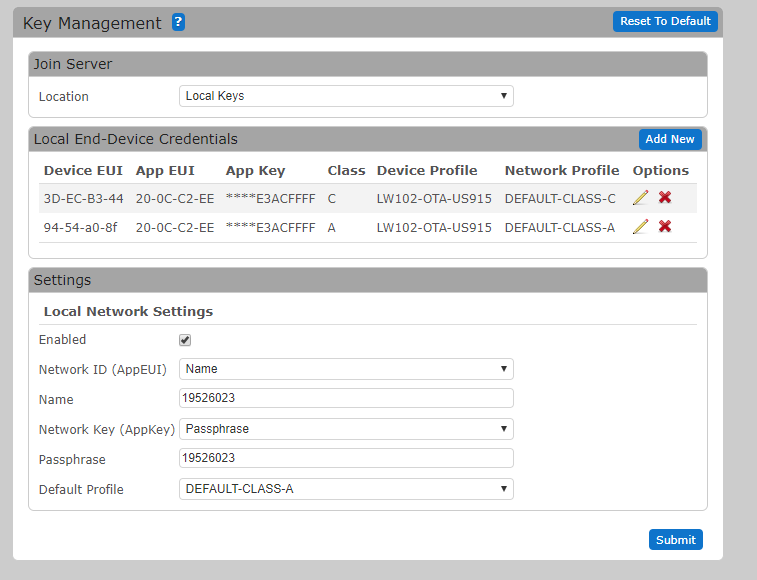
Console:
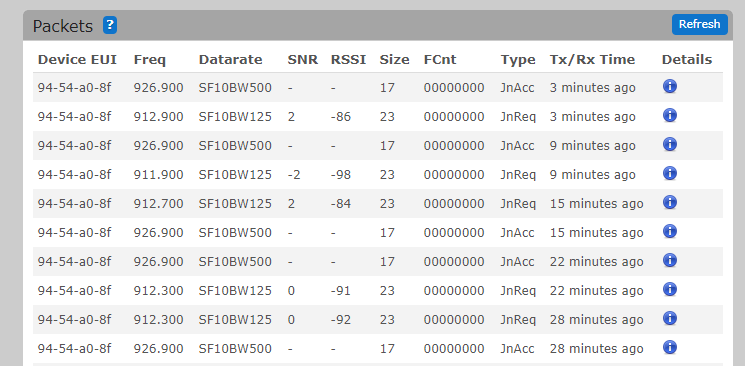
The gateway is under another project right now so all I can do is try to connect to it with the given configuration by using Pycom module -
@tuanlinh1711 There's something weird in your logs... All join accepts are sent on the 926.9 MHz frequency at SF10 BW500 (DR10), whatever the incoming channel.
My understanding of the LoRaWAN spec is that for US915, downlinks (including join accepts) should be sent either:
- in RX1 on a channel that depends on the incoming channel number and a data rate that depends on the incoming data rate and RX1DROffset,
- or on RX2 on the 923.3 MHz channel at DR8 (though this is overridden in your config)
So it's definitely not RX2 (not the right channel, not the right data rate), so it must be RX1.
But then we should have:
- request on 912.3 = uplink channel 50 -> downlink channel 2 = 924.5 MHz
- request on 912.7 = uplink channel 52 -> downlink channel 4 = 925.7 MHz
- request on 911.9 = uplink channel 48 -> downlink channel 0 = 923.3 MHz
- request on 912.9 = uplink channel 53 -> downlink channel 5 = 926.3 MHz
Instead, it's always sending on 926.9, which is channel 6.
I don't see anything if the settings screens shown which would set this, maybe somewhere in the Advanced Settings?
Also, two other points:
- the LoPy should cycle through the various channels, so you should at some point end up sending the join request on an uplink channel (54) that results in the LoPy listening on channel 6 and receiving the join accept.
- your log shows only a few join requests spaced apart quite a lot. The LoPy should be retrying and sending join requests at regular intervals (don't remember off the top of my head, but something like every 15 seconds I believe), so you should have many more requests in your logs.
You can try to enable only channel 54 to see if you get things through, but there's something fishy...
-
@jcaron
HiThank you for your time. I tried to join the network with the end device from Multitech and it worked just fine. The gateway will always send the response at 926MHz but the Multitech End Device will get the response but not the Lopy. I'll talk to the engineer who in charges of the gateway and see what can I do about it and update as soon as possible
Thank you for your response
-
@jcaron
Hi
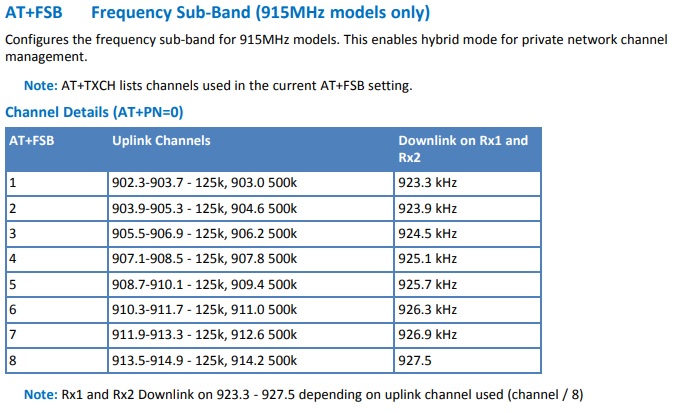
I went through the Xdot document and I found out that if I choose the channel 7 uplink, it'll always send the downlink reply in 926.9 MHz as I attached below
I left the Lopy untouched for at least 15 minutes and it tried about 3 times in 9 minutes and that's pretty much it.
I don't know what did I do wrong with the Lopy but it seems like it's more likely to be my configuration ... -
@tuanlinh1711 Be are that the channel numbering in that table is not the official LoRaWAN numbering, nor that used in your code: it starts at 1 instead of 0. Also those channels are for sub-band 0, when your gateway is listening on sub-band 7.
As I wrote previously, you should try enabling only channel 54, that should make the LoPy listen on the downlink channel the gateway is sending on:
   for channel in range(0, 72):
        lora.remove_channel(channel)

    channel = 54
    lora.add_channel(channel, frequency=902300000+channel*200000, dr_min=0, dr_max=3)
Don't know if the settings for US915 are any different from EU868 in that respect, but joins repeated every 3 minutes does not seem quite right, you're most probably just seeing only part of them because they are sent on channels the gateway is not listening on.
-
@jcaron
Hi
I did remove all other channels and enable channel 54 only but it couldn't join the network.
This is my code:from network import LoRa import socket import time import binascii import utime import pycom import ubinascii pycom.rgbled(0x007f00) # green def select_subband(lora, subband): if (type(subband) is int): if ((subband<1) or (subband>8)): raise ValueError("subband out of range (1-8)") else: raise TypeError("subband must be 1-8") for channel in range(0, 72): lora.remove_channel(channel) for channel in range((subband-1)*8, ((subband-1)*8)+8): lora.add_channel(channel, frequency=902300000+channel*200000, dr_min=0, dr_max=4) lora = LoRa(mode=LoRa.LORAWAN, adr=True, sf=10, coding_rate=1,power_mode = LoRa.ALWAYS_ON,frequency =926900000,bandwidth = LoRa.BW_125KHZ,tx_power = 14, public=False, tx_retries=2,device_class = LoRa.CLASS_A,region=LoRa.US915 ) sb = 7 #Change to desired conduit frequency sub-band #select_subband(lora,7) for channel in range(0, 72): lora.remove_channel(channel) lora.add_channel(54, frequency=902300000+channel*200000, dr_min=0, dr_max=4) # assign your AppEUI, AppKey, DevEUI app_eui = binascii.unhexlify('ff ff ba 78 20 0c c2 ee'.replace(' ','')) app_key = binascii.unhexlify('12 67 ad a4 da e3 ac 12 67 6b ad da e3 ac ff ff'.replace(' ','')) #dev_eui = binascii.unhexlify ('70 b3 d5 49 94 54 a0 8f'.replace(' ','')) #app_eui = ubinascii.unhexlify('19526023') #app_key = ubinascii.unhexlify('19526023') # create an OTAA authentication (DevEUI, AppEUI, AppKey) #auth =(dev_eui, app_eui, app_key) # create an OTAA authentication (AppEUI, AppKey) auth=(app_eui, app_key) # join a network using OTAA (Over the Air Activation) lora.join(activation=LoRa.OTAA, auth=auth, timeout=0,dr =0 ) print("Joining...") while not lora.has_joined(): print('Not joined yet...') pycom.rgbled(0x00) time.sleep(0.1) pycom.rgbled(0xFF0000) time.sleep(2) #print('Not yet joined on frequency sub-band '+str(sb)+'...') print('joined')The gateway did send back the Join Accept
-
Hi everyone
I figured it out that the Gateway is using "MTS Private " network which is Multitech's proprietary Lora network for their product. I switched back to LoraWAN Private and it worked just fine.
Thank you for your help

Hello! It looks like you're interested in this conversation, but you don't have an account yet.
Getting fed up of having to scroll through the same posts each visit? When you register for an account, you'll always come back to exactly where you were before, and choose to be notified of new replies (either via email, or push notification). You'll also be able to save bookmarks and upvote posts to show your appreciation to other community members.
With your input, this post could be even better 💗
Register Login