Ping command
-
@fruiz1113 Using uos.urandom, uping then is (3 lines changed):
# µPing (MicroPing) for MicroPython
# copyright (c) 2018 Shawwwn <shawwwn1@gmail.com>
# License: MIT

# Internet Checksum Algorithm
# Author: Olav Morken
# https://github.com/olavmrk/python-ping/blob/master/ping.py
# @data: bytes
def checksum(data):
    if len(data) & 0x1: # Odd number of bytes
        data += b'\0'
    cs = 0
    for pos in range(0, len(data), 2):
        b1 = data[pos]
        b2 = data[pos + 1]
        cs += (b1 << 8) + b2
    while cs >= 0x10000:
        cs = (cs & 0xffff) + (cs >> 16)
    cs = ~cs & 0xffff
    return cs

def ping(host, count=4, timeout=5000, interval=10, quiet=False, size=64):
    import utime
    import uselect
    import uctypes
    import usocket
    import ustruct
    import uos

    # prepare packet
    assert size >= 16, "pkt size too small"
    pkt = b'Q'*size
    pkt_desc = {
        "type": uctypes.UINT8 | 0,
        "code": uctypes.UINT8 | 1,
        "checksum": uctypes.UINT16 | 2,
        "id": (uctypes.ARRAY | 4, 2 | uctypes.UINT8),
        "seq": uctypes.INT16 | 6,
        "timestamp": uctypes.UINT64 | 8,
    } # packet header descriptor
    h = uctypes.struct(uctypes.addressof(pkt), pkt_desc, uctypes.BIG_ENDIAN)
    h.type = 8 # ICMP_ECHO_REQUEST
    h.code = 0
    h.checksum = 0
    h.id[0:2] = uos.urandom(2)
    h.seq = 1

    # init socket
    sock = usocket.socket(usocket.AF_INET, usocket.SOCK_RAW, 1)
    sock.setblocking(0)
    sock.settimeout(timeout/1000)
    try:
        addr = usocket.getaddrinfo(host, 1)[0][-1][0] # ip address
    except IndexError:
        not quiet and print("Could not determine the address of", host)
        return None
    sock.connect((addr, 1))
    not quiet and print("PING %s (%s): %u data bytes" % (host, addr, len(pkt)))

    seqs = list(range(1, count+1)) # [1,2,...,count]
    c = 1
    t = 0
    n_trans = 0
    n_recv = 0
    finish = False
    while t < timeout:
        if t==interval and c<=count:
            # send packet
            h.checksum = 0
            h.seq = c
            h.timestamp = utime.ticks_us()
            h.checksum = checksum(pkt)
            if sock.send(pkt) == size:
                n_trans += 1
                t = 0 # reset timeout
            else:
                seqs.remove(c)
            c += 1

        # recv packet
        while 1:
            socks, _, _ = uselect.select([sock], [], [], 0)
            if socks:
                resp = socks[0].recv(4096)
                resp_mv = memoryview(resp)
                h2 = uctypes.struct(uctypes.addressof(resp_mv[20:]), pkt_desc, uctypes.BIG_ENDIAN)
                # TODO: validate checksum (optional)
                seq = h2.seq
                if h2.type==0 and h2.id==h.id and (seq in seqs): # 0: ICMP_ECHO_REPLY
                    t_elasped = (utime.ticks_us()-h2.timestamp) / 1000
                    ttl = ustruct.unpack('!B', resp_mv[8:9])[0] # time-to-live
                    n_recv += 1
                    not quiet and print("%u bytes from %s: icmp_seq=%u, ttl=%u, time=%f ms" % (len(resp), addr, seq, ttl, t_elasped))
                    seqs.remove(seq)
                    if len(seqs) == 0:
                        finish = True
                        break
            else:
                break

        if finish:
            break

        utime.sleep_ms(1)
        t += 1

    # close
    sock.close()
    ret = (n_trans, n_recv)
    not quiet and print("%u packets transmitted, %u packets received" % (n_trans, n_recv))
    return (n_trans, n_recv)
Edit: Added a useful error message in case the address could not be resolved.
-
@robert-hh I get
Traceback (most recent call last):
  File "<stdin>", line 114, in <module>
  File "<stdin>", line 50, in ping
AttributeError: 'module' object has no attribute 'SOCK_RAW'
when I try to run this Robert
-
@kjm Same result with
# µPing (MicroPing) for MicroPython # copyright (c) 2018 Shawwwn <shawwwn1@gmail.com> # License: MIT # Internet Checksum Algorithm # Author: Olav Morken # https://github.com/olavmrk/python-ping/blob/master/ping.py # @data: bytes def checksum(data): if len(data) & 0x1: # Odd number of bytes data += b'\0' cs = 0 for pos in range(0, len(data), 2): b1 = data[pos] b2 = data[pos + 1] cs += (b1 << 8) + b2 while cs >= 0x10000: cs = (cs & 0xffff) + (cs >> 16) cs = ~cs & 0xffff return cs def ping(host, count=4, timeout=5000, interval=10, quiet=False, size=64): import utime import uselect import uctypes import usocket import ustruct import machine # prepare packet assert size >= 16, "pkt size too small" pkt = b'Q'*size pkt_desc = { "type": uctypes.UINT8 | 0, "code": uctypes.UINT8 | 1, "checksum": uctypes.UINT16 | 2, "id": uctypes.UINT16 | 4, "seq": uctypes.INT16 | 6, "timestamp": uctypes.UINT64 | 8, } # packet header descriptor h = uctypes.struct(uctypes.addressof(pkt), pkt_desc, uctypes.BIG_ENDIAN) h.type = 8 # ICMP_ECHO_REQUEST h.code = 0 h.checksum = 0 h.id = machine.rng() & 0xffff h.seq = 1 # init socket sock = usocket.socket(usocket.AF_INET, usocket.SOCK_RAW, 1) sock.setblocking(0) sock.settimeout(timeout/1000) addr = usocket.getaddrinfo(host, 1)[0][-1][0] # ip address sock.connect((addr, 1)) not quiet and print("PING %s (%s): %u data bytes" % (host, addr, len(pkt))) seqs = list(range(1, count+1)) # [1,2,...,count] c = 1 t = 0 n_trans = 0 n_recv = 0 finish = False while t < timeout: if t==interval and c<=count: # send packet h.checksum = 0 h.seq = c h.timestamp = utime.ticks_us() h.checksum = checksum(pkt) if sock.send(pkt) == size: n_trans += 1 t = 0 # reset timeout else: seqs.remove(c) c += 1 # recv packet while 1: socks, _, _ = uselect.select([sock], [], [], 0) if socks: resp = socks[0].recv(4096) resp_mv = memoryview(resp) h2 = uctypes.struct(uctypes.addressof(resp_mv[20:]), pkt_desc, uctypes.BIG_ENDIAN) # TODO: validate checksum (optional) seq = h2.seq if h2.type==0 and h2.id==h.id and (seq in seqs): # 0: ICMP_ECHO_REPLY t_elasped = (utime.ticks_us()-h2.timestamp) / 1000 ttl = ustruct.unpack('!B', resp_mv[8:9])[0] # time-to-live n_recv += 1 not quiet and print("%u bytes from %s: icmp_seq=%u, ttl=%u, time=%f ms" % (len(resp), addr, seq, ttl, t_elasped)) seqs.remove(seq) if len(seqs) == 0: finish = True break else: break if finish: break utime.sleep_ms(1) t += 1 # close sock.close() ret = (n_trans, n_recv) not quiet and print("%u packets transmitted, %u packets received" % (n_trans, n_recv)) return (n_trans, n_recv) -
@kjm I tried that on my FiPy and it worked. Firmware 1.20.0 rc 11.1
Otherwise I wouldn't have written that. SOCK_RAW is also not supported on ESP8266 and Pyboard D.
Edit:
There is this piece of code in modusocket.c:#if defined (LOPY) || defined (SIPY) || defined (LOPY4) || defined(FIPY) { MP_OBJ_NEW_QSTR(MP_QSTR_SOCK_RAW), MP_OBJ_NEW_SMALL_INT(SOCK_RAW) }, #endifexcluding SOCK_RAW from WiPy. Dropping that #if/#endif makes ping working on the WiPy.
Edit 2: You could try just to supply the value of 3 for the second parameter, which is the int value of usocket.SOCK_RAW. -
@robert-hh Bit over my head Rob, any advice on how to get ping working on my GPY?
-
@kjm Try changing this line (about line 49):
sock = usocket.socket(usocket.AF_INET, usocket.SOCK_RAW, 1)
into
sock = usocket.socket(usocket.AF_INET, 3, 1)It is just the symbolic constant usocket.SOCK_RAW, which is not defined.
-
@robert-hh said in Ping command:
sock = usocket.socket(usocket.AF_INET, 3, 1)
Ahh, excellent! Wish I had your flair for this stuff squire. I couldn't interest you in having a look at my other stumbling block(https://forum.pycom.io/topic/4932/urequests-timeouts/3) by any chance?
-
@robert-hh Any ideas what could cause a large negative result?
PING google.com (172.217.167.78): 64 data bytes 84 bytes from 172.217.167.78: icmp_seq=1, ttl=56, time=-5859553813934326.171875 ms 84 bytes from 172.217.167.78: icmp_seq=2, ttl=56, time=-5859553813934326.171875 ms 84 bytes from 172.217.167.78: icmp_seq=3, ttl=56, time=-5859553813934326.171875 ms 84 bytes from 172.217.167.78: icmp_seq=4, ttl=56, time=-5859553813934326.171875 ms 4 packets transmitted, 4 packets received -
@kjm This line:
t_elasped = (utime.ticks_us()-h2.timestamp) / 1000
Instead of utime.ticks_diff(), the code uses simple subtraction. The ticks_cpu(), ticks_us() and ticks_ms() timers wrap around, and therefore ticks_diff() must bes used for time differences. See also the documentation at https://docs.pycom.io/firmwareapi/micropython/utime.html. So the line in questions should be:
t_elasped = utime.ticks_diff(h2.timestamp, utime.ticks_us()) / 1000UPDATE: since the order of arguments for ticks_diff() was changed between the master branch and the release-candidate, a safe change is:
t_elasped = abs(utime.ticks_diff(utime.ticks_us(), h2.timestamp) / 1000) -
@robert-hh understood tnx
-
@robert-hh said in Ping command:
sock = usocket.socket(usocket.AF_INET, 3, 1)
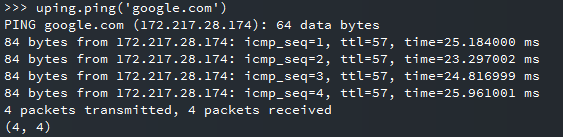
Thanks Robert ! It works ! Finally I can use the ping command to see other HW on the same network !
It is my first step with GPY board and necessary to try network
It is hard to find the way to use micropython ESP32 scripts compatible with pycom and there is lack of information , micropython sentences for pycom differs.
-
Another question , I succedeed when I ping to external pages , and to the gateway of the router I am connected but I can not get other machines , for example router IP is 192.168.1.1 , GPY IP 192.168.1.8 , my laptop is at 192.168.1.9 , when I type uping.ping ('192.168.1.9) , I got no packets reply , may be a router set up ?
Thanks again -
@fruiz1113 Probably it is a security setting of your PC to refuse ping requests.
-
@robert-hh Thanks !

Hello! It looks like you're interested in this conversation, but you don't have an account yet.
Getting fed up of having to scroll through the same posts each visit? When you register for an account, you'll always come back to exactly where you were before, and choose to be notified of new replies (either via email, or push notification). You'll also be able to save bookmarks and upvote posts to show your appreciation to other community members.
With your input, this post could be even better 💗
Register Login