Gpy wont attach to LTE but Fipy does
-
here is the connection code for reference.
import time from machine import RTC from network import LTE import pycom import machine import math import network import os import time import utime import gc from machine import RTC from machine import SD lte = LTE() rtc = RTC() pycom.heartbeat(False) # Returns a network.LTE object with an active Internet connection. def getLTE(): # If already used, the lte device will have an active connection. # If not, need to set up a new connection. if lte.isconnected(): return lte # Modem does not connect successfully without first being reset. print("Resetting LTE modem ... ", end='') lte.send_at_cmd('AT^RESET') print("OK") time.sleep(1) # While the configuration of the CGDCONT register survives resets, # the other configurations don't. So just set them all up every time. print("Configuring LTE ", end='') #lte.send_at_cmd('AT+CGDCONT=1,"IP","pse.telus.iot"') print(".", end='') #lte.send_at_cmd('AT!="RRC::addscanfreq band=28 dl-earfcn=9410"') print(".", end='') lte.send_at_cmd('AT+CFUN=1') print(" OK") # If correctly configured for carrier network, attach() should succeed. if not lte.isattached(): print("Attaching to LTE network ", end='') lte.attach(band=28,apn="pse.telus.iot") while(True): if lte.isattached(): print(" OK") break print('.', end='') time.sleep(1) # Once attached, connect() should succeed. if not lte.isconnected(): print("Connecting on LTE network ", end='') lte.connect() while(True): if lte.isconnected(): print(" OK") break print('.', end='') time.sleep(1) # Once connect() succeeds, any call requiring Internet access will # use the active LTE connection. return lte # Clean disconnection of the LTE network is required for future # successful connections without a complete power cycle between. def endLTE(): print("Disonnecting LTE ... ", end='') lte.disconnect() print("OK") time.sleep(1) print("Detaching LTE ... ", end='') lte.dettach() print("OK") lte=getLTE() pycom.rgbled(0xFF00FF) -
Hi @newmicropython , I am sorry that I cannot answer your question. But like you did, I am trying to send some mqtt data by using FiPy and LTE M1. However, I got stuck whenever typing the line "lte = LTE()" as below.
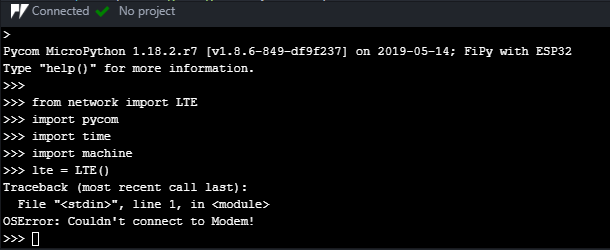
I realised that you uploaded your code successfully. Have you ever gotten any problem as mine? Please help me. Many thanks!
-
@diepducle
what expansion board are you using?
I got this error yesterday with my Fipy but i put it in our custom motherboard where it seems there was something wire to the same pins as the LTE modem so it gave me the same error. once i took it off that board and put in on a expansion board or breadboard it worked again. -
@newmicropython I am using the Pycom Expansion Board 3.0. I am a newbie in this area so I have just followed the instructions from this site: https://docs.pycom.io. I searched in our forum but still cant find the answer.
-
@diepducle
according to the docs the only thing i can see is you should remove the rts jumper from the expansion board. -
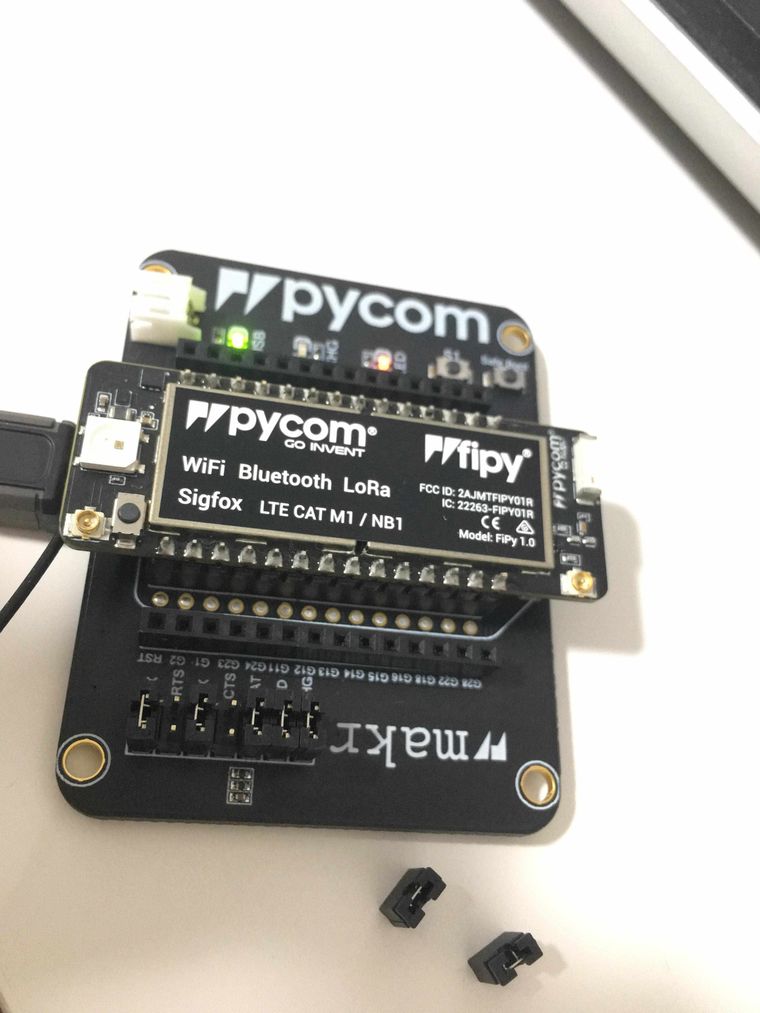
@newmicropython Hi, I took out the CTS and RTS jumper as you can see in the picture below. I am not sure it is the right way to remove these jumpers, but sadly the code still does not work :(
-
@diepducle
is your Fipy V1.0 ?
im having problems with Gpy 1.0 were it wont connect with any Gpy firmware or Modem firmware.
im just going to return my GPY and either order some more that are 1.2 or just not order any. -
@newmicropython What network are you trying to connect it? Do you know which band(s) it uses?
The 1.0 hardware versions had limited band support, see https://forum.pycom.io/topic/4869/band-support-for-gpy-and-fipy for details. If you need support for bands not supported by 1.0, you can send it to Pycom for upgrade.
Where did you buy the boards from?
-
@newmicropython As far as I can tell, removing the jumpers would only be required for FiPy. But according to your first post your trouble is with a GPy.
-
@robert-hh The issue is that @diepducle "hijacked" the thread with a separate question. The initial question is indeed about not being able to attach using the GPy 1.0 while the 1.2 FiPy works. The discussion about uploading the code, expansion board, jumpers etc. is unrelated... :-(
-
@jcaron said in Gpy wont attach to LTE but Fipy does:
@newmicropython What network are you trying to connect it? Do you know which band(s) it uses?
The 1.0 hardware versions had limited band support, see https://forum.pycom.io/topic/4869/band-support-for-gpy-and-fipy for details. If you need support for bands not supported by 1.0, you can send it to Pycom for upgrade.
Where did you buy the boards from?
Im trying to connect to Telus in Canada i have a few trial sims. I am using band 28 for all tests which from the docs is supported in all versions of gpy. I bought the gpys from Mouser so if i cant get them to connect this week i will just return them.
I was just wondering if there was something i missed in any firmware or code that my fipy connects and works great but gpy wont attach. they were both sitting on my desk using the same sim cards. i have 3 sims and tried them all in each device. the fipy connected with each sim card so i know its not the sim cards. I used the same antennas, expansion boards,code for both.
-
@newmicropython Are you sure you are using band 28? The information I find says either bands 2, 4, 12 or bands 2, 4, 7, 12, 13, 17, 29.
As different bands may be available in different locations (based on cell tower equipment, distance from tower, and obstacles between the tower and you), it's quite possible you could actually only connect using bands that are not support by the 1.0 hardware (e.g. bands 2, 7, 17, 29).
-
@jcaron
i can try another band out.
but my script below with the fipy was on band 28.if we specify the band would it connect to another band if it was not available?
-
@newmicropython From the code that is hard to tell. In the code, first the command AT!=""clearscanconfig" is issued. Then the band parameter leads to the command AT!="RRC:addscanband=xx" to be sent to the modem. If you specify a band, this command is sent for just that band. if you omit the band=xx parameter, then trhe addscanband command is sent for the bands 3, 4, 12, 13, 20,28, and for newer modem firmware for bands 5 and 8.
-
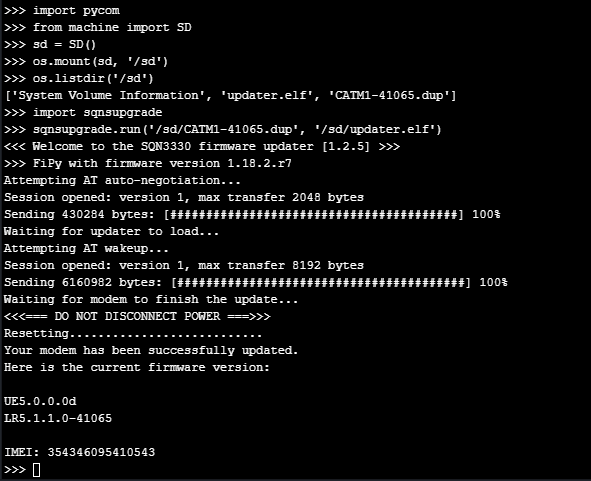
@gt1 Yes, my FiPy is V1.0.
I already solved this problem by upgrading the modem firmware. As you can see the result as follow:
-
@newmicropython Hi, thank you for your support. I've already fixed my problem by upgrading the modem firmware.
Now I am using your code to connect to LTE network but I got stuck at "attaching step", as you can see in the picture below.
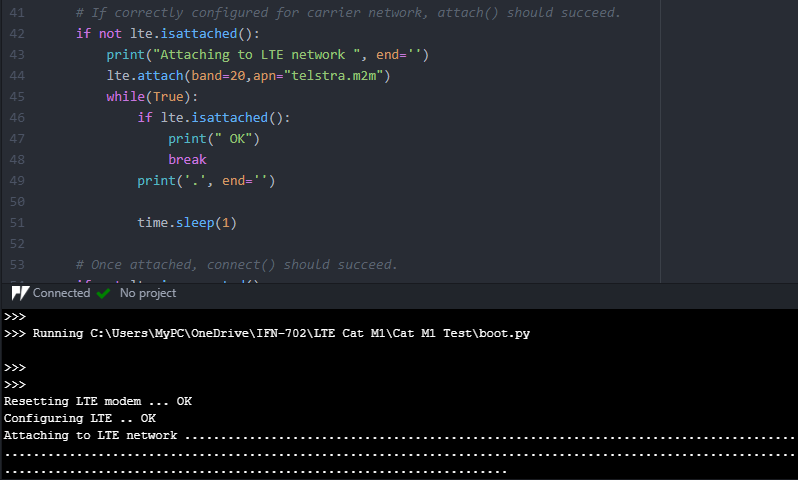
I am trying to connect to Telstra in Australia and I think the band 28 is accurate but I dont know what is "apn"? Could you please help me with this line of code: "lte.attach(band=28,apn="telstra.m2m")"?. Many thanks.
-
@diepducle It would be great if you asked your own questions in a separate thread rather than mixing your questions with OP's initial question, it makes things quite difficult to follow for everybody.
-
@jcaron I am so sorry about that. It is my first time to use the forum. I will create a new thread. Thank you for reminding me.
-
Bumping this if anyone knows how to fix I have updated to the latest firmware as well

Hello! It looks like you're interested in this conversation, but you don't have an account yet.
Getting fed up of having to scroll through the same posts each visit? When you register for an account, you'll always come back to exactly where you were before, and choose to be notified of new replies (either via email, or push notification). You'll also be able to save bookmarks and upvote posts to show your appreciation to other community members.
With your input, this post could be even better 💗
Register Login