WIPY2 Power Consumption 100 - 120ma ??
-
I am measuring the power consumption of the WIPY2 + expansion board with nothing plugged in and it is drawing between 100 to 120ma.
My usages for these would be battery powered, low power and I understand from the documentation that the power consumption can be less than 20ma with wireless enabled.
120ma is a lot and it's a show-stopper for me, there's simply no way that this could run long term as a battery powered device, or am I missing something ??
Just measured the current consumption of the wipy2 when not connected to the expansion board and it is running at approx 90ma.
PeterC
-
20mA with WiFi enabled sounds to me like an impossible target, at least for current WiFi technology. I don't know any chip that would do that!
What's possible is to get closer to 20mA with WiFi off. Then you can just turn on WiFi when needed. For battery powered applications you should also think about using sleep modes for the main CPU too. Both of these features should eventually be possible this week, according to Pycom.
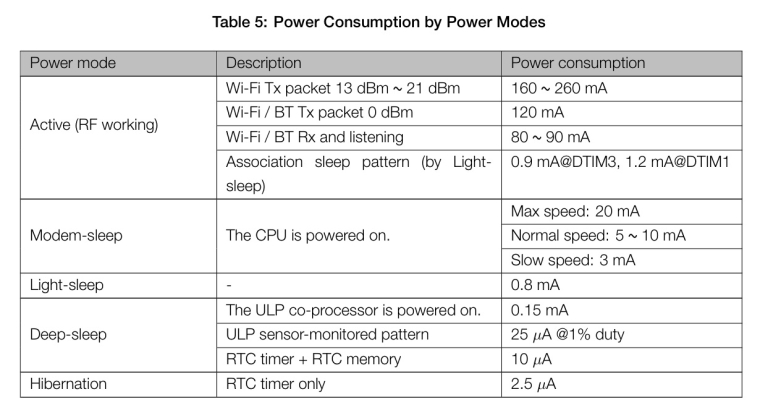
Here's a handy table showing the power modes available on the ESP32 processor. Since the WiPy has other components its consumption will be higher than this, but should in the same ballpark.
-
Thanks for clarifying that, I am sure I read somewhere that it was 14mah and that was why I purchased a few units and began testing, but I can't find that right now, maybe I dreamt it :-)
So with some rough calculations, I am trying to determine how long it will last on a 2700mah battery supply, and based on worst case of 150mah when wifi is on and 0.8mah when in light sleep, the best I can expect is about 20 days, my goal was 90 days, and I can see now that this is impossible.
The wifi will connect & send small packets once every 15 minutes
WIFI Connect & Send Data
30 seconds * 150mah = 1.25mah
every hour = 5mah
every day = 120mahWIFI ONLY Off (20mah)
20mah x 24 hours = 480mah
Max = 5 daysLight Sleep = 0.8mah
every day 0.8 x 24 = 19.2mah + 120mah (wifi send) = 139.2mah
2700 / 139.2 = Max 19.4 days -
@crankshaft
Why not Deep Sleep? only Light Sleepbut i remember the same 20 mA specification with Wifi enabled on minimal wifi power and transmission rate
-
Actually, If I read the table correctly, in light sleep you still maintain wifi association, so the amount of time to wake, transmit and sleep again might be much less.
If you go into deep sleep, then when waking, you will need to re-associate with the network and my observations, the association causes power spikes.
-
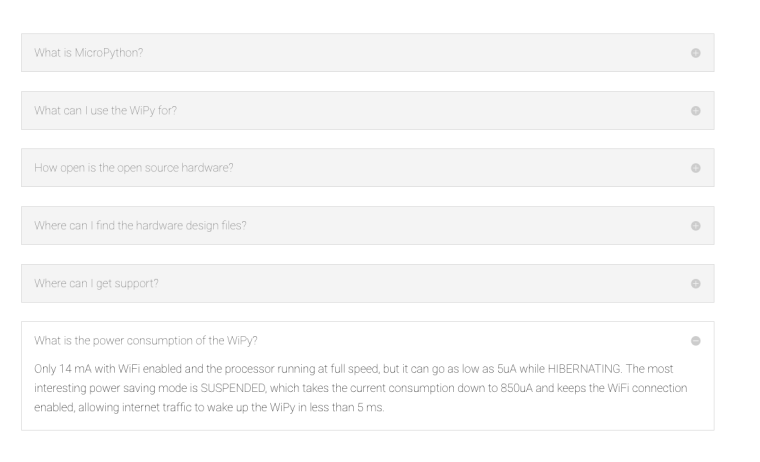
OK, I knew I had seen the power consumption stated as 14mah with wifi enabled:
What is the power consumption of the WiPy?
Only 14 mA with WiFi enabled and the processor running at full speed, but it can go as low as 5uA while HIBERNATING. The most interesting power saving mode is SUSPENDED, which takes the current consumption down to 850uA and keeps the WiFi connection enabled, allowing internet traffic to wake up the WiPy in less than 5 ms.https://www.pycom.io/support/faqs/
-
@crankshaft
Those 14mA are probably considering the average current in modem-sleep mode, so not transmitting or receiving data, just keeping the WiFi link available.In modem sleep mode the ESP32 will turn on WiFi very briefly at the beaconing interval set by the access point, enough to to remain 'connected' but not actively transmitting or receiving outside that beacon window.
The ESP32 on the WiPy is not running at full speed, so the current is probably within the "Normal speed" range. If you take this + average the above it may well be within the 14mA shown.
Sorry if I caused any confusion with my original reply, I meant that active WiFi actually transmitting or receiving on 20mA would not be possible.
I see a commit to support modem sleep on the ESP-IDF core library just 9 days ago so we may see this soon.
Hello! It looks like you're interested in this conversation, but you don't have an account yet.
Getting fed up of having to scroll through the same posts each visit? When you register for an account, you'll always come back to exactly where you were before, and choose to be notified of new replies (either via email, or push notification). You'll also be able to save bookmarks and upvote posts to show your appreciation to other community members.
With your input, this post could be even better 💗
Register Login