Fipy, not enter to main.py using pybytes and LTE
-
Hi!
I'm working with Fipy board. When in pybytes WiFi network all my code works perfectly, but when I use LTE network and upload the firmware using Pycom firmware update, the code freeze after entablish connection with pybytes.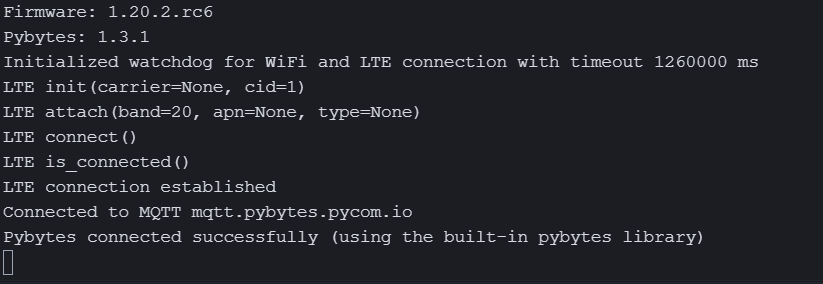
This is my output. The main.py file never executeAm I failed with some configuration? I had working on it about 2 days and I can't connect using LTE
This is my code
import pycom
import time

# Import what is necessary to create a thread
import _thread
from time import sleep


# Increment index used to scan each point from vector sensors_data
def inc(index, vector):
    if index < len(vector)-1:
        return index+1
    else:
        return 0

# Define your thread's behaviour, here it's a loop sending sensors data every 5 seconds
def send_env_data():
    idx = 0
    sensors_data = [0, -0.2, -0.5, -0.7, -0.8, -0.9, -0.9, -0.9, -0.8, -0.6, -0.4, -0.2, 0, 0.3, 0.5, 0.7, 0.8, 0.9, 0.9, 0.9, 0.8, 0.6, 0.4, 0.1]

    while (pybytes):
        # send one element from array `sensors_data` as signal 1
        print('Sending signal...')
        pybytes.send_signal(1, sensors_data[idx])
        idx = inc(idx, sensors_data)
        sleep(5)

pycom.heartbeat(False)

color = [0x7f0000, 0x007f00, 0x00007f]
counter = 0
while True:
    pycom.rgbled(color[counter])
    if counter >= 2:
        counter = 0
    counter = counter + 1
    sleep(5)

# Start your thread
_thread.start_new_thread(send_env_data, ())
Thanks in advance
-
I have a similar problem with a GPy – but for me everything works as long as the device is connected via LTE. When on WiFi the execution stops at the same line. I don't even have much code in the
main.pyfile, just setting the RGB LED to a different color.Firmware: 1.20.2.r1 Pybytes: 1.6.0 Initialized watchdog for WiFi and LTE connection with timeout 1260000 ms WiFi connection established Connected to MQTT mqtt.pybytes.pycom.io Pybytes connected successfully (using the built-in pybytes library)After that the REPL does not appear, and
main.pynever gets executed. In the Pybytes Dashboard no connection seems to be recognized (the "last connection" does not update like it does when the device is connected via LTE).Does anyone have an idea what the problem could be?
-
Can you try the following:
>>> import pycom;
>>> pycom.nvs_set('pybytes_debug', 99)
From here: https://docs.pycom.io/pybytes/api/#debugging
It seems the Pybytes is getting stuck somewhere, but I cannot tell exactly what. Let me know of the output!Gijs
-
@Gijs Thanks for answering.
The following is the debug output when connecting with Wifi – it gets stuck when trying to connect to the Pycom MQTT server:
Firmware: 1.20.2.r1
Pybytes: 1.6.0
{'wifi': {'ssid': '<SSID>', 'password': '<PASSWORD>'}, 'pybytes_autostart': True, 'username': '<EMAIL>', 'cfg_msg': 'Pybytes configuration read from /flash/pybytes_config.json', 'server': 'mqtt.pybytes.pycom.io', 'lte': {'apn': 'em', 'cid': 1, 'reset': False, 'carrier': 'standard', 'band': 20, 'type': 'IP'}, 'ssl': False, 'device_id': '<DEVICE_ID>', 'network_preferences': ['wifi', 'lte'], 'dump_ca': False, 'wlan_antenna': 0, 'ota_server': {'port': 443, 'domain': 'software.pycom.io'}}
Attempting to connect with network wifi
Initialized watchdog for WiFi and LTE connection with timeout 1260000 ms
WLAN connected? False
Wifi connection attempt: 1
WLAN connected? False
(ssid='<SSID>', bssid=b'<BSSID>', sec=3, channel=6, rssi=-50)
Connecting with <SSID> and <PASSWORD>
WiFi connection established
MQTT Protocol
Socket send error [Errno 104] ECONNRESET
In contrast is the debug output when connecting with LTE only – everything works in this case:
Firmware: 1.20.2.r1 Pybytes: 1.6.0 {'wifi': {'ssid': '<SSID>', 'password': '<PASSWORD>'}, 'cfg_msg': 'Pybytes configuration read from /flash/pybytes_config.json', 'wlan_antenna': 0, 'ota_server': {'port': 443, 'domain': 'software.pycom.io'}, 'server': 'mqtt.pybytes.pycom.io', 'ssl': False, 'lte': {'apn': 'em', 'cid': 1, 'reset': False, 'carrier': 'standard', 'band': 20, 'type': 'IP'}, 'device_id': '<DEVICE_ID>', 'network_preferences': ['lte'], 'pybytes_autostart': True, 'dump_ca': False, 'username': '<EMAIL>'} Attempting to connect with network lte Initialized watchdog for WiFi and LTE connection with timeout 1260000 ms LTE init(carrier=None, cid=1) LTE attach(band=20, apn=em, type=IP) LTE connect() LTE is_connected() LTE connection established connect_lte with start_mqtt is now removed please call communication_protocol or start_mqtt directly MQTT Protocol Packet sent. (Length: 114) This is PybytesProtocol.start_MQTT Packet sent. (Length: 44) Connected to MQTT mqtt.pybytes.pycom.io Pybytes connected successfully (using the built-in pybytes library) This is pack_info_message() __pack_message: b'<MESSAGE>' MQTT Protocol Packet sent. (Length: 50) Pybytes configuration read from /flash/pybytes_config.json Pycom MicroPython 1.20.2.r1 [v1.11-a5aa0b8] on 2020-09-09; GPy with ESP32 Pybytes Version: 1.6.0 -
Hi,
This is a really odd issue and I cannot reproduce it like this. Do you get this everytime you use pybytes? Can you try manually connecting a socket tomqtt.pytybes.pycom.io? Is your WiFi stable and connected to the internet? the ECONNRESET error is thrown when the server closes the connection abruptly.. -
@Gijs I found the issue! The GPy was connected to my guest wifi which apparently has a firewall that blocks all non-websurfing and -email traffic (probably by only allowing ports 80 and 443). Connecting it to my main wifi or disabling this firewall let the GPy start up.
It would be nice if Pybytes still continues booting up even if it can not connect to the MQTT server.
Hello! It looks like you're interested in this conversation, but you don't have an account yet.
Getting fed up of having to scroll through the same posts each visit? When you register for an account, you'll always come back to exactly where you were before, and choose to be notified of new replies (either via email, or push notification). You'll also be able to save bookmarks and upvote posts to show your appreciation to other community members.
With your input, this post could be even better 💗
Register Login