5v UART Communication
-
Hi all !
I use a pycom and want to read (also write but this one work) UART message
I configure UART to 1200 baudrates and I'm able to write to my component.
My problem is :
- My component send UART message with 0V -> 0 and 5V-> 1
I'm not able to read this information, do you have a solution for me ?Thank you,
Bastien Taillandier
-
@btaillandier That looks like a different problem. The ESP32 should reliably see a 0 if the low level is below 1V, and a 1 if the high level is above 2V. So check the low level of your component.
If your component sends with 5V/0V levels, you can easily drop that to 3.3V/0V with a two resistor voltage divider, like 12k/22k. Even a 10k resistor between output device - input pycom should do, even if that us not the best choice.Direct coupling without any kind of current limitation is NOT recommended. It may damage the input. The information whether the ESP32 is 5v tolerant is inconclusive. Officially it's not, but some posts from Espressif tell that it is.
-
I tried the voltage divider with 10k and 20k to have 3.3V, that didn't solve my problem.
Here my code :
import time
import pycom
from machine import Pin, rng
from machine import UART


BAUDRATE = 1200
# this uses the UART_1 default pins for TXD and RXD (``P3`` and ``P4``)
uart = UART(1, baudrate=BAUDRATE, pins=('P3','P4'))

pycom.heartbeat(False) # disable the blue blinking

while True:
    data = uart.readline()
    print(data)
    if data == b'1' :
        pycom.rgbled(0x00ff00) # make the LED light up green in colour
        print("Recu")
    else :
        pycom.rgbled(0xff0000)
        print("Pas recu")
    time.sleep(0.1)
I think this code is good because I'm able to talk to my component.
Here what my component send to my pycom :
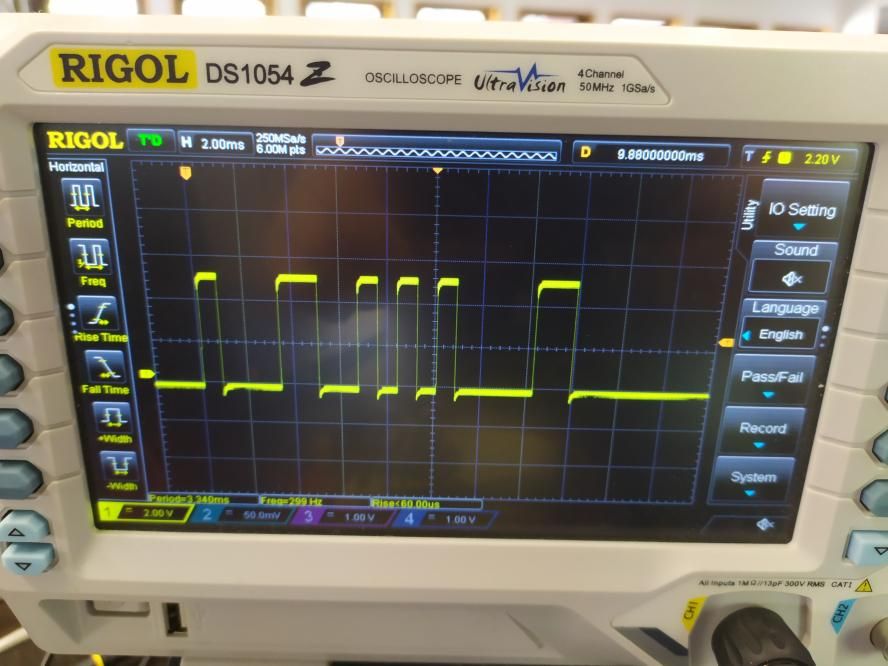
Do you see something wrong ?
-
@btaillandier It looks as if the component sends in inverted mode. That's bad because Pycom does not support inverted mode. I made a PR for that once, but it was not accepted. You have to put an inverter between the component and the Pycom device. A simple inverter with a 2N7000 transistor and a 10k pull-up resistor should be sufficient:
Gate-> component, Source to GND, Drain to Pycom input, resistor between Pycom input and 3.3V. You can also use an NPN transistor, but then you need another resistor between the component and the tansistor base.
P.S.: The PR for inverted mode is here: https://github.com/pycom/pycom-micropython-sigfox/pull/362. The only changed file is mods/machuart.c. If you are able to build your own firmware, then you can use that option.
-
@robert-hh Really thank you for your answer
I compare the emission signal with the reception signal (It should normally be the same)
and here the emission signal :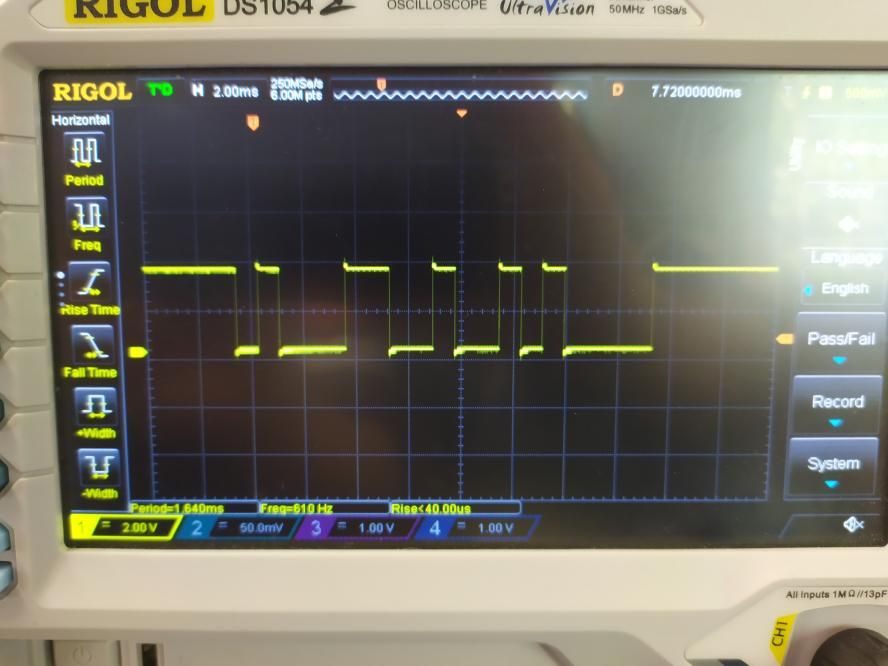
We can see that is the same signal, not inversed, but the stop bit is 0 and not 1 and when there is no message, the signal stay at 1 instead of 0.
I think I can't solve my problem with pycom but maybe with my component.
-
@btaillandier If the silent level is 1, then it is the 'normal' TTL mode. If the silent level is 0, then it is the inverted TTL mode. If the incoming signal is silent at 0V, then the UART needs to run in the inverted mode. It may be that he component send in RS232 mode, where the silent level is -5-12V. In that case the input protection diode of the ESP32 will cut that ot about -0.5 V. So maybe you can change the output mode.
-
@robert-hh
I will try to invert the signal then and to contact the constructor of my component
Thank you for your help and have a good day -
@btaillandier For testing, I can prepare a firmware tarball for you, which includes the UART inverted mode. I need to know the type of pycom module, and whether you use Pybytes or not. This tarball can be installed using the pycom updater.
-
@robert-hh Yes thank you it could be very nice to test this.
It's a Lopy4 and I don't use Pybytes. -
@btaillandier The tarball is at https://github.com/robert-hh/Shared-Stuff.git. It's name is: LoPy4-1.20.2.rc11_invert.tar.gz
You call the inversion with e.g.from machine import UART
uart=UART(1, 1200, invert=UART.INV_RX)there is also UART.INV_TX, UART.INV_CTS and UART.INV_RTS, to be or'ed if required.

Hello! It looks like you're interested in this conversation, but you don't have an account yet.
Getting fed up of having to scroll through the same posts each visit? When you register for an account, you'll always come back to exactly where you were before, and choose to be notified of new replies (either via email, or push notification). You'll also be able to save bookmarks and upvote posts to show your appreciation to other community members.
With your input, this post could be even better 💗
Register Login