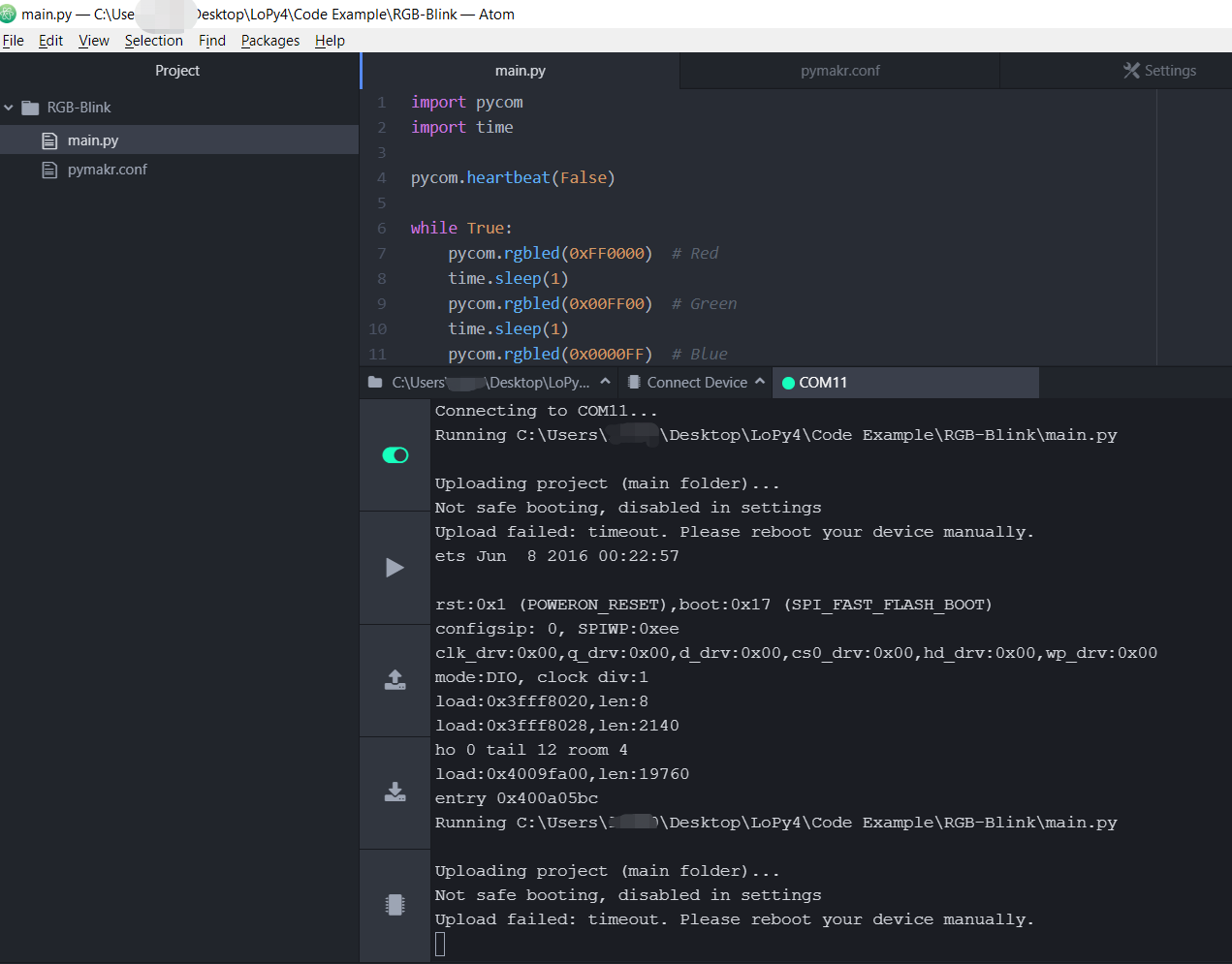
Upload failed: timeout. Please reboot your device manually.
-
I am using a lopy4 on a Pysense v1.1. When I try to upload the RGB blink tutorial code to the board, I got this error. The firmware on both the LoPy4 and Pysense is updated, and it seems that the device is connected to the PC correctly. And the address in pymakr.conf is changed to the correct port (COM11)
-
Press CTRL+C 2 times
Get console
and Update -
Took about 3 hours to figure out, but I found this solution online here: https://docs-mk2.readthedocs.io/en/latest/gettingstarted/programming/safeboot/#safe-boot-1
"
-
We have the same page here: https://docs.pycom.io/gettingstarted/programming/safeboot/
If you can perhaps recommend a better location, let me know!
Hello! It looks like you're interested in this conversation, but you don't have an account yet.
Getting fed up of having to scroll through the same posts each visit? When you register for an account, you'll always come back to exactly where you were before, and choose to be notified of new replies (either via email, or push notification). You'll also be able to save bookmarks and upvote posts to show your appreciation to other community members.
With your input, this post could be even better 💗
Register Login