New GPY - LED Faulty
-
@Gijs Thanks for your response. Today I will go back to testing the OS and modem firmware you recommend and try to provide more detail of the problem.
We have previously tried hardwiring a PC +5V power supply to our design to try to eliminate possible power supply issues. The system would still crash in this test case. We have also tried to accelerate the problem by rapidly powering on/off a drill motor near the unit with the hope of causing the problem. This was also unsuccessful.
The coredumps are different from crash to crash.
We do use the _thread module.
#####################################################################
#                          Initialize Tasks
#####################################################################
def init_tasks():
    n = 8192    # 4096 is marginal
    _thread.stack_size(n)
    log("initializing tasks with stack size: {}".format(n))

    _thread.start_new_thread(com.com_task, ())
    _thread.start_new_thread(cycle.cycle_task, ())
We do not use pybytes.
Our current version does not use the LTE() module.
I will look at creating a skeleton program that experiences the same type of crashes that I could publish.
-
@tlanier After reflowing the solder joints on the LED, the LED now works properly.
-
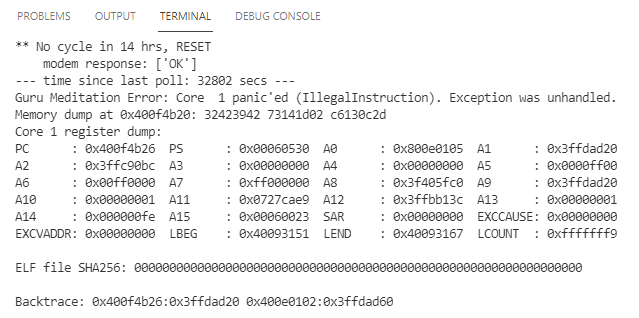
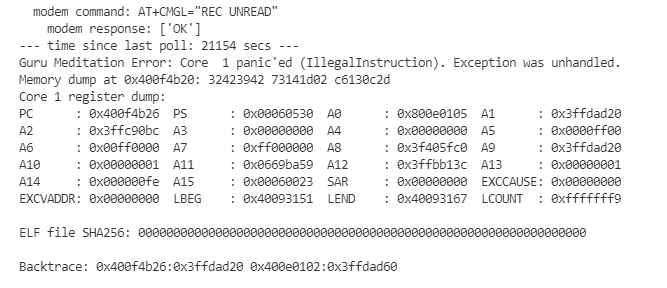
@Gijs I have switched to the latest OS (1.20.2.r4) and modem firmware (48829) as suggested. I have run the application on our board for about 4 days, and I have now been able to capture 2 crashes at the same "Backtrace" address that occurred days apart.
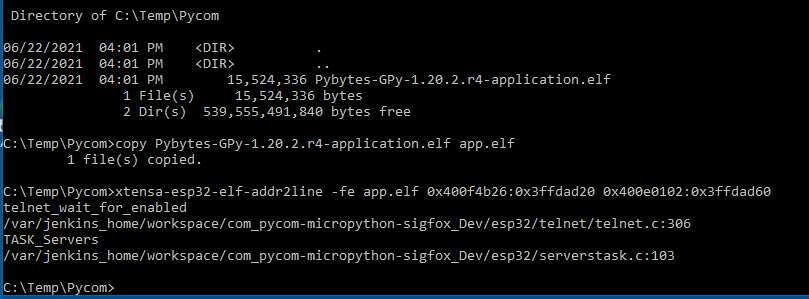
I've run the xtensa-esp32-elf-addr2line program and identified the location where the crash occurs (see below).
telnet_wait_for_enabled()
Is there anyone familiar with why the program would be executing code in a telnet module? I do not run or need a telnet program running in my app. Can it be disabled?
Any help would be appreciated.
-
Hi,
Thanks for putting in the work and decoding the issue!
I must say I've never seen issues with the Telnet module before.. Though it is possible to disable it using the server module:
https://docs.pycom.io/firmwareapi/pycom/network/server/though it seems odd. I did a short inspection of the code at the point of the crash, and it's waiting for Telnet to be enabled..
In any case, let me know if that improves your stability!
-
@Gijs Thanks for the info on how to disable Telnet and FTP. I will begin testing immediately with both servers disabled.
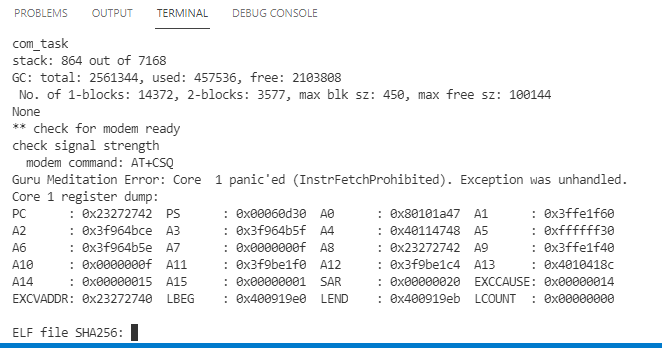
Last night I had a third crash which was not like the previous two. Unfortunately in this case the device locked up and did not finish displaying the core dump and backtrace address.
I also have running a second test device on a Pymakr board with a stripped down version of my program (i2c routines and some other stuff removed). So far that test has run for two days without crashing. Maybe this could lead to a sample reference program that others could study. One thing I'm looking for is a public test web site I can do simple gets/posts to in the demo program.
-
@Gijs Here's a couple of things that have come up while reading the docs.

Shouldn't the function signature be:
pycom.pybytes_on_boot([boolean])
This function call does not exist in OS version 1.20.2.r4.
-
@Gijs We have now had a third crash at the same Backtrace address even with the server disabled. The init_pycom() function is called at the beginning of our program.
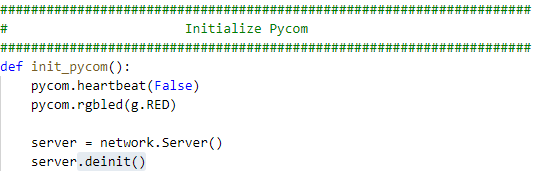
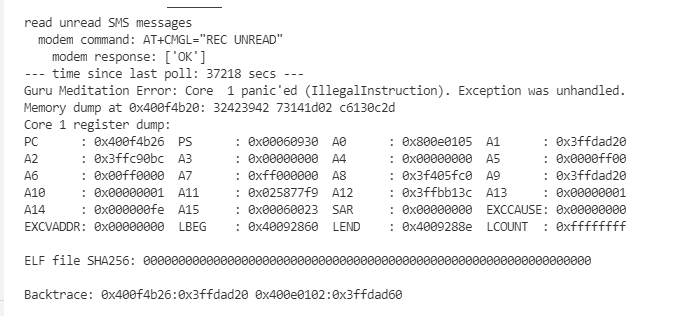
The crash below happened less than a day after adding the server.deinit() call to the program. Apparently the telnet_wait_for_enabled() gets called even when the server is disabled. Any ideas of what we can try next?
-
@tlanier said in New GPY - LED Faulty:
@Gijs Here's a couple of things that have come up while reading the docs.
Shouldn't the function signature be:
pycom.pybytes_on_boot([boolean])This function call does not exist in OS version 1.20.2.r4.
Thanks, I'll have that corrected. The correct function call should be
pycom.lte_modem_en_on_boot([boolean])Im looking to reproduce the error you're seeing but I'm not quite sure what is actually happening. We get an error here as you've shown before:
    // Check if the telnet service has been enabled
    if (telnet_data.enabled) { <<---
        telnet_data.state = E_TELNET_STE_START;
    }
Which almost makes it seem like there's a bad value for
telnet_data.enabled, though we get 'Illegal Instruction'. Could you perhaps attach a minimum reproduction (you can send me a PM if you dont wish to share it publically). Though Im wondering, does it happen on all your devices or just a specific one?Let me know
Gijs
-
@Gijs The program crashed again last night at the same backtrace address even with the server disabled.
I assume that at boot the OS is copied from flash to ram to run. The fact that perfectly valid C code is suppose to be located at that location in memory and that an illegal instruction panic is generated implies that something is overwriting the code at that memory address and altering the code.
I'm not familiar with what tools are available to debug low level on the ESP32. Is there a method to monitor a memory address and trap the code that alters the memory location?
Should I move on to the current beta release and try to troubleshoot my program running on it? Would I have a better chance of getting help in resolving the issue? Obviously the developers are working on the new stuff, not the old stuff.
My second test running on a Pymakr board with code removed that would not run on the Pymakr board (no i2c routines talking to our specific hardware) ran for 4 days before it crashed with no backtrace display. Does that mean that the i2c routines accelerate the problem maybe?
I'm open to any ideas of how to troubleshoot the problem.
Is the problem likely within MicroPython? If so should I look at a newer release or should I look at rewriting our code without MicroPython and just using the Espressif SDK?
Should I look at rewriting our code using unmodified ESP32 MicroPython without the changes made by Pycom? Has anyone else tried that? Is ESP32 MicroPython widely used outside of Pycom? The Adafruit CircuitPython doesn't even support threading. The ESP32 MicroPython V1.15 documentation concerning _thread states:
This module implements multithreading support. This module is highly experimental and its API is not yet fully settled and not yet described in this documentation.Is threading the problem? Should I rewrite our program and try to eliminate the use of threads?
Is there something I might be doing in a timer interrupt that could cause the problem? Currently I do i2c code in the timer interrupt. I have now demonstrated crashes on a Pymakr board without i2c code (not the same backtrace address). There could be multiple problems, not just one. I will try just setting a flag in the timer interrupt and doing the i2c code on one of the main threads as a test.
Is the problem likely within the Expressif SDK? If so, should I look at a newer release of the SDK?
Does anyone have any GPy code running for extended periods without crashing?
Is ESP32 MicroPython a viable tool for embedded applications that should not crash? If not, is that the reason why Pycom's new product uses a STM32H7BQIY6QTR chip and not an ESP32 chip? Has Pycom given up on making the ESP32 product reliable and moved their development resources to a different design?
https://pycom.io/product/f01-h7-oem-module/
Does anyone have ideas on what a MicroPython program can do that would cause an illegal instruction panic? Are there known coding errors that might cause the problem? I'm displaying micropython.mem_info() to look for abnormal memory usage, but I see no clues from that.
Do we need to develop a external hardware watchdog circuit that toggles power on/off if not triggered within a specified time?
What path has the highest probability of success?
Program crashes in embedded systems are unacceptable.
-
You have a lot of questions :), I'll try to get to them all:
I'm not familiar with what tools are available to debug low level on the ESP32. Is there a method to monitor a memory address and trap the code that alters the memory location?
You could try to run the
espcoredump.py. You can feed it the code in between '====core dump start===' and '=== core dump end===', as.corefileand it gives more information about the threads currently running and other miscellaneous information. Use the following command in a terminal:$IDF_PATH/components/espcoredump/espcoredump.py info_corefile -t b64 -c ./corefile ./application.elfShould I move on to the current beta release and try to troubleshoot my program running on it? Would I have a better chance of getting help in resolving the issue? Obviously the developers are working on the new stuff, not the old stuff.
You could indeed check if the issue persists in 1.20.3.b3.
My second test running on a Pymakr board with code removed that would not run on the Pymakr board (no i2c routines talking to our specific hardware) ran for 4 days before it crashed with no backtrace display. Does that mean that the i2c routines accelerate the problem maybe?
I cannot imagine the i2c routine affecting this issue, though who knows...
Is the problem likely within MicroPython? If so should I look at a newer release or should I look at rewriting our code without MicroPython and just using the Espressif SDK?
Im not exactly sure when / where the telnet library was introduced and why its causing issues here. though rewriting the code to the ESP-IDF takes the amount of work to a totally different level.
Should I look at rewriting our code using unmodified ESP32 MicroPython without the changes made by Pycom? Has anyone else tried that? Is ESP32 MicroPython widely used outside of Pycom?
Im not sure what parts you need in the code. Perhaps we can look at custom-compiling a firmware without any trace of the telnet module. I think the only thing you'd need to do is take out https://github.com/pycom/pycom-micropython-sigfox/blob/Dev/esp32/mptask.c#L407, but there might be more complications.
I think Micropython is on a level similar of usage to arduino-esp32, though I might be mistaken.
Is threading the problem? Should I rewrite our program and try to eliminate the use of threads?
Perhaps the issue is here, perhaps it isn't. I've seen
_threaddo some odd things, but interfere in such a way with other threads I have not yet. They should be defined on the same level as TASK_Servers (which runs the telnet command eventually), next to each other.Do we need to develop a external hardware watchdog circuit that toggles power on/off if not triggered within a specified time?
If all is well, the device should recover from the coredump, similar to a power reset.
Program crashes in embedded systems are unacceptable.
I'd like to rephrase this to 'Program crashes in embedded systems are unavoidable, take the necessary precautions'. I agree issues like this should not occur (at least not this often), but crashes / issues / glitches are bound to happen, and the way they are handled defines whether they are acceptable.
Perhaps, but Im not sure if you've already tried this or if it will help, using the CLI firmware updater tool, you can do an
erase all(https://docs.pycom.io/advance/cli/). Or in the GUI firmware updater tool, use clear NVS and CONFIG partitions, as well as erase flash. In other cases, I wouldn't rule out power glitches, but as you get the same backtrace every time, I want to take this out of the mix.Still, Im interested in reproducing the issue, or hearing anyone else who has the same issue. I've had devices running for days on end without issues, so Im also curious to what could be causing this to happen repeatedly.
Sorry I did not get to all of your questions, but let me know! -
@Gijs Thanks for the response.
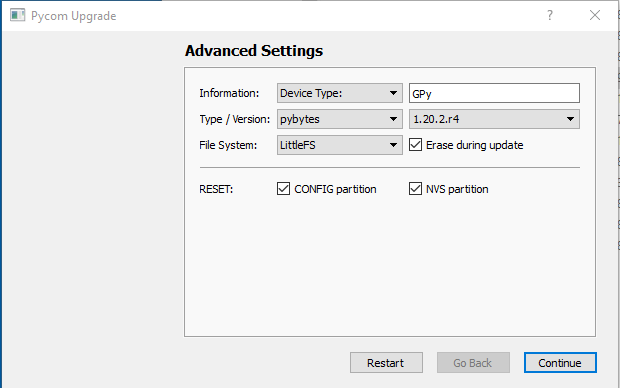
When I program the firmware I've always used the GUI Pycom Firmware Update program under Windows.
I always check all 3 boxes.
(1) Erase during update, (2) RESET: config partition, and (3) RESET: NVS partition
Is this equivalent to the "erase all" that you suggest in the CLI firmware updater tool?
-
It's not exactly equal. Im not sure of the exact differences, but I believe one writes 0xff and the other writes 0x00 to the partitions, and some other minor differences. Im also not sure if it will have the desired effect (ie, stop the coredumps) but let me know of your results!
-
@Gijs Using the erase all option in the CLI firmware update tool changed the crash location. I have not tried to repeat this and I even hesitated to post it since I have not thoroughly investigated this behavior. This test also turned up a issue with our program not initializing the mode for checking for registration. I added the modem command "AT+CEREG=0" which disables unsolicited modem responses. Why clearing memory with a different tool affected the mode the modem was in is a mystery.
Instead I moved on to trying some different things. First I tried running generic ESP32 MicroPython on the GPy. It does work but I got stuck trying to talk to the modem. The following code to initialize the uart apparently is not correct. I think the pin assignments are correct, but I could not get any response to a simple "AT" command to the modem.
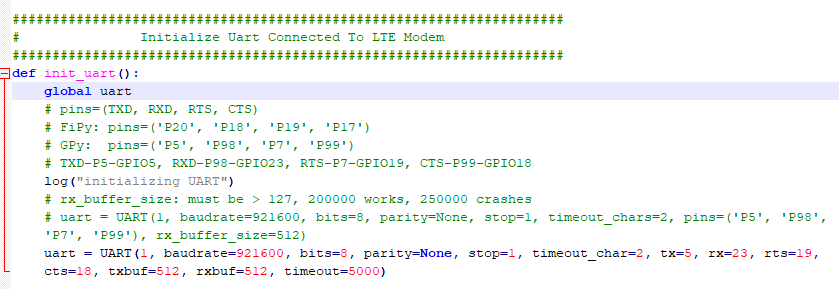
I know I jumping around, but I'm looking for something that I can make work. My next attempt is to use Pycom's OS but strip out all use of threading and timer interrupts. I hope to have this version mostly complete today. This method may turn out to be a good alternative if it works.
-
@tlanier said in New GPY - LED Faulty:
This test also turned up a issue with our program not initializing the mode for checking for registration. I added the modem command "AT+CEREG=0" which disables unsolicited modem responses. Why clearing memory with a different tool affected the mode the modem was in is a mystery.
In version 1.20.2.r2 and later, we switched the CEREG state from 2 to 1 in order to work with the unsolicited modem responses. Though that should be happening in the firmware side, not through erasing the flash..
Concerning the backtrace you decoded, that shows nothing to do with the LTE modem, but it looks like a memory error. Let me share a function that checks all memory stacks, perhaps the issue is there..
def memory():
    machine.info()
    print("GC free=", gc.mem_free(), "alloc=", gc.mem_alloc(), "total=", gc.mem_alloc() + gc.mem_free())
    # micropython.mem_info()
    print("mp stack", micropython.stack_use())
    print("heap internal", pycom.get_free_heap()[0])
    print("heap external", pycom.get_free_heap()[1])
You will need to add the appropriate imports
There are other forum users that have attempted to manually create a LTE library, let me link you to their attempt:
https://forum.pycom.io/topic/6202/method-to-take-control-of-cell-modemAlso, let me know if this coredump persists, or if it is just one-off.
-
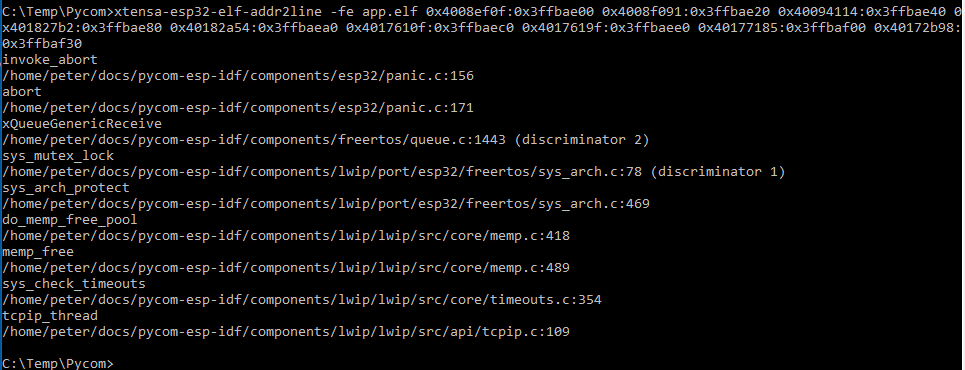
@Gijs Sorry for the long delay in responding. I have rewritten our software to eliminate the use of threads and timer interrupts. My hope was this might eliminate the crashes. Instead the crashes still occur in different places and more frequently the processor locks up without printing the backtrace. Last night I was able to get a crash with backtrace.
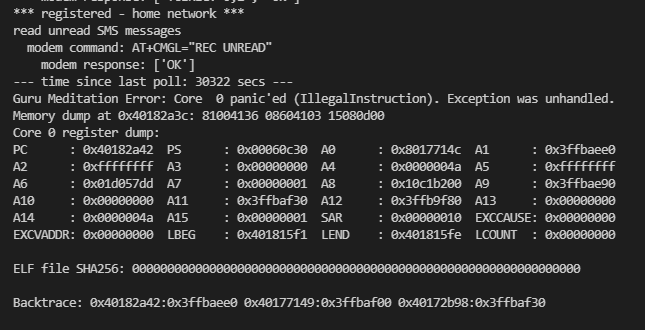

The interesting thing here is even though I do not import or use the LTE module, the program is crashing inside a LWIP (Lightweight TCP/IP Stack) routine. Apparently the TCP/IP software is being loaded and called even though I am not using it in any way.
One idea is now to learn how to rebuild the Pycom OS without including the LWIP stuff. I'm not sure how big a task that would be at this time.
I've also investigated a new product that might have some promise. With some effort I was able to get their product loaded on the GPy. They currently do not have support for the Sequans modem in the GPy. The Toit language is definitely harder to read than Python from my point of view and the UART driver documentation is lacking (although it does support CTS and RTS).
Toit | Cloud-managed containers on the ESP32
My decision point now seems to be:
-
Try to rebuild the Pycom OS without features that I don't need to try to eliminate the crashes. Since I don't require the TCP/IP stack (we use the Sequans modem TCP/IP stack), threading, or timer interrupts, this should make the code simpler. It is a real shame that there is no hardware reset pin to the modem from the ESP32. I hope this is fixed in some future design of the GPy.
-
Rewrite my app using the Espressif SDK in C/C++. One hurdle I have doing this is that the hardware design already uses the pins that the JTAG debugger requires. It looks like I would have to live with debugging using print statements. I would encourage Pycom to clearly show hardware designers what pins should not be used if they hope to do JTAG debugging with their design.
-
Pursue learning Toit and try to write a driver for the Gpy's Sequans modem.
-
Further pursue using generic MicroPython. The initial roadblock I ran into was getting the UART talking to the modem.
-
Pursue designing an external watchdog timer circuit that would power the GPy down/up after crashes. One challenge to this approach would be to make it field installable. Maybe the watchdog device plugs into the GPy socket and the GPy plugs into the watchdog device. A GPIO pin would be connected internally to allow triggering the device. To be generally useful to current designs, there would need to be some way to jumper/select which currently unused GPIO pin would be used for the trigger.
If anyone out there can think of any better ideas, I'm open to suggestions. Which path is my best chance of success?
-
Hello! It looks like you're interested in this conversation, but you don't have an account yet.
Getting fed up of having to scroll through the same posts each visit? When you register for an account, you'll always come back to exactly where you were before, and choose to be notified of new replies (either via email, or push notification). You'll also be able to save bookmarks and upvote posts to show your appreciation to other community members.
With your input, this post could be even better 💗
Register Login