simple mqtt and wss
-
@jcaron I tried that one also, without luck.
client = MQTTClient("GT01", "something.com", user=b"user", password=b"pass",
    ssl=True,  ssl_params = {'cert_reqs':ussl.CERT_NONE})
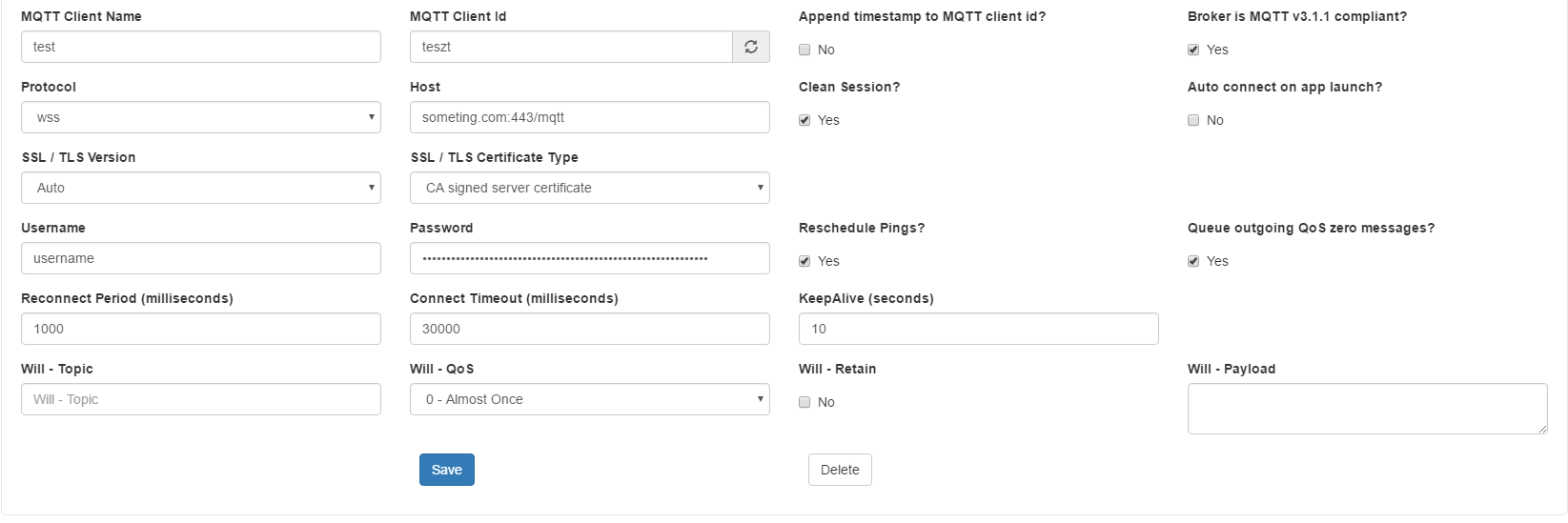
With this settings I am able to connect the mqtt server with mqttbox:
-
@tttadam that config is using websockets, which I don’t think simple mqtt supports. Websockets are useful for web clients as this is the only kind of socket they can open, but MQTT by default works over raw TCP or TLS over TCP, without the additional websockets layer.
What’s your emqx configuration?
-
This issue is come up again.
Yes I know simple mqtt does not support wss, but then is there any other avaible library which does or some workaround?
I search every corner of the internet, but didn't find any. -
@tttadam Did you try this? https://gist.github.com/ccooper21/cf956344c0a1428a0c1a9aa71edd4205
-
I did not, but this topic came back again! :)
So this time I will have a secure mqtt. -
This post is deleted! -
@tttadam Did you get a resolution to this? I have wasted many hours trying to get MQTT working. To me this should be the "Hello World" for this set of products. If there are any resources showing how to get it working for FiPy that can be shared I would greatly appreciate. In my case I am trying to get it to talk to Mosquitto - which (looks like it doesn't support sockets).
-
@Antman
Well, this is the code I use:ssl_params= {} if self._isMQTTS: import ussl if iftools.os_path_isfile("/flash/cert/ca.pem"): ssl_params= { 'server_hostname':self._MQTThost, 'cert_reqs':ussl.CERT_REQUIRED, 'ca_certs':'/flash/cert/ca.pem'} else: ssl_params= { 'server_hostname':self._MQTThost} mqttc = MQTTClient(self._devid.encode('utf-8'), self._MQTThost, user=self._MQTTuser.encode('utf-8'), password=self._MQTTapikey.encode('utf-8'), ssl=self._isMQTTS, port=self._MQTTport, keepalive=self._keepalive_secs, ssl_params = ssl_params) mqttc.set_callback(self.mqtt_sub_cb) # we want a persistant session so that the mqtt server stored messages when we are not connected mqttc.connect(clean_session=False)MQTTClient is from the umqtt.py source that is in the micropython core.
Works ok, although you have to call its 'check_msg()' method regularly to poll for received messages.
I haven't tested it in practice with a server CA certif... -
This post is deleted! -
Hope you managed to solve your problem, OP. You can use TLS encryption to secure the connection on your MQTT broker.
I recommend getting more info from here on how to secure your data. This guide was written by the team behind the MQTT broker Mosquitto and is, therefore, reliable and up to date. You can follow their step-by-step guide to configure a professional, secure and performant MQTT broker.
I also have several devices in a network and use this encryption system to make sure no one hacks them. Securing data transfer between clients of a network is mandatory.
Hello! It looks like you're interested in this conversation, but you don't have an account yet.
Getting fed up of having to scroll through the same posts each visit? When you register for an account, you'll always come back to exactly where you were before, and choose to be notified of new replies (either via email, or push notification). You'll also be able to save bookmarks and upvote posts to show your appreciation to other community members.
With your input, this post could be even better 💗
Register Login