[SOLVED] WiPy firmware to a standard WROOM-32?
-
A comment in the IRC chat is I should try flashing in DIO mode. Since the flasher tool does not include the binary firmware is there somewhere I can just download it?
-
@BetterAuto You can fimnd them here.
https://software.pycom.io/downloads/WiPy-1.6.13.b1.tar.gz
For the other versions, just change the version number in the link.
See also https://forum.pycom.io/topic/517/downgrading-firmware-advanced-users -
Thank you!
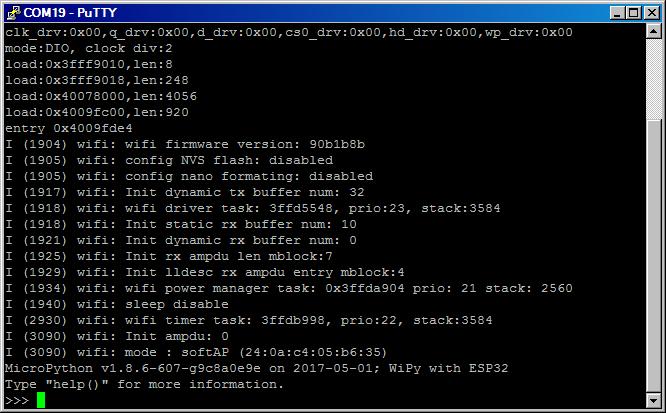
Found that I can do it with the standard firmware updater. I edited C:\Program Files (x86)\Pycom\Pycom Firmware Update\Upgrader\bin\updater.py, changed qio to dio.
-
Several pins are unusable on the ESP-WROOM-32. GPIO16, 7, 32, 33, 25, 26, 27, and 13.
Anyone know of a way to remap the pins? Probably have to recompile the firmware is my guess.
-
@BetterAuto
Change pins.csv https://github.com/pycom/pycom-micropython-sigfox/blob/master/esp32/boards/WIPY/pins.csv perhaps? -
-
Hi;
This thread is marked as solved, but there does not appear to be a solution ?
I have flashed the firmware to an esp32-wroom, however I get the RTCWDT_RTC_RESET reboot.
I have seen this before with the micropython port and the cause was related to the flash size, type and speed which is now included in the application (wipy) binary file.
If there is a solution, would someone mind sharing it as the esp-32 port looks like it is constrained by lack of resources and is moving extremely slowly.
Many Thanks
-
@crankshaft I'm the one who marked my own thread solved because except for the pinouts still needing to be modified, I can boot successfully on an ESP-WROOM-32 from Espressif. Both the individual module and on the Espressif breakout board. I had to modify the flasher program as stated above but that's what I needed to do. I didn't get the error you're getting, so I marked it as solved.
Sorry that I don't know the answer to your question, but perhaps someone else does. Perhaps try exactly the same modules I tried?
https://smile.amazon.com/gp/product/B01MU8LL47/ref=oh_aui_detailpage_o07_s00?ie=UTF8&psc=1
https://smile.amazon.com/gp/product/B01N0SB08Q/ref=oh_aui_detailpage_o05_s00?ie=UTF8&psc=1
-
@BetterAuto - thanks, can you elaborate on what you mean by modify the flasher ?
Is it possible you canalso let me know what you modified in the pins to save me re-inventing the wheel !
-
@BetterAuto - Thanks for the help, as this post has so many threads, I thought I would create a new one which shows the steps I took.
-
@BetterAuto Once you have the environment set up to build the firmware yourself, you can simply flash the firmware to any esp32 module with "make TARGET=WIPY flash". I tried that with the Wemos Lolin, which has an WROOM32-module, and and Sparkfun esp32 thing. Since these board have the logic implemented to switch GPIO0, you do not even have to care for strapping it to GND manually. The Huzzah esp32 should work the same way.
-
While Im waiting for Wipy 2.o modules.
Have tried to flash Wipy 2.0 firmware on new board from Wemos Lolin 32 Lite without success.
Has anyone else tried new Lolin 32 lite boards?
-
@easyrider I tried it and it fails. @damien's explanation: The Lolin32 Lite uses esp32 revision 1. The Pycom software decides by revision, whether the device has external SPI RAM, and this tries to use SPI-RAM on the LOLIN32 Lite. The ESP32 firmware of micropython.org (http://micropython.org/download/) or loboris' branch of it (https://github.com/loboris/MicroPython_ESP32_psRAM_LoBo/tree/master/MicroPython_BUILD/firmware/esp32) work both.
-
Thanks Robert.
Have uploaded 1.9.2 version using command line and esptool, individually bootloader then partitioner and then wipy firmware. With limited testing board boots ok and runs simple scripts.
Not sure if esp32 revision check is done by uploader.py for all firmware verions or only new 1.10 that supports external 4MB Ram and 8MB flash?
-
@easyrider The older revisions of the pycom firmware before 1.10.0 run fine on the Lolin 32 lite.
-
@easyrider The revision check is done at many places in the code. I managed to create a version of the 1.10.1b1 firmware for the LOLIN32 lite with a rough hack. I changed the function esp_get_revision() in system_api.c of the esp_idf to always return 0, so the code believes it runs on a revision 0 chip. That is not a clean way and maybe has other side effects.
-
Hello!
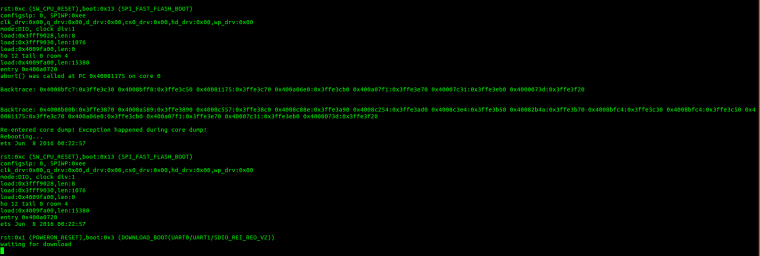
I'm tryng to run the newest wipy fw (1.10.2.b1) on the WROOM32.
All i have is reboot.
The board work fine with 1.9.2 fw
Any ideas?
-
@paco88 I might be that that the device you are trying uses a revision 1 chip. You can tell by using esptool.py. If the xxPy firmware detects a revision 1 chip, it also assumes 4 Mbyte external RAM and 8 MByt eexternal flash. If that is not present, it will not work.
Please do not blame Pycom for that. They focus on making software for their own devices, which is hard enough. -
@robert-hh said in [SOLVED] WiPy firmware to a standard WROOM-32?:
fi
Only curiosity, i'm not blaming pycom.
I'm using both wipy2.0 and WROOM32 -

Hello! It looks like you're interested in this conversation, but you don't have an account yet.
Getting fed up of having to scroll through the same posts each visit? When you register for an account, you'll always come back to exactly where you were before, and choose to be notified of new replies (either via email, or push notification). You'll also be able to save bookmarks and upvote posts to show your appreciation to other community members.
With your input, this post could be even better 💗
Register Login