RJ45, in combination with a LoPy
-
I have used these Ethernet to UART converters.
They can be preconfigured so that no AT commands are necessary and they appear as a standard UART to the WiPy code.TX and RX are the only connections needed between the module and WiPy.
You could connect the reset line as well, if you would like to be able to reset the module from within the WiPy code.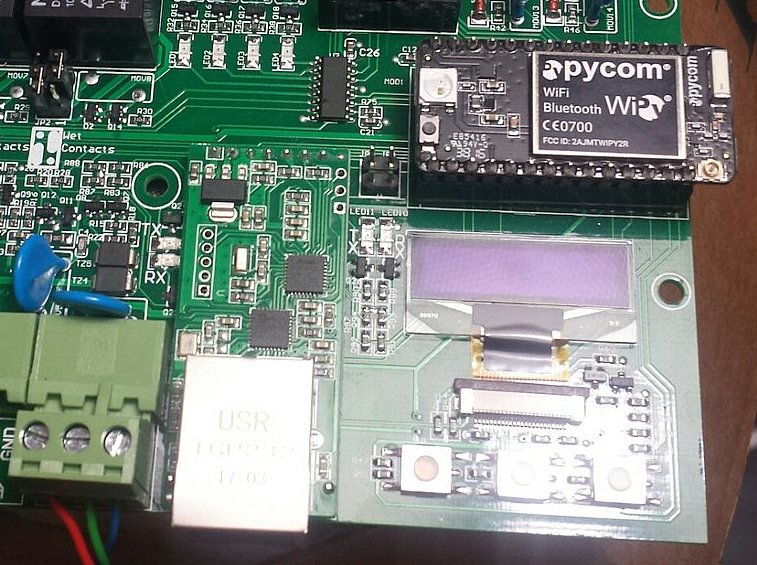
-
@Shaun Good to hear. Does pre-configure mean: You connect them once with RX/TX and a suitable adapter to a PC or the like, make the settings and then you placed them into the target environment? Or do the units have a kind of initial configuration, which can be managed by the LAN port?
-
@Shaun
Sorry for spam
I see that you are using the same green connectors as me - i use it near to always as servo connector :) -
@robert-hh The converters can be configured live over Ethernet using configuration software that is downloaded from the suppliers website.
http://www.usriot.com/p/serial-uart-ethernet-module/The modules even include a webserver with a configuration page that enables parameters to be changed
-
@Shaun
Hi shaun, thx for the tip, do you know if the USR-TCP232-T unit (https://www.elektor.com/ethernet-module-usr-tcp232-t) should also work out for my situation (in your experience)? This module is available in the Netherlands the other (your unit) is only available outside Europe, That means long p&p times :-(http://www.tcp232.net/download/USR-TCP232-T-EN.pdf
It's on ttl level :-)
-
@joena Yes, I have used the older model as well (larger can xtal), the newer module has the smaller smt xtal.
They all can work as a simple Ethernet to UART (3V3 TTL) bridge the same way a USB to UART converter works.
A computer must load the Ethernet virtual serial port driver. -
@Shaun thx shaun, Just bought the module, see how it goes :-) thx for the tip
-
@Shaun hi Shaun, the TTL <> RJ45 module has arrived :) it even was the same version/model as yours :) so I was very glad (I didn't expect that ;)) I have a question...
I found the manual quite challenging, perhaps it's my lack of understanding (technical) English, or perhaps the Chinese people think in too technical terms ;) But how did you set up the module?
My situation is as follows,
I have a LoPy,
I have a USR-TCP232-T2 module
I have a Extron MLC 104 IP PLUS button/control panel (for controlling the av equipment in a classroom)With my LoPy I want to sent TTL signals (Tx/Rx) to the USR, which converts them to RJ45 (IP: 192.168.254.254, Subnet: 255.255.0.0) which is connected to the Extron button/control panel.
For the USR I can select a few things, but I guess I need TCP Server? Could you elaborate how you did your setup?
My guess would be to first connect it via ethernet (patch) cable to local laptop and make the USR a TCP server, than use a cross cable to connect between the USR <> Extron button panel?I can also adjust IP addresses, but I guess I need the USR IP (to access the module) to remain the same and the target IP to be the IP of the Extron button/control panel?
i Hope you can help me out with this? With regards, Jeroen
-
in addition, do you Shaun (or any others off-course ;)) know of a good video for any help in this matter (with this module)? On you-tube I saw a video in Spanish (but I'm looking for English or Dutch :P)
-
@joena Is there at all WiFi at the location? Then LoPy can use WiFi and the AV equipment RJ45.
-
@joena said in RJ45, in combination with a LoPy:
Extron MLC 104 IP PLUS button/control panel
Hi Joena.
The module can be configured using the software download from the supplier;
http://www.usriot.com/usr-m0-setup-software/The simplest configuration is using UDP mode.
One can create a virtual serial link between 2 or more modules.
or
Create a virtual serial link between 1 or more modules and a PC running the virtual serial over Ethernet driver.
http://www.usriot.com/usr-vcom-virtual-serial-software/I'm not familiar with the " Extron MLC 104 IP PLUS button/control panel", but it sounds as if you are not wanting to connect a USR module to a TTL serial port on the Extron, in which case the Extron will then need to be able to run a custom driver or application that you provide and load onto it, that will then communicate with the USR module.
Example code can be found here;
http://www.usriot.com/tcpip-demo-code/ -
@papasmurph Hi grote smurf :) At work there is WiFi available, but it's managed by another (IT) department. If there is going to be a fixed 'wifi device' connected to their wireless network (read 100+ connections per building) their gonna give me issues with IP connections, security, etc. I know you can do add a separate VLAN for this, but I want it to work independently.
Thanks for your answer though... Grts, Jeroen
-
@Shaun Thx so much Shaun, i will try this out. Will let you know how it goes. thx again, Jeroen


Hello! It looks like you're interested in this conversation, but you don't have an account yet.
Getting fed up of having to scroll through the same posts each visit? When you register for an account, you'll always come back to exactly where you were before, and choose to be notified of new replies (either via email, or push notification). You'll also be able to save bookmarks and upvote posts to show your appreciation to other community members.
With your input, this post could be even better 💗
Register Login