New Firmware release 1.7.5.b1
-
@livius
Hi. Thanks for asking.
Unfortunately yes - I programmed it with an Arduino and I know it contains data. Code inthe arduino reads it back etc etc. Also, It worked and read back correctly only once after power up of a WiPy previously and failed everytime thereafter.
Erased records are 0xFF as well... Being all 00 is strange. -
@RichardTXD
Are you sure you don't need to send a control byte first to the eeprom inc the starting memory address (2 bytes)?data = bytearray(2) data[0]=memaddress >> 8 #MSB data[1]=memaddress & 0xFF #LSB i2c.writeto(i2c_adress, data,stop=False)I2C.readfrom_mem is a generic "read from sequential registers" function it doesn't know about each memory chip's protocol. Likewise I'm not sure it does the signalling the way the Microchip protocol expects, do you have a logic analyser?
I have an I2C eeprom to test but not sure when I'll be able to do it, may take a few days.
-
@jmarcelino
Wow. I didn't know you could make stop optional. I'll re-read the docs and see if I was blind on this. I would have tried it if so. That would allow page read and page write as stop bit/ack bit is used etc.However I've looked for any information on memory read and memory write and been unable to determine if the routines send the correct intialization. I think I did pose the question on another thread and didn't get an answer.
Also, I know that the previous firmware would read the first read of data correctly the first time up after a power up (sometimes) - then fail every other time. I thought to do that it must have setup the A1 command - maybe not on a read etc and first time up....
Maybe you have the solution - a million thanks if so.
Yes - absolutely...The 24LC512 and others demand a leading command xA1 or xA0 for read or write respectively - and also bits 1, 2 and 3 are the chip number on the bus - for those interested. I didn't see how other chips (can have up to 8 on the one bus of this size) could be addressed if it was automatic so making it generic is actually better.
Strangely, Arduino Wire library does the correct thing by sending the lead in code - and quite pointless saying that - but without contrary knowledge I thought it might be the same here.
Yes, I believe I have the bus addressing corrrect with - but clearly without the leading A1 it won't work.
result = i2c.readfrom_mem(80, 0, 32)
The 80 is returned by a scan.
I'll try coding the sequence and manipulate stop encoding etc...
Thanks - Richard
-
@daniel Hello, i have updated my SiPy with the last version but my application will not start anymore. I've got the message:
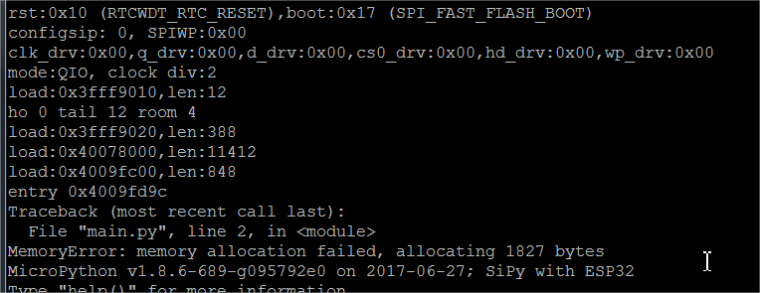
My application was working correctly with the previous version. The new features of the current version warrant updating.
Is it possible to go back to the previous version (downgrade)? And how ?
Thanks in advance for help.
-
@ederle
to downgrade fallow this post:
https://forum.pycom.io/topic/517/downgrading-firmware-advanced-users/15but first check your
main.pyandboot.py
and what do you allocate there - try playing withgc.collect()andgc.mem_free() -
@daniel Is the github repository up-to-date?
-
-
Hello,
The repo was updated a couple of minutes ago. Feel free to pull the latest changes: https://github.com/pycom/pycom-micropython-sigfox
Cheers,
Daniel -
@daniel
Is this good assumption that this is comasive commit?
Because i do not see commits between for1.7.4 -
@daniel Thank you for the WPA_ENT! I will be testing this weekend :-)
-
@jmarcelino
I had high hopes and was rather pleased you pointed out the variant using a controlled stop. Sady it doesn't work for me.
Here is my code. Changing the string I try to write doesn't change anything.
I hadsome concern in my Python noobishness that my assignments to the addressing array may not be correct but a print(str(addressing)) of it showed it was correct (not in th below code).
Oh. I saw you mention an older I2C eeprom you had. I checked it out - it may be a 5v only part.---- begin ---- from machine import I2C import time # configure the I2C bus # i2c = I2C(0, I2C.MASTER, baudrate=100000, pins=('P9', 'P10')) i2c = I2C(0, I2C.MASTER, baudrate=100000) print('scanning') print(i2c.scan()) # returns list of slave addresses, tells me chip is on the bus loops = 0 addressing = bytearray(3) addressing[0] = 0xA0 # Write command, chip 0 on bus addressing[1] = 0x00 # MSB address addressing[2] = 0x00 # LSB address i2c.writeto(80, addressing, stop=False) # setup chip, no stop means more to follow i2c.writeto(80, '123hello world456') # this should be a "page write" (assume) time.sleep(1) # crazy long. 5mS should be enough addressing[0] = 0xA1 # make it a read command, chip 0 on bus while 1: i2c.writeto(80, addressing, stop=False) # setup chip, no stop means more to follow time.sleep(0.1) # not necessary. "try anything" result = i2c.readfrom(80, 32) # clock out 32 bytes in page mode (assume) print(str(loops) + ' ' + str(result)) time.sleep(1.0) loops = loops + 1 ---- it returns ---- scanning [80] 0 b'\x0f\x0c\x08\x12\x13,\x01Y\x02C\x04\x07\n\x10\x00\xff\x0f\x0c\x08\x12\x18,\x01I\x03\xfb\x04\x1e\n\x11\x00\xff' 1 b'\x0f\x0c\x08\x12\x13,\x01Y\x02C\x04\x07\n\x10\x00\xff\x0f\x0c\x08\x12\x18,\x01I\x03\xfb\x04\x1e\n\x11\x00\xff'
Hello! It looks like you're interested in this conversation, but you don't have an account yet.
Getting fed up of having to scroll through the same posts each visit? When you register for an account, you'll always come back to exactly where you were before, and choose to be notified of new replies (either via email, or push notification). You'll also be able to save bookmarks and upvote posts to show your appreciation to other community members.
With your input, this post could be even better 💗
Register Login