New firmware release v1.7.7.b1 (REQUIRES NEW UPDATER TOOL)
-
@daniel said in New firmware release v1.7.7.b1 (REQUIRES NEW UPDATER TOOL):
RMT driver for measuring pulses
What exactly is the "RMT driver for measuring pulses"? We are looking at various pulse counting options, so I'm interested in learning more about this.
-
@Eric24
There is a pycom.pulses_get(pin,timeout) function but seems a bit primitive and "raw" at the moment - as far as I can see only used internally to calibrate the deep sleep timer.You do get a list of (signal_level, duration) tuples, where duration seems to be in microseconds (RMT channel clocks = APB_CLK (80Mhz) / clk_div (80) but I'm not completely sure)
There's a set of fixed thresholds at the moment so it may be only useful for some applications.
-
@jmarcelino yes, it's microseconds.
@Eric24 we do have plans to make the function more generic. Your input regarding your needs to measure pulses would definitely help. What kind of API do you think will be more helpful for you?
-
@daniel
hello,
in my DHT pure python library here to read a DHT sensor (temperature and humidity) i read the pulses send by the sensor like this :def __collect_input(self): # collect the data while unchanged found unchanged_count = 0 # this is used to determine where is the end of the data max_unchanged_count = 100 last = -1 data = [] m = bytearray(800) # needs long sample size to grab all the bits from the DHT irqf = disable_irq() self.__pin(1) for i in range(len(m)): m[i] = self.__pin() ## sample input and store value enable_irq(irqf) for i in range(len(m)): current = m[i] data.append(current) if last != current: unchanged_count = 0 last = current else: unchanged_count += 1 if unchanged_count > max_unchanged_count: break #print(data) return datanot very accurate because samples are over 10 us
i have made a first try with the new function pulses_get like that :def read2(self): self.__send_and_sleep(0, 0.019) irqf = disable_irq() self.__pin(1) # collect data data = pycom.pulses_get(self.__pin,500) enable_irq(irqf) return datahere is what i get :

it seems to be more accurate that the first method ! (real time in us of the pulses)
timing of the DHT :
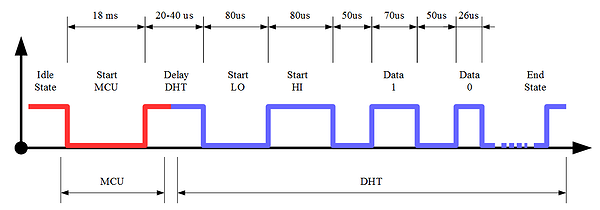
The first value for 1 level (88) seems to be the Start HI . We have the 40 data bits of the DHT !
to be continued .... -
@daniel Actually, my needs are for counting pulses, not measuring their duration (although that would certainly be useful, I don't have a specific use-case for it right now). My thinking on the pulse counting is that I'll have to wait until the ESP32's ULP is supported for it to be practical to do (i.e. pulse counting using interrupts or other methods require the module to be awake too much--at least once per pulse--whereas the ULP has the potential of being able to count pulses during deep-sleep).
-
@jmarcelino It looks as if this function is useful for the DHT sensors. There are solutions using pure python, but they sometimes fail.
-
@daniel, @robert-hh I can confirm as well, that the sd-card error is gone with this release. Thanks!
-
hello,
it seems that there is a problem with the function pulses_getwith this code :
       # pull down to low until 19 ms
        self.__send_and_sleep(0, 0.019)
        data = pycom.pulses_get(self.__pin,100)
        self.__pin(1)
        print(data)
       time.sleep(5)
i acquire data from a DHT sensor.
the first time i run this code it is OK , i have all the pulses data in the data variable.
But if i run this code in a loop the second time , i have no data acquired.
Maybe i am wrong somewhere but if someone can check this. -
hello
@Jurassic-Pork (answer to myself :-) )
i think that i have found where is the problem. To work with the DHT , i need to put the used pin in mode OPEN_DRAIN (input / output) . I initialize my classe like this :th = DTH(Pin('P3', mode=Pin.OPEN_DRAIN),0)it seems that the function pulses_get change the mode of the pin used to INPUT. So the second time i try a read , it doesn't work.
with this change in my code :self.__send_and_sleep(0, 0.019) data = pycom.pulses_get(self.__pin,100) self.__pin.init(Pin.OPEN_DRAIN) self.__pin(1)it is now ok in my loop :-)
-
Is the git repository updated?
-
@Paco88
Yes it is


Hello! It looks like you're interested in this conversation, but you don't have an account yet.
Getting fed up of having to scroll through the same posts each visit? When you register for an account, you'll always come back to exactly where you were before, and choose to be notified of new replies (either via email, or push notification). You'll also be able to save bookmarks and upvote posts to show your appreciation to other community members.
With your input, this post could be even better 💗
Register Login