Welcome to the Pycom forum Forum
    • \[\[global:header.categories\]\]
    • \[\[global:header.recent\]\]
    • \[\[global:header.tags\]\]
    • \[\[global:header.popular\]\]
    • Login

    Explore Pybytes | Official Documentation | Report a Firmware Bug/Issue | GitHub

    Alex's Corner - Week 4 - WiPy & Publishing/Subscribing With MQTT

    Scheduled Pinned Locked Moved Events
    wipylivewebinarmqttwlan
    24 Posts 8 Posters 13.3k Views 9 Watching
    Loading More Posts
    • Oldest to Newest
    • Newest to Oldest
    • Most Votes
    Reply
    • Reply as topic
    Log in to reply
    This topic has been deleted. Only users with topic management privileges can see it.
    • B Offline
      bucknall @mmarkvoort
      last edited by

      @mmarkvoort Oops thanks!

      Developer Evangelist - Pycom

      1 Reply Last reply Reply Quote 0
      • PiAirP Offline
        PiAir
        last edited by

        You mention WiPy, am I correct in guessing that it will work the same for LoPy?
        And if not: can you should/cover the differences? :)

        B 1 Reply Last reply Reply Quote 0
        • B Offline
          bucknall @PiAir
          last edited by

          Hi @PiAir,

          Yep! Exactly the same :) I'll do a quick run down on the differences between the two devices.

          Developer Evangelist - Pycom

          N 1 Reply Last reply Reply Quote 0
          • PiAirP Offline
            PiAir
            last edited by

            I use MQTT extensively and the the example in https://docs.pycom.io/pycom_esp32/pycom_esp32/tutorial/includes/mqtt.html#basic-usage-example makes absolutely no sense to someone that doesn't know what MQTT is for (sorry).
            I mean, it sends "OFF" and "ON" to an MQTT broker which you can then view in a websocket client (yippie).

            So I think I would be useful for the demo to use 1 WiPy with a sensor (a button, a temperature sensor, anything really). This WiPy then sends data to a MQTT server. The second WiPy subscribes to that same topic and has for example a relay that switches on a light, a ventilator (if temp > certain value) etc.
            That at least shows the purpose of MQTT (if you explain that a third, forth etc. WiPy can also subscribe to the topic and listen).

            Or...have the WiPy subscribe to the MQTT feed of a device on The Things Network so that you have the bridge: LoPy -> LoRaWAN -> Gateway -> TTN -> MQTT -> WiPY -> relay... :)
            (provided of course that TTN is up tomorrow when you do the livestream ;-) )

            B 1 Reply Last reply Reply Quote 2
            • B Offline
              bucknall @PiAir
              last edited by

              @PiAir You're right the MQTT example in the docs doesn't make a whole lot of sense and I'll get around to updating this!

              What you've described is exactly how I plan to demo MQTT. I'm not going to use TTN, unfortunately, as I've been testing it today and it's not reliable at the moment...

              If you have time, please do join in and comment/ask me questions as I go along! The more questions you ask, the better I can help provide answers to questions!

              Developer Evangelist - Pycom

              PiAirP 1 Reply Last reply Reply Quote 0
              • PiAirP Offline
                PiAir @bucknall
                last edited by

                @bucknall You know I watch them :) but it is during work hours, so joining in live is going to be a bit difficult. They don't mind me playing with the LoPy in the evening or in the weekend, but during the day I'm supposed to do other stuff.
                I can totally understand you don't want to try another TTN live demo. :)

                B 1 Reply Last reply Reply Quote 0
                • B Offline
                  bucknall @PiAir
                  last edited by bucknall

                  @PiAir Not worried about trying another demo - I might try to set up the gateway with another network such as Loriot in the future or at least try again once TTN is working correctly.

                  I've pushed the docs updates regarding the LoRaWAN TTN Nano-Gateway code to our docs now so that should be going live next docs update. I'll post an update when it's online.

                  Developer Evangelist - Pycom

                  1 Reply Last reply Reply Quote 1
                  • R Offline
                    robmarkcole
                    last edited by robmarkcole

                    @bucknall Since I can't attend the demo live, my questions are:

                    1. How to handle authentification - user and password? Also can I keep passwords separate from the main code? Are passwords encrypted over the network?
                    2. Bandwidth - what is max rate I can push readings over MQTT?
                    3. Sleep mode - if I wake from sleep mode are messages that were sent whilst sleeping received?
                    4. The docs mention a bug on line 57, I guess you will cover addressing that https://docs.pycom.io/pycom_esp32/pycom_esp32/tutorial/includes/mqtt.html
                    5. One final question, is it possible to pass a variable into a running python program using MQTT? For instance, could I pass in (via MQTT) the variable which sets how frequently the Wipy takes a measurement?

                    Cheers!
                    p.s. if you do a demo, perhaps also use a local MQTT broker on your mac, with mosquitto? Seems the most generic approach to me rather than a cloud service..
                    p.p.s. for week 5 perhaps you could cover/mention the json library? :-)

                    1 Reply Last reply Reply Quote 2
                    • B Offline
                      bucknall
                      last edited by

                      Links that I mentioned in my the live stream:

                      • http://www.bitreactive.com/how-fast-can-you-publish-mqtt-messages/
                      • http://www.hivemq.com/blog/mqtt-essentials-part-4-mqtt-publish-subscribe-unsubscribe
                      • https://simplifiedthinking.co.uk/2015/10/03/install-mqtt-server/

                      Developer Evangelist - Pycom

                      1 Reply Last reply Reply Quote 0
                      • R Offline
                        robmarkcole
                        last edited by

                        Perfect! Is the video available to download?

                        B 1 Reply Last reply Reply Quote 0
                        • B Offline
                          bucknall @robmarkcole
                          last edited by

                          @robmarkcole it's hosted on YouTube so you can view it back whenever you wish. Regarding downloading it, I'm sure you can but I won't advise tools to do that as I believe it's against YouTube's Ts & Cs...!

                          Developer Evangelist - Pycom

                          1 Reply Last reply Reply Quote 1
                          • R Offline
                            robmarkcole
                            last edited by

                            @bucknall MQTT up and running now, thanks!

                            0_1492165564979_upload-ba7cec5f-5649-45f1-9811-7a9fc980c162

                            1 Reply Last reply Reply Quote 1
                            • R Offline
                              robmarkcole
                              last edited by

                              Hmm this working before lunch, what could be going on?

                              0_1492181218928_upload-459019bb-4809-4554-88a9-bafe1ae15570

                              B 1 Reply Last reply Reply Quote 0
                              • B Offline
                                bucknall @robmarkcole
                                last edited by

                                @robmarkcole I have a lot of problems using hivemq, its often down - maybe try another broker? like mosquitto?

                                Developer Evangelist - Pycom

                                1 Reply Last reply Reply Quote 0
                                • R Offline
                                  robmarkcole
                                  last edited by

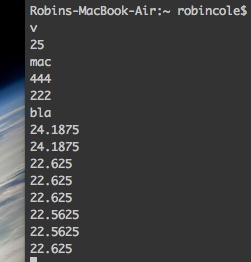
                                  OK great, now publishing temperature readings from my DS18B20 to my Mac via MQTT. However I note that client.connect() returns 0 even though the connection is working..
                                  0_1492181907548_upload-58ec517d-7773-45e7-8eb3-617138ee7b46

                                  1 Reply Last reply Reply Quote 0
                                  • R Offline
                                    RL-Auroraim
                                    last edited by

                                    Hi @bucknall

                                    I would like to have our LoPys interpret incoming subscription messages and execute a corresponding function. How do I go about saving subscribed messages as a string variable for example so I can compare them?

                                    PiAirP 1 Reply Last reply Reply Quote 0
                                    • PiAirP Offline
                                      PiAir @RL-Auroraim
                                      last edited by

                                      @RL-Auroraim You can see an example of subscribe here in the video: https://youtu.be/3NDPSbr5J14?t=12m57s that Alex posted. But it looks like he hasn't pushed that one to github yet? (correct @bucknall ?)

                                      B 1 Reply Last reply Reply Quote 0
                                      • B Offline
                                        bucknall @PiAir
                                        last edited by

                                        @PiAir That's correct, I'll make sure that's updated on both the docs & GitHub! Cheers!

                                        Developer Evangelist - Pycom

                                        1 Reply Last reply Reply Quote 0
                                        • RobTuDelftR Offline
                                          RobTuDelft
                                          last edited by

                                          Link in Youtube description seems to link to the week 5 forum topic

                                          Without data you're just another person with an opinion.
                                          Hackster | About me

                                          1 Reply Last reply Reply Quote 1
                                          • R Offline
                                            robmarkcole @bucknall
                                            last edited by

                                            @bucknall just posted about sending images over MQTT, perhaps one for another Corner?

                                            1 Reply Last reply Reply Quote 0

                                            Hello! It looks like you're interested in this conversation, but you don't have an account yet.

                                            Getting fed up of having to scroll through the same posts each visit? When you register for an account, you'll always come back to exactly where you were before, and choose to be notified of new replies (either via email, or push notification). You'll also be able to save bookmarks and upvote posts to show your appreciation to other community members.

                                            With your input, this post could be even better 💗

                                            Register Login
                                            • 1
                                            • 2
                                            • 1 / 2
                                            • First post
                                              Last post

                                            Pycom on Twitter

                                            Pycom
