Mac address format to hexadecimal
-
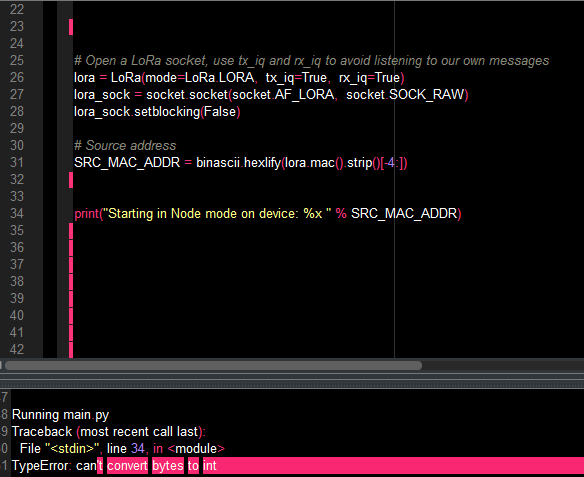
I wanted to take the last four bytes of the mac address of the lopy as shown in the code. I just tried to print it as hexadecimal value but it keeps giving me an error. What could possibly be the problem?
-
You converte SRC_MAC_ADDR to a string in line 31, so you have to use %s a format specifier in line 34.
-
@robert-hh So, it means I can only use the address as a %s format not as hexadecimal value. Because my intention was to use it like a device id where by I send a message to a particular node with a specific mac address.
-
@timeb The data returned by lora.mac() is a 8 byte binary quantity in a bytes object. These bytes may not be printable chars. And it is also not an integer, and can therefore not be printed with the %x specifier. If you want to print it in a ASCII-Hex representation, you have to convert that with ubinascii.hexlify, like you did, and print it with the %s specifier. The results is a string. How you further proceed with the data, is up to you. You could use the binary object or the string.

Hello! It looks like you're interested in this conversation, but you don't have an account yet.
Getting fed up of having to scroll through the same posts each visit? When you register for an account, you'll always come back to exactly where you were before, and choose to be notified of new replies (either via email, or push notification). You'll also be able to save bookmarks and upvote posts to show your appreciation to other community members.
With your input, this post could be even better 💗
Register Login