[SOLVED] PyTrack USB Driver
-
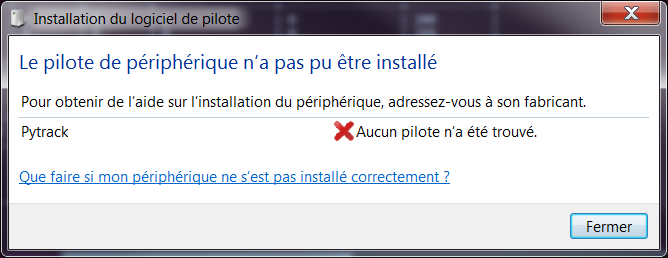
I receive 2 pieces of PyTrack yesterday :-) But when i connect them to my PC with usb i have the message below.
Question: is there a specific usb driver for PyTrack ? On the board, the usb bridge is a PIC16 LF14459.Thanks in advance for help ;-)
-
I did a quick test of the PyTrack on Windows 10 x64 and it is detected automatically. It's using the standard Microsoft USB2SER driver.
For older Windows systems it might be necessary that Pycom releases an .inf file so that Windows knows to use the default usb serial driver.
I can check more on this later.
-
@Xykon thank you for the answer. I use Windows 7 Pro 64 bits.
-
The only PC with Windows 7 x64 I have is my work notebook... I tried to craft an .inf file for the PyTrack but it wouldn't install due to missing driver signatures, which are enforced on this notebook and I don't have the rights to change that.
If you're desperate you could download a free copy of Windows 10 to run in a virtual machine until PyCom releases proper drivers for old operating systems.
I'm currently trying the latest version of Ubuntu Linux... the board is recognised as /dev/ttyACM0 but I'm not getting any serial output from my LoPy yet. That part is working fine in Windows 10 so this must be a Linux specific problem.
I don't have any Mac so cannot try MacOS.
-
Hi all ,
Got same problem here ,
I built a working driver from MicroChip MLA
0_1496334483000_rename to zip.pdf
rename the file to .zip , unpack and use it when ask for driver ( it's just a modded .inf ) , work for me with Putty ( defaut 115200 bauds)
got a small bug with Pymakr ( open and instant close ) , will investigate that later .hope it help.
Stephane A.
-
Hello,
On any linux, Mac OS and for Windows 10 and up no driver is needed. There's a tiny driver to be installed for previous versions of Windows. We will release it together with instructions tomorrow.
Cheers,
Daniel -
I know this is not directly related to the question from the OP, but I did manage to get the boards to work on Ubuntu Linux.
The trick is to disable the modem manager via
sudo systemctl stop ModemManager.serviceandsudo systemctl disable ModemManager.serviceI thought I'd mention this here in case anyone else is searching for this.
-
@stef thanks for the help. I will test quickly.
-
@stef works fine on windows 7 64 bits. thanks :-)
-
@ederle , nice to see that it's help.
By the way , i manage to get the GPS working , if anyone need code before official release , i can post it.
Stéphane A.
-
@stef I would like to test your GPS lib. Can you post it please ? Thanks :-)
Hello! It looks like you're interested in this conversation, but you don't have an account yet.
Getting fed up of having to scroll through the same posts each visit? When you register for an account, you'll always come back to exactly where you were before, and choose to be notified of new replies (either via email, or push notification). You'll also be able to save bookmarks and upvote posts to show your appreciation to other community members.
With your input, this post could be even better 💗
Register Login