Pytrack and Pysense firmware release 0.0.2
-
Hello,
We have released a new firmware for Pytrack and Pysense. The version is 0.0.2. These are the release notes:
- Add possibility to wakeup via the Pysense/Pytrack pushbutton.
- Correct the timing of the deep sleep cycles.
- Correct the generic read/write modify function to control the PIC microcontroller.
The instructions to apply the new firmware can be found in: ~~https://docs.pycom.io/pycom_esp32/pycom_esp32/toolsandfeatures.html#updating-pysense-and-pytrack-firmware~~
New link: https://docs.pycom.io/chapter/pytrackpysense/installation/firmware.html
We will publish the libraries to use the GPS and the sensors on the board tomorrow.
Cheers,
Daniel -
@daniel said in Pytrack and Pysense firmware release 0.0.2:
How to upgrade under Windows?
-
Some additional tips to help MAC users:
- After downloading the Pytrack/Pysense DFU, rename it to firmware_file.dfu
- Move the DFU file to Library folder
- Hold the push button and connect the Pytrack/sense ( no LoPY etc needed) over USB
- release the button and paste the command : dfu-util -D firmware_file.dfu
- Should be good to go!
-
@livius
dfu-util is also available for windows http://dfu-util.sourceforge.net/releases/dfu-util-0.9-win64.zip
Should be really similar to use (from command line)
-
@jmarcelino said in Pytrack and Pysense firmware release 0.0.2:
@livius
dfu-util is also available for windows http://dfu-util.sourceforge.net/releases/dfu-util-0.9-win64.zip
Should be really similar to use (from command line)
The pysense is recognised by my Windows 10 as Serial USB device.

However, when I plug it in with the button pressed it says unknown device, no driver available.

Hence the update fails
PS C:\Users\.....\Pycom\dfu-util-0.9-win64> .\dfu-util.exe -D .\pysense_0.0.2.dfu dfu-util 0.9 Copyright 2005-2009 Weston Schmidt, Harald Welte and OpenMoko Inc. Copyright 2010-2016 Tormod Volden and Stefan Schmidt This program is Free Software and has ABSOLUTELY NO WARRANTY Please report bugs to http://sourceforge.net/p/dfu-util/tickets/ Match vendor ID from file: 04d8 Match product ID from file: f011 Cannot open DFU device 04d8:f011 No DFU capable USB device available -
@jmarcelino said in Pytrack and Pysense firmware release 0.0.2:
I have tried it before i asked ;-)
But it say unknown vendor for meI have tried also -s
dfu-util.exe -s COM4 -D pysense_0.0.2.dfuBut have not tried much. In the evening i will try more
-
@livius
Ha sorry I see Windows needs a DFU driver! No problem, libUSBk to the rescue.Try installing the driver package I generated:
[now old, see above]or install libusbK and make your own using the inf-wizard :-)
Once that's done
dfu-util -D pysense_0.0.2.dfuwill work (remember you only have about 7 seconds to run it after releasing the button, so install the driver first)DFU-UTIL has to be >= version 0.8
Tested with PyTrack not sure if the PySense uses the same ID, will try it up later. -
@jmarcelino thanks for the Windows instructions and the driver package!
-
PySense and PyTrack DFU use different USB IDs so I generated two driver packages for Windows using libusbK (I don't know how to make a single one...)
PySense: http://metavurt.net/software/drivers/PySense_DFU.zip
PyTrack: http://metavurt.net/software/drivers/PyTrack_DFU.zipAfter installing the driver you need download dfu-util for Windows from http://dfu-util.sourceforge.net/releases/dfu-util-0.8-binaries/win32-mingw32/ , I recommend the static compiled binary to avoid any library issues, you only need one executable: dfu-util-static.exe
Place the executable and the dfu firmware from Pycom together and get ready to run:
dfu-util-static.exe -D pysense_0.0.2.dfuor
dfu-util-static.exe -D pytrack_0.0.2.dfudepending on your firmware and boardThen connect the board with the button pressed down, release the button after one second and run the command above - remember you only have 7 seconds to do so!
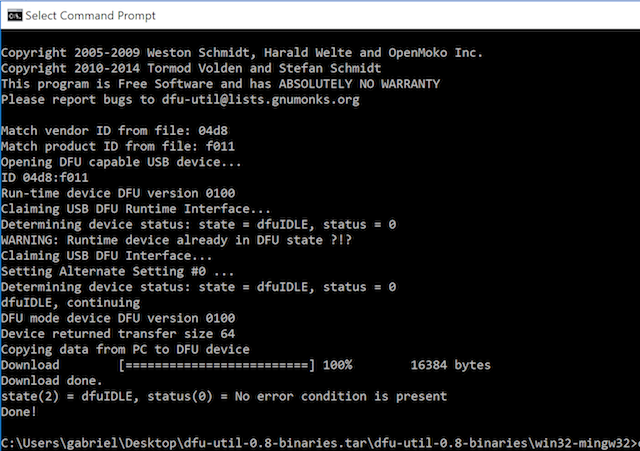
The process will look like this
-
@joe2612
on macbook pro :
I advice to specify device since another device is in dfu modedfu-util -l dfu-util 0.7 Copyright 2005-2008 Weston Schmidt, Harald Welte and OpenMoko Inc. Copyright 2010-2012 Tormod Volden and Stefan Schmidt This program is Free Software and has ABSOLUTELY NO WARRANTY Please report bugs to dfu-util@lists.gnumonks.org Found Runtime: [05ac:8289] devnum=0, cfg=1, intf=3, alt=0, name="UNDEFINED" Found Runtime: [04d8:f011] devnum=0, cfg=1, intf=0, alt=0, name="UNDEFINED"so i advice to specify device :
dfu-util --device 04d8:f011 -D pysense_0.0.2.dfu dfu-util 0.7 Copyright 2005-2008 Weston Schmidt, Harald Welte and OpenMoko Inc. Copyright 2010-2012 Tormod Volden and Stefan Schmidt This program is Free Software and has ABSOLUTELY NO WARRANTY Please report bugs to dfu-util@lists.gnumonks.org Filter on vendor = 0x04d8 product = 0xf011 Opening DFU capable USB device... ID 04d8:f011 Run-time device DFU version 0100 Claiming USB DFU Runtime Interface... Determining device status: state = dfuIDLE, status = 0 WARNING: Runtime device already in DFU state ?!? Found Runtime: [04d8:f011] devnum=0, cfg=1, intf=0, alt=0, name="UNDEFINED" Claiming USB DFU Interface... Setting Alternate Setting #0 ... Determining device status: state = dfuIDLE, status = 0 dfuIDLE, continuing DFU mode device DFU version 0100 Device returned transfer size 64 Dfu suffix version 100 bytes_per_hash=327 Copying data from PC to DFU device Starting download: [##################################################] finished! state(2) = dfuIDLE, status(0) = No error condition is present Done! ``` -
@jobbyworld
If you update to dfu-util version 0.8 or later it should pick up the correct ids from the file to filter on -
@jmarcelino thanks for the instructions!
@daniel where can we find examples and libraries?
regards -
@daniel
for me pysense + wipy2 hangs after few secondsupgrade was ok
dfu-util-static.exe -D pysense_0.0.2.dfu
dfu-util 0.8

Copyright 2005-2009 Weston Schmidt, Harald Welte and OpenMoko Inc.
Copyright 2010-2014 Tormod Volden and Stefan Schmidt
This program is Free Software and has ABSOLUTELY NO WARRANTY
Please report bugs to dfu-util@lists.gnumonks.org

Match vendor ID from file: 04d8
Match product ID from file: f011
Opening DFU capable USB device...
ID 04d8:f011
Run-time device DFU version 0100
Claiming USB DFU Runtime Interface...
Determining device status: state = dfuIDLE, status = 0
WARNING: Runtime device already in DFU state ?!?
Claiming USB DFU Interface...
Setting Alternate Setting #0 ...
Determining device status: state = dfuIDLE, status = 0
dfuIDLE, continuing
DFU mode device DFU version 0100
Device returned transfer size 64
Copying data from PC to DFU device
Download        [=========================] 100%        16384 bytes
Download done.
state(2) = dfuIDLE, status(0) = No error condition is present
Done!
wipy2 after fresh
os.mkfs('/flash')with current firmware
1.7.2.b1(official build)i put 6 times
os.uname()but only first 2 i get response and then it hang totally
all interfaces go down - wifi and uart
no info on COM/response on any command and no outputrst:0x1 (POWERON_RESET),boot:0x17 (SPI_FAST_FLASH_BOOT) ets Jun 8 2016 00:22:57 rst:0x10 (RTCWDT_RTC_RESET),boot:0x17 (SPI_FAST_FLASH_BOOT) configsip: 0, SPIWP:0x00 clk_drv:0x00,q_drv:0x00,d_drv:0x00,cs0_drv:0x00,hd_drv:0x00,wp_drv:0x00 mode:QIO, clock div:2 load:0x3fff9010,len:12 ho 0 tail 12 room 4 load:0x3fff9020,len:388 load:0x40078000,len:11412 load:0x4009fc00,len:848 entry 0x4009fd9c MicroPython v1.8.6-650-g9bacbbd4 on 2017-06-09; WiPy with ESP32 Type "help()" for more information. >>> os.uname() (sysname='WiPy', nodename='WiPy', release='1.7.2.b1', version='v1.8.6-650-g9bacbbd4 on 2017-06-09', machine='WiPy with ESP32') >>> os.uname() (sysname='WiPy', nodename='WiPy', release='1.7.2.b1', version='v1.8.6-650-g9bacbbd4 on 2017-06-09', machine='WiPy with ESP32') >>>i moved this wipy to expansion board and it work without any problem
-
@livius after it hangs, does it revive by resetting the WiPy 2, or do you have to power cycle the pysense?
-
@daniel
it revive by pressing reset button on Wipy2
and back hangUPDATE
pytrack is ok only pysense is affected -
-
@livius
Does the Pysense after update appear as a USB serial device using the usbser driver?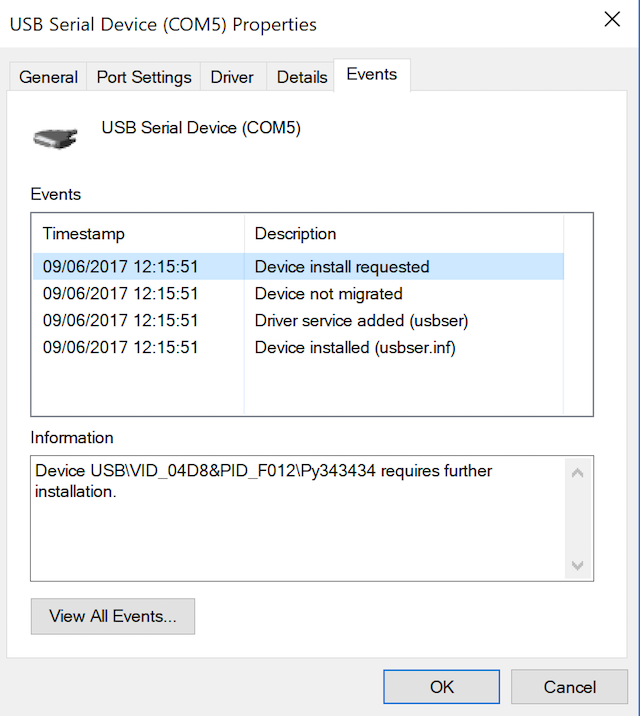
-
@jmarcelino said in Pytrack and Pysense firmware release 0.0.2:
Not sure how many checks the DFU stuff uses (would think it was reliable since it's a USB.org standard) but maybe try flashing it again?
I have tried before 5 times before written here
also with different cable on different USB port - no difference
and with really short cable (used for near everythin programing)
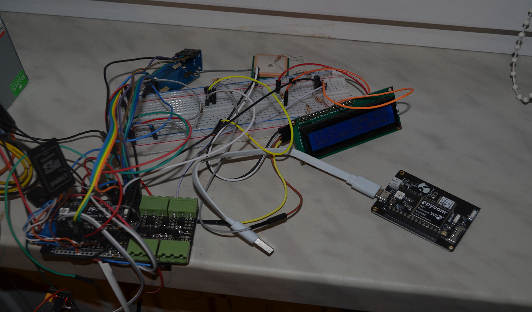
e.g. white cable below
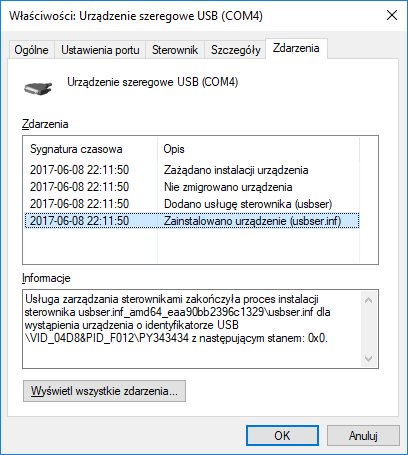
Does the Pysense after update appear as a USB serial device using the usbser driver?
yes
-
@livius
Sorry should have figured you'd have done that already :-)Not sure what it can be, but if pressing reset works I guess it's the WiPy crashing and not the Pysense shutting it off. Sounds like that was the question Daniel had.
-
@jmarcelino said in Pytrack and Pysense firmware release 0.0.2:
Sorry should have figured you'd have done that already :-)
for us we can assume this always ;-)
Hello! It looks like you're interested in this conversation, but you don't have an account yet.
Getting fed up of having to scroll through the same posts each visit? When you register for an account, you'll always come back to exactly where you were before, and choose to be notified of new replies (either via email, or push notification). You'll also be able to save bookmarks and upvote posts to show your appreciation to other community members.
With your input, this post could be even better 💗
Register Login