Welcome to the Pycom forum Forum
    • \[\[global:header.categories\]\]
    • \[\[global:header.recent\]\]
    • \[\[global:header.tags\]\]
    • \[\[global:header.popular\]\]
    • Login

    Explore Pybytes | Official Documentation | Report a Firmware Bug/Issue | GitHub

    Pytrack and Pysense Libraries Release 1.0.0

    Scheduled Pinned Locked Moved Announcements & News
    pytrackpysenselibrary
    41 Posts 14 Posters 20.2k Views 15 Watching
    Loading More Posts
    • Oldest to Newest
    • Newest to Oldest
    • Most Votes
    Reply
    • Reply as topic
    Log in to reply
    This topic has been deleted. Only users with topic management privileges can see it.
    • C Offline
      Camot @johncaipa
      last edited by

      @johncaipa

      from pysense import Pysense

      py = Pysense()

      volt_float = py.read_battery_voltage()

      M 1 Reply Last reply Reply Quote 0
      • M Offline
        mqlopes @Camot
        last edited by

        @Camot Hello. I have both a Pysense and a Pytrack. I'm trying to read the battery voltage using "py.read_battery_voltage()", but I keep receiving the same values when the boards are connected to USB (with the batteries attached). For Pysense: 0.1203943 and for Pytrack 0.06017921. Thanks for your help.

        C papasmurphP 2 Replies Last reply Reply Quote 0
        • C Offline
          Camot @mqlopes
          last edited by

          @mqlopes

          I am not sure I understand your point. Why do you expect a changing battery voltage when you board is USB powered? Unplug USB and you see the voltage decreasing slowly.

          M 1 Reply Last reply Reply Quote 0
          • papasmurphP Offline
            papasmurph @mqlopes
            last edited by

            @mqlopes When USB is connected the voltage is stable 3.3 Volts, while the battery is being charged. What you are asking about would require hooking into the battery itself, which is not the case.

            M J 2 Replies Last reply Reply Quote 0
            • M Offline
              mqlopes @Camot
              last edited by

              @Camot Tks for your advice.

              1 Reply Last reply Reply Quote 0
              • M Offline
                mqlopes @papasmurph
                last edited by

                @papasmurph Ok, I see. Thanks for your support.

                1 Reply Last reply Reply Quote 0
                • J Offline
                  Jiemde Pybytes Beta @papasmurph
                  last edited by

                  Hi @papasmurph
                  What I understand is that it's the 3.3 volts who is tested with this function not the voltage of the battery ? Am I right ?
                  Jiemde

                  papasmurphP 1 Reply Last reply Reply Quote 0
                  • papasmurphP Offline
                    papasmurph @Jiemde
                    last edited by

                    @Jiemde As far as I understand it's the driving voltage, so if connected to USB it's measuring the stable 3.3 Volt from the power supply, that then also charges the battery.

                    1 Reply Last reply Reply Quote 0
                    • IplookyI Offline
                      Iplooky
                      last edited by

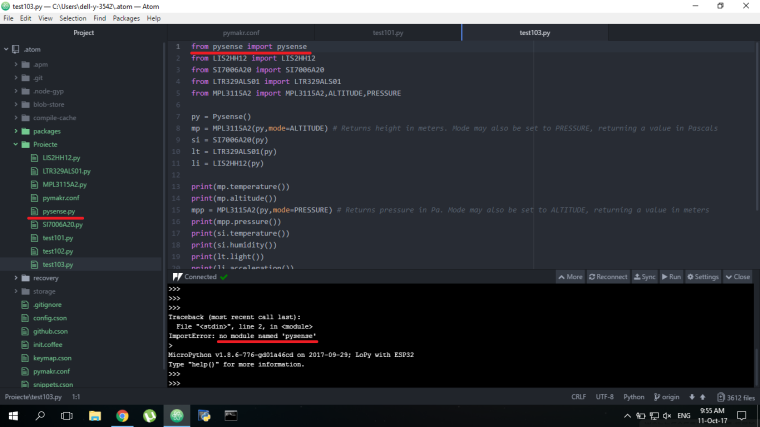
                      0_1507708741732_Untitled.png

                      What am I missing ?

                      1 Reply Last reply Reply Quote 0
                      • D Offline
                        daniel
                        last edited by

                        it should be:

                        from pysense import Pysense
                        

                        Note the capital P in the class name.

                        IplookyI 1 Reply Last reply Reply Quote 0
                        • IplookyI Offline
                          Iplooky @daniel
                          last edited by

                          @daniel It has the same result in all the 4 combinations : pysense Pysense, pp, Pp and PP (it doesn't find the module pysense, if i delete it then it will not recognise the module LIS2HH12 and so on..). It is enough just to put the libraries in the same folder and then declare them in the code ?

                          1 Reply Last reply Reply Quote 0
                          • D Offline
                            daniel
                            last edited by

                            How does your file system on the module look like? By default libraries are only searched inside the lib folder. Are you putting it there or somewhere else?

                            If you want to add other folder to the system path, you can do for example:

                            import sys
                            sys.path.append('/flash/my_folder')
                            

                            Cheers,
                            Daniel

                            IplookyI 1 Reply Last reply Reply Quote 0
                            • IplookyI Offline
                              Iplooky @daniel
                              last edited by

                              @daniel you where right, I had all the libraries outside the lib folder and that's why it did not work.
                              still:
                              import sys
                              sys.path.append('/flash/my_folder')
                              helped me a lot! Thank you!

                              1 Reply Last reply Reply Quote 0

                              Hello! It looks like you're interested in this conversation, but you don't have an account yet.

                              Getting fed up of having to scroll through the same posts each visit? When you register for an account, you'll always come back to exactly where you were before, and choose to be notified of new replies (either via email, or push notification). You'll also be able to save bookmarks and upvote posts to show your appreciation to other community members.

                              With your input, this post could be even better 💗

                              Register Login
                              • 1
                              • 2
                              • 3
                              • 2 / 3
                              • First post
                                Last post

                              Pycom on Twitter

                              Pycom