WIPY on ESP32-WROOM Procedure
-
Re: [SOLVED] WiPy firmware to a standard WROOM-32?
OK, I have succeeded with this, here's how to do it:
-
Setup Build Environment, I created a bash script (OSX/LINUX) to do this, you should run it line by line and be sure to add the paths to XTENSA and the IDF:
https://github.com/pacmac/micropython-share/blob/master/wipy-wroom/wipy-wroom.sh
-
Modify pycom-micropython-sigfox/esp32/boards/WIPY/pins.csv and remove any pins (GPIO) that are not on your device.
Renumber the Pins so that there are no gaps, the default WIPY is 24 pins (P0 to P23) however the esp32 wroom dev board I have does not have pins 37 & 38, so they have to be removed, it is renumbered P0 to P25 (26 pins) as this board has more I/O than the WIPY2 board.
First Column is the expansion board G# number, second is the GPIO# and the third is the P# Number. I have set the first column to be the same as the GPIO# so that I can call a pin using a the GPIO number i.e. Pin('0') instead of Pin('P2') as the P# is only applicable to the layout of the WIPY board.
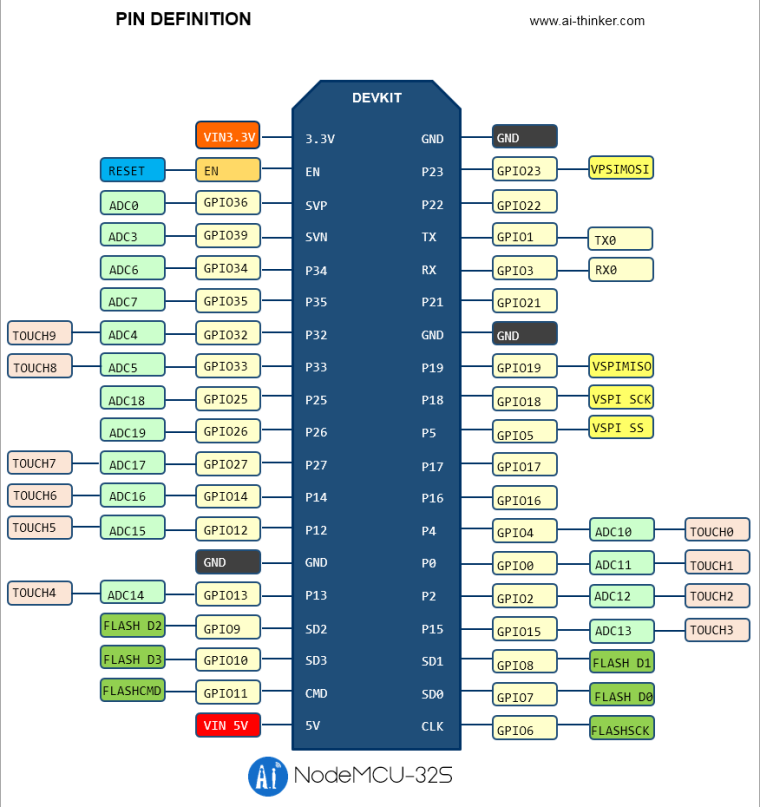
Here's the board this is based on, but there are many clones of this that are pretty much the same:
http://www.electrodragon.com/product/esp32-devkitc/
And here's the modified pins file:
https://github.com/pacmac/micropython-share/blob/master/wipy-wroom/pins.csv -
Make (build) the Binaries:
make BOARD=WIPY -j5 TARGET=boot
make BOARD=WIPY -j5 TARGET=app -
Erase & flash the device using your USB Port & dio flash mode:
make BOARD=WIPY -j5 erase ESPPORT=/dev/tty.SLAB_USBtoUART
make BOARD=WIPY -j5 flash ESPPORT=/dev/tty.SLAB_USBtoUART ESPFLASHMODE=dio
And that should be it, took a few hours to figure it out, thanks so much to everyone in the original post who contributed.
It is also possible to create a combined firmware.bin file that you can use to upload to the device using pytool.py instead of using the development environment.
-
-
Thanks for writing this up! Hopefully, it'll be useful to the community!
Thanks! :)
-
I wonder how it should be configured?--pins.csv
What does each column mean? -
When i excute “make BOARD=WIPY -j4 TARGET=boot”
export error "make: *** No rule to make target 'GNUmakefile'。" -
@jack - I think that the first columns is an alias, can be anything you want, I just renamed mine to be the same as the gpio id, the second column is the gpio and the 3rd is the wipy P number.
-
@jack - Check that you have setup the SYSTEM PATHS to xtensa and pycom-esp-idf correctly.
-
@crankshaft
Can you help me?
When I modify the pins.csv file, the compiler error:mods/pybadc.c:68:85: error: 'PIN_MODULE_P20' undeclared here (not in a function)
{.pin = &PIN_MODULE_P20, .channel = ADC1_CHANNEL_5, .enabled = false},
^
CC mods/pybdac.c
../py/mkrules.mk:47: recipe for target 'build/WIPY/release/mods/pybadc.o' failed
make: *** [build/WIPY/release/mods/pybadc.o] Error 1 -
@jack
This is the content of the pins.csv file:
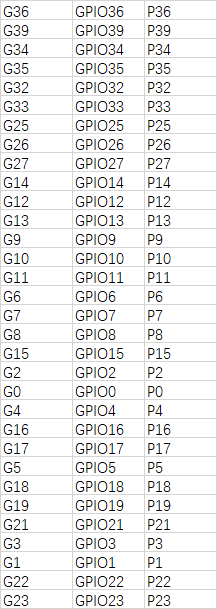 G36 GPIO36 P36
G39 GPIO39 P39
G34 GPIO34 P34
G35 GPIO35 P35
G32 GPIO32 P32
G33 GPIO33 P33
G25 GPIO25 P25
G26 GPIO26 P26
G27 GPIO27 P27
G14 GPIO14 P14
G12 GPIO12 P12
G13 GPIO13 P13
G9 GPIO9 P9
G10 GPIO10 P10
G11 GPIO11 P11
G6 GPIO6 P6
G7 GPIO7 P7
G8 GPIO8 P8
G15 GPIO15 P15
G2 GPIO2 P2
G0 GPIO0 P0
G4 GPIO4 P4
G16 GPIO16 P16
G17 GPIO17 P17
G5 GPIO5 P5
G18 GPIO18 P18
G19 GPIO19 P19
G21 GPIO21 P21
G3 GPIO3 P3
G1 GPIO1 P1
G22 GPIO22 P22
G23 GPIO23 P23 -
@jack - look at my note # 3:
"Renumber the Pins so that there are no gaps,"
The error message you received tells you the problem: "PIN_MODULE_P20' undeclared here"
You have not declared P20, you must renumber the pins, see my example pins.csv
-
@crankshaft
In fact, I don't have p20.
In addition, I found that the pins.c files generated by the compilation process are not consistent with the pins.csv I defined.
{
Create build/WIPY/release/pins.c
CC build/WIPY/release/pins.c
}
Please check your files. -
Hello! It looks like you're interested in this conversation, but you don't have an account yet.
Getting fed up of having to scroll through the same posts each visit? When you register for an account, you'll always come back to exactly where you were before, and choose to be notified of new replies (either via email, or push notification). You'll also be able to save bookmarks and upvote posts to show your appreciation to other community members.
With your input, this post could be even better 💗
Register Login