How do I exit a thread?
-
How do I kill thr() in this example? Does it have something to do with the id arg passed?
def thr(id):
    from time import sleep
    i = 0
    while True:
        print(i)
        i += 1
        sleep(delay)

import _thread
_thread.start_new_thread(thr, (1, 0))
Maybe should I do this?
mythr = _thread.start_new_thread(thr, (1, 0)) mythr.exit() -
@BetterAuto Hmmm. The _thread.exit() function in the docs isn't exactly clear on how it should be used, but since it has no params, my best guess is that it would be executed from inside the thread you want to kill. You might also try just breaking out of the while True loop.
Now, if the thread itself doesn't know it's supposed to die, you might have to implement an appropriate communications channel from the main program to the thread (could be as simple as a global "kill" variable), as there does not appear to be a _thread function that can kill a particular thread from outside that thread. It's a bit strange that this doesn't exist, as it's a common thing found in many threading implementations.
-
Thanks, I'll try it soon. (Don't have access to my WiPy at the moment.)
-
+1, is it possible to kill the thread from outside ?
-
This code based on @Eric24's suggestion does work. Ugly, but functional. I had trouble with my opening post code so I went back to the example in the docs and that works.
import _thread
import time

kill = dict()

def th_func(delay, id):
    global kill
    while True:
        if id in kill and kill[id]:
            break

        time.sleep(delay)
        print('Running thread %d' % id)

for i in range(2):
    kill[i] = False
    _thread.start_new_thread(th_func, (i + 1, i))


kill[0] = True
kill[1] = True
And this fails. _thread.exit() does not work from outside the thread.
import _thread import time threads = dict() def th_func(delay, id): while True: time.sleep(delay) print('Running thread %d' % id) for i in range(2): threads[i] = _thread.start_new_thread(th_func, (i + 1, i)) threads[0].exit() threads[1].exit() >>> Running thread 0 Running thread 1 Running thread 0 Running thread 0 Running thread 1 Running thread 0 threads[0].exit() Traceback (most recent call last): File "<stdin>", line 1, in <module> AttributeError: 'NoneType' object has no attribute 'exit' >>> threads[1].exit() Traceback (most recent call last): File "<stdin>", line 1, in <module> AttributeError: 'NoneType' object has no attribute 'exit' >>> Running thread 0 Running thread 1 Running thread 0 >>> -
@BetterAuto said in How do I exit a thread?:
How do I kill thr() in this example?
It is generally a bad pattern to kill a thread abruptly, in Python, and in any language. Think of the following cases:
- the thread is holding a critical resource that must be closed properly
- the thread has created several other threads that must be killed as well.
If you REALLY need to use a Thread, there is no way to kill thread directly. What you can do, however, is to use a "daemon thread". In fact, in Python, a Thread can be flagged as daemon:
If you do NOT really need to have a Thread , what you can do, instead of using the threading package , is to use the multiprocessing package . Here, to kill a process, you can simply call the method:
yourProcess.terminate()Python will kill your process (on Unix through the SIGTERM signal, while on Windows through the TerminateProcess() call). Pay attention to use it while using a Queue or a Pipe! (it may corrupt the data in the Queue/Pipe)
-
@larry-hems are you referring to regular Python or Pycom's implementation of MicroPython? Because I couldn't find a daemon flag, or multiprocessing as an option with Pycom's uPy.
No daemon flag:
https://docs.pycom.io/firmwareapi/micropython/_thread/No multiprocessing module:
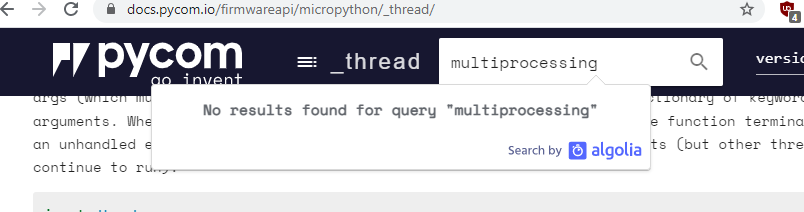
-
I think the concepts @larry-hems mentions apply to Micropython, but the function calls might differ.
If I understand correctly, all threads in micropython are daemon threads, as they continue running after command is returned to the REPL. Only after amachine.reset()or pressing the reset button will the thread be closed automatically. -
Thanks for the clarification.
-
This post is deleted!
Hello! It looks like you're interested in this conversation, but you don't have an account yet.
Getting fed up of having to scroll through the same posts each visit? When you register for an account, you'll always come back to exactly where you were before, and choose to be notified of new replies (either via email, or push notification). You'll also be able to save bookmarks and upvote posts to show your appreciation to other community members.
With your input, this post could be even better 💗
Register Login