Unable to connect using default password www.pycom.io
-
I just received my WiPy and PySense board. I have mounted the WiPy onto the PySense board and connect the modules to my PC using a USB cable.
-
It seems that the PySense driver is missing. Have tried to update but unable to find driver. Have tried everything including installing the FTDI CDM drivers.
-
Tried to connect to the WiPy wifi. I am able to see WiPy-Wlan-xxx but it fail to connect when I enter the default password www.pycom.io.
have checked out all the documentations.
Any ideas or suggestions? Thank you
-
-
@doubleo
try safe mode for ftp connect
https://docs.pycom.io/pycom_esp32/pycom_esp32/toolsandfeatures.html#boot-modes-and-safe-bootWhich system? Windows/Linux...
If windows then if you plug usb cable do you see unknow devide in device manager?Do you have expansion board or some simple USB>UART TTL converter?
something like this
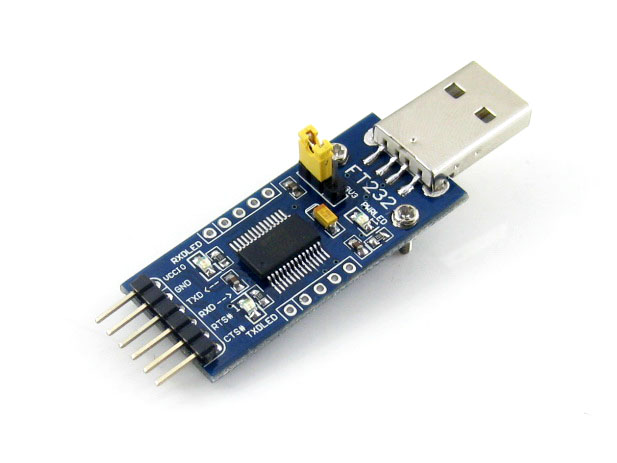
-
@doubleo
The pysense doesn't use an FTDI chip, it's a USB-CDC class device.Windows 10, Linux and Mac should pick it up automatically, for Windows 7 you need this driver https://docs.pycom.io/pycom_esp32/pycom_esp32/tutorial/includes/windows-7.html#windows-7-driver
-
Thank you.
- Problem resolved. Driver updated successfully.
- Any idea on the connection to the WiPy wifi?
I disconnected my PC from my other network.
Then try to connect to wipy-wlan-xxxx with default password but fail to connect.
The LED blinking blue light stop blinking. Sometimes turn into a different color but connection fail.
Thank you
-
@doubleo
If the board is brand new you might need a firmware update maybe something is not very reliable on your version, can you connect to it over serial a doos.uname()to check the version?To upgrade you'll need the Expansion board, the Pysense won't do - or at least I've never been able to use it like that.
Alternatively an FTDI or CP2102 module together with some Dupont (jumper) cables and/or breadboard as livius suggested would work as well.
-
@jmarcelino
Thanks again for the answer. yes, I think I need to update the firmware. I managed to get my ATOM and Pymakr working to test code on the board. However, the WiPy is not very stable. It seems to hang very often and I need to do a hard reset.
So I think best is to upgrade the firmware. Did not buy an expansion board but have the pysense.Thank you
-
@jmarcelino
I managed to get the firmware version. It is 1.6.7.b1. Is this a stable version? Do I still have to upgrade it?
Thank you
Hello! It looks like you're interested in this conversation, but you don't have an account yet.
Getting fed up of having to scroll through the same posts each visit? When you register for an account, you'll always come back to exactly where you were before, and choose to be notified of new replies (either via email, or push notification). You'll also be able to save bookmarks and upvote posts to show your appreciation to other community members.
With your input, this post could be even better 💗
Register Login