Gesture PAJ7620 library help
-
Hi Pycom team,
i have one grove gesture PAJ7620 module. i like to interface it with lopy module. I have rewrite the module library given for raspberry pi. But unfortunately, it shows initialization error. Please need help from experts. Here is the error note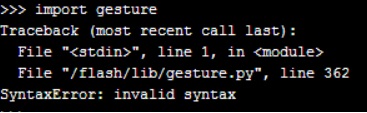
and here is the code
#!/usr/bin/env python # # GrovePi Library for using the Grove - Gesture Sensor v1.0(http://www.seeedstudio.com/depot/Grove-Gesture-p-2463.html) # # The GrovePi connects the Raspberry Pi and Grove sensors. You can learn more about GrovePi here: http://www.dexterindustries.com/GrovePi # # Have a question about this library? Ask on the forums here: http://forum.dexterindustries.com/c/grovepi # # History # ------------------------------------------------ # Author Date Comments # Karan 31 Dec 15 Initial Authoring # # Code derived from the basic Arduino library for the Gesture Sensor by Seeed: https://github.com/Seeed-Studio/Gesture_PAJ7620 ''' ## License The MIT License (MIT) GrovePi for the Raspberry Pi: an open source platform for connecting Grove Sensors to the Raspberry Pi. Copyright (C) 2017 Dexter Industries Permission is hereby granted, free of charge, to any person obtaining a copy of this software and associated documentation files (the "Software"), to deal in the Software without restriction, including without limitation the rights to use, copy, modify, merge, publish, distribute, sublicense, and/or sell copies of the Software, and to permit persons to whom the Software is furnished to do so, subject to the following conditions: The above copyright notice and this permission notice shall be included in all copies or substantial portions of the Software. THE SOFTWARE IS PROVIDED "AS IS", WITHOUT WARRANTY OF ANY KIND, EXPRESS OR IMPLIED, INCLUDING BUT NOT LIMITED TO THE WARRANTIES OF MERCHANTABILITY, FITNESS FOR A PARTICULAR PURPOSE AND NONINFRINGEMENT. IN NO EVENT SHALL THE AUTHORS OR COPYRIGHT HOLDERS BE LIABLE FOR ANY CLAIM, DAMAGES OR OTHER LIABILITY, WHETHER IN AN ACTION OF CONTRACT, TORT OR OTHERWISE, ARISING FROM, OUT OF OR IN CONNECTION WITH THE SOFTWARE OR THE USE OR OTHER DEALINGS IN THE SOFTWARE. ''' import time import machine #import RPi.GPIO as GPIO #import smbus, sys # use the bus that matches your raspi version '''rev = GPIO.RPI_REVISION if rev == 2 or rev == 3: bus = smbus.SMBus(1) else: bus = smbus.SMBus(0) ''' #Registers and variables for the gesture sensor GES_REACTION_TIME =0.5 # You can adjust the reaction time according to the actual circumstance. GES_ENTRY_TIME =0.8 # When you want to recognize the Forward/Backward gestures, your gestures' reaction time must less than GES_ENTRY_TIME(0.8s). GES_QUIT_TIME =1.0 BANK0 = 0 BANK1 = 1 PAJ7620_ADDR_BASE =0x00 #REGISTER BANK SELECT PAJ7620_REGITER_BANK_SEL =(PAJ7620_ADDR_BASE + 0xEF) #W #DEVICE ID PAJ7620_ID =0x73 #REGISTER BANK 0 PAJ7620_ADDR_SUSPEND_CMD =(PAJ7620_ADDR_BASE + 0x3) #W PAJ7620_ADDR_GES_PS_DET_MASK_0 =(PAJ7620_ADDR_BASE + 0x41) #RW PAJ7620_ADDR_GES_PS_DET_MASK_1 =(PAJ7620_ADDR_BASE + 0x42) #RW PAJ7620_ADDR_GES_PS_DET_FLAG_0 =(PAJ7620_ADDR_BASE + 0x43) #R PAJ7620_ADDR_GES_PS_DET_FLAG_1 =(PAJ7620_ADDR_BASE + 0x44) #R PAJ7620_ADDR_STATE_INDICATOR =(PAJ7620_ADDR_BASE + 0x45) #R PAJ7620_ADDR_PS_HIGH_THRESHOLD =(PAJ7620_ADDR_BASE + 0x69) #RW PAJ7620_ADDR_PS_LOW_THRESHOLD =(PAJ7620_ADDR_BASE + 0x6A) #RW PAJ7620_ADDR_PS_APPROACH_STATE =(PAJ7620_ADDR_BASE + 0x6B) #R PAJ7620_ADDR_PS_RAW_DATA =(PAJ7620_ADDR_BASE + 0x6C) #R #REGISTER BANK 1 PAJ7620_ADDR_PS_GAIN =(PAJ7620_ADDR_BASE + 0x44) #RW PAJ7620_ADDR_IDLE_S1_STEP_0 =(PAJ7620_ADDR_BASE + 0x67) #RW PAJ7620_ADDR_IDLE_S1_STEP_1 =(PAJ7620_ADDR_BASE + 0x68) #RW PAJ7620_ADDR_IDLE_S2_STEP_0 =(PAJ7620_ADDR_BASE + 0x69) #RW PAJ7620_ADDR_IDLE_S2_STEP_1 =(PAJ7620_ADDR_BASE + 0x6A) #RW PAJ7620_ADDR_OP_TO_S1_STEP_0 =(PAJ7620_ADDR_BASE + 0x6B) #RW PAJ7620_ADDR_OP_TO_S1_STEP_1 =(PAJ7620_ADDR_BASE + 0x6C) #RW PAJ7620_ADDR_OP_TO_S2_STEP_0 =(PAJ7620_ADDR_BASE + 0x6D) #RW PAJ7620_ADDR_OP_TO_S2_STEP_1 =(PAJ7620_ADDR_BASE + 0x6E) #RW PAJ7620_ADDR_OPERATION_ENABLE =(PAJ7620_ADDR_BASE + 0x72) #RW #PAJ7620_REGITER_BANK_SEL PAJ7620_BANK0=0 PAJ7620_BANK1=1 #PAJ7620_ADDR_SUSPEND_CMD PAJ7620_I2C_WAKEUP =1 PAJ7620_I2C_SUSPEND =0 #PAJ7620_ADDR_OPERATION_ENABLE PAJ7620_ENABLE=1 PAJ7620_DISABLE=0 #ADC, delete REG_ADDR_RESULT = 0x00 REG_ADDR_ALERT = 0x01 REG_ADDR_CONFIG = 0x02 REG_ADDR_LIMITL = 0x03 REG_ADDR_LIMITH = 0x04 REG_ADDR_HYST = 0x05 REG_ADDR_CONVL = 0x06 REG_ADDR_CONVH = 0x07 GES_RIGHT_FLAG =1<<0 GES_LEFT_FLAG =1<<1 GES_UP_FLAG =1<<2 GES_DOWN_FLAG =1<<3 GES_FORWARD_FLAG =1<<4 GES_BACKWARD_FLAG =1<<5 GES_CLOCKWISE_FLAG =1<<6 GES_COUNT_CLOCKWISE_FLAG =1<<7 GES_WAVE_FLAG =1<<0 #Gesture output FORWARD = 1 BACKWARD = 2 RIGHT = 3 LEFT = 4 UP = 5 DOWN = 6 CLOCKWISE = 7 ANTI_CLOCKWISE = 8 WAVE = 9 #Initial register state initRegisterArray=( [0xEF,0x00], [0x32,0x29], [0x33,0x01], [0x34,0x00], [0x35,0x01], [0x36,0x00], [0x37,0x07], [0x38,0x17], [0x39,0x06], [0x3A,0x12], [0x3F,0x00], [0x40,0x02], [0x41,0xFF], [0x42,0x01], [0x46,0x2D], [0x47,0x0F], [0x48,0x3C], [0x49,0x00], [0x4A,0x1E], [0x4B,0x00], [0x4C,0x20], [0x4D,0x00], [0x4E,0x1A], [0x4F,0x14], [0x50,0x00], [0x51,0x10], [0x52,0x00], [0x5C,0x02], [0x5D,0x00], [0x5E,0x10], [0x5F,0x3F], [0x60,0x27], [0x61,0x28], [0x62,0x00], [0x63,0x03], [0x64,0xF7], [0x65,0x03], [0x66,0xD9], [0x67,0x03], [0x68,0x01], [0x69,0xC8], [0x6A,0x40], [0x6D,0x04], [0x6E,0x00], [0x6F,0x00], [0x70,0x80], [0x71,0x00], [0x72,0x00], [0x73,0x00], [0x74,0xF0], [0x75,0x00], [0x80,0x42], [0x81,0x44], [0x82,0x04], [0x83,0x20], [0x84,0x20], [0x85,0x00], [0x86,0x10], [0x87,0x00], [0x88,0x05], [0x89,0x18], [0x8A,0x10], [0x8B,0x01], [0x8C,0x37], [0x8D,0x00], [0x8E,0xF0], [0x8F,0x81], [0x90,0x06], [0x91,0x06], [0x92,0x1E], [0x93,0x0D], [0x94,0x0A], [0x95,0x0A], [0x96,0x0C], [0x97,0x05], [0x98,0x0A], [0x99,0x41], [0x9A,0x14], [0x9B,0x0A], [0x9C,0x3F], [0x9D,0x33], [0x9E,0xAE], [0x9F,0xF9], [0xA0,0x48], [0xA1,0x13], [0xA2,0x10], [0xA3,0x08], [0xA4,0x30], [0xA5,0x19], [0xA6,0x10], [0xA7,0x08], [0xA8,0x24], [0xA9,0x04], [0xAA,0x1E], [0xAB,0x1E], [0xCC,0x19], [0xCD,0x0B], [0xCE,0x13], [0xCF,0x64], [0xD0,0x21], [0xD1,0x0F], [0xD2,0x88], [0xE0,0x01], [0xE1,0x04], [0xE2,0x41], [0xE3,0xD6], [0xE4,0x00], [0xE5,0x0C], [0xE6,0x0A], [0xE7,0x00], [0xE8,0x00], [0xE9,0x00], [0xEE,0x07], [0xEF,0x01], [0x00,0x1E], [0x01,0x1E], [0x02,0x0F], [0x03,0x10], [0x04,0x02], [0x05,0x00], [0x06,0xB0], [0x07,0x04], [0x08,0x0D], [0x09,0x0E], [0x0A,0x9C], [0x0B,0x04], [0x0C,0x05], [0x0D,0x0F], [0x0E,0x02], [0x0F,0x12], [0x10,0x02], [0x11,0x02], [0x12,0x00], [0x13,0x01], [0x14,0x05], [0x15,0x07], [0x16,0x05], [0x17,0x07], [0x18,0x01], [0x19,0x04], [0x1A,0x05], [0x1B,0x0C], [0x1C,0x2A], [0x1D,0x01], [0x1E,0x00], [0x21,0x00], [0x22,0x00], [0x23,0x00], [0x25,0x01], [0x26,0x00], [0x27,0x39], [0x28,0x7F], [0x29,0x08], [0x30,0x03], [0x31,0x00], [0x32,0x1A], [0x33,0x1A], [0x34,0x07], [0x35,0x07], [0x36,0x01], [0x37,0xFF], [0x38,0x36], [0x39,0x07], [0x3A,0x00], [0x3E,0xFF], [0x3F,0x00], [0x40,0x77], [0x41,0x40], [0x42,0x00], [0x43,0x30], [0x44,0xA0], [0x45,0x5C], [0x46,0x00], [0x47,0x00], [0x48,0x58], [0x4A,0x1E], [0x4B,0x1E], [0x4C,0x00], [0x4D,0x00], [0x4E,0xA0], [0x4F,0x80], [0x50,0x00], [0x51,0x00], [0x52,0x00], [0x53,0x00], [0x54,0x00], [0x57,0x80], [0x59,0x10], [0x5A,0x08], [0x5B,0x94], [0x5C,0xE8], [0x5D,0x08], [0x5E,0x3D], [0x5F,0x99], [0x60,0x45], [0x61,0x40], [0x63,0x2D], [0x64,0x02], [0x65,0x96], [0x66,0x00], [0x67,0x97], [0x68,0x01], [0x69,0xCD], [0x6A,0x01], [0x6B,0xB0], [0x6C,0x04], [0x6D,0x2C], [0x6E,0x01], [0x6F,0x32], [0x71,0x00], [0x72,0x01], [0x73,0x35], [0x74,0x00], [0x75,0x33], [0x76,0x31], [0x77,0x01], [0x7C,0x84], [0x7D,0x03], [0x7E,0x01]) #Enable debug message debug=0 class gesture(self): #Initialize the sensors def __init__(self, i2c): self.i2c=i2c self.address=PAJ7620_ID time.sleep(.001) self.paj7620SelectBank(BANK0) self.paj7620SelectBank(BANK0) data0 = self.paj7620ReadReg(0, 1)[0] data1 = self.paj7620ReadReg(1, 1)[0] if self.debug: print("data0:",data0,"data1:",data1) if data0 != 0x20 :#or data1 <> 0x76: print("Error with sensor") #return 0xff if data0 == 0x20: print("wake-up finish.") for i in range(len(initRegisterArray)): self.paj7620WriteReg(initRegisterArray[i][0],initRegisterArray[i][1]) self.paj7620SelectBank(BANK0) print("Paj7620 initialize register finished.") #Write a byte to a register on the Gesture sensor def paj7620WriteReg(self,addr,cmd): self.i2c.writeto_mem(self.address, addr, cmd) #Select a register bank on the Gesture Sensor def paj7620SelectBank(self,bank): if bank==BANK0: self.paj7620WriteReg(PAJ7620_REGITER_BANK_SEL,PAJ7620_BANK0) #Read a block of bytes of length "qty" starting at address "addr" from the Gesture sensor def paj7620ReadReg(self,addr,qty): return self.i2c.readfrom_mem(self.address, addr,qty) #Print the values from the gesture sensor def print_gesture(self): data=self.paj7620ReadReg(0x43,1)[0] if data==GES_RIGHT_FLAG: time.sleep(GES_ENTRY_TIME) data=self.paj7620ReadReg(0x43, 1)[0] if data == GES_FORWARD_FLAG: print("Forward") time.sleep(GES_QUIT_TIME) elif data == GES_BACKWARD_FLAG: print("Backward") time.sleep(GES_QUIT_TIME) else: print("Right") elif data==GES_LEFT_FLAG: time.sleep(GES_ENTRY_TIME) data=self.paj7620ReadReg(0x43, 1)[0] if data == GES_FORWARD_FLAG: print("Forward") time.sleep(GES_QUIT_TIME) elif data == GES_BACKWARD_FLAG: print("Backward") time.sleep(GES_QUIT_TIME) else: print("Left") elif data==GES_UP_FLAG: time.sleep(GES_ENTRY_TIME) data=self.paj7620ReadReg(0x43, 1)[0] if data == GES_FORWARD_FLAG: print("Forward") time.sleep(GES_QUIT_TIME) elif data == GES_BACKWARD_FLAG: print("Backward") time.sleep(GES_QUIT_TIME) else: print("Up") elif data==GES_DOWN_FLAG: time.sleep(GES_ENTRY_TIME) data=self.paj7620ReadReg(0x43, 1)[0] if data == GES_FORWARD_FLAG: print("Forward") time.sleep(GES_QUIT_TIME) elif data == GES_BACKWARD_FLAG: print("Backward") time.sleep(GES_QUIT_TIME) else: print("Down") elif data==GES_FORWARD_FLAG: print("Forward") time.sleep(GES_QUIT_TIME) elif data==GES_BACKWARD_FLAG: print("Backward") time.sleep(GES_QUIT_TIME) elif data==GES_CLOCKWISE_FLAG: print("Clockwise") elif data==GES_COUNT_CLOCKWISE_FLAG: print("anti-clockwise") else: data1=self.paj7620ReadReg(0x44, 1)[0] if (data1 ==GES_WAVE_FLAG): print("wave") #Return a vlaue from the gestire sensor which can be used in a program # 0:nothing # 1:Forward # 2:Backward # 3:Right # 4:Left # 5:Up # 6:Down # 7:Clockwise # 8:anti-clockwise # 9:wave def return_gesture(self): data=self.paj7620ReadReg(0x43,1)[0] if data==GES_RIGHT_FLAG: time.sleep(GES_ENTRY_TIME) data=self.paj7620ReadReg(0x43, 1)[0] if data == GES_FORWARD_FLAG: return 1 time.sleep(GES_QUIT_TIME) elif data == GES_BACKWARD_FLAG: return 2 time.sleep(GES_QUIT_TIME) else: return 3 elif data==GES_LEFT_FLAG: time.sleep(GES_ENTRY_TIME) data=self.paj7620ReadReg(0x43, 1)[0] if data == GES_FORWARD_FLAG: return 1 time.sleep(GES_QUIT_TIME) elif data == GES_BACKWARD_FLAG: return 2 time.sleep(GES_QUIT_TIME) else: return 4 elif data==GES_UP_FLAG: time.sleep(GES_ENTRY_TIME) data=self.paj7620ReadReg(0x43, 1)[0] if data == GES_FORWARD_FLAG: return 1 time.sleep(GES_QUIT_TIME) elif data == GES_BACKWARD_FLAG: return 2 time.sleep(GES_QUIT_TIME) else: return 5 elif data==GES_DOWN_FLAG: time.sleep(GES_ENTRY_TIME) data=self.paj7620ReadReg(0x43, 1)[0] if data == GES_FORWARD_FLAG: return 1 time.sleep(GES_QUIT_TIME) elif data == GES_BACKWARD_FLAG: return 2 time.sleep(GES_QUIT_TIME) else: return 6 elif data==GES_FORWARD_FLAG: return 1 time.sleep(GES_QUIT_TIME) elif data==GES_BACKWARD_FLAG: return 2 time.sleep(GES_QUIT_TIME) elif data==GES_CLOCKWISE_FLAG: return 7 elif data==GES_COUNT_CLOCKWISE_FLAG: return 8 else: data1=self.paj7620ReadReg(0x44, 1)[0] if (data1 == GES_WAVE_FLAG): return 9 return 0 ''' if __name__ == "__main__": g=gesture() g.init() while True: g.print_gesture() time.sleep(.1) # print g.return_gesture() # time.sleep(.1) '''@LOPY @ MICROPYTHON
-
@mahmud021
better will be adding link for lib
or post few lines and mark which line is 362PS. formating post rules:
http://commonmark.org/help/ -
@mahmud021 There seems to be a mix of tabs and spaces in the file. Please replace all tabs by spaces. That's what cuased the error.
Besides that, the statement:class gesture(self):
seems odd. I would have expected just
class gesture:
-
Hi team,
Thanks all of you. I have solved the problem. -
This post is deleted! -
@mahmud021
You have not priviledge to upload files
I have upvoted your 2 posts - try again to upload file - or simply put content using formatting ```
here is full forum formatting
http://commonmark.org/help/ -
Library for Grove Gesture Sensor. Here is the link
-
@mahmud021 Is it possible for you to share the library with the working program with me?
-
I think the last link they attached: https://github.com/rafi021/Pycom-module-Example also includes the library with example

Hello! It looks like you're interested in this conversation, but you don't have an account yet.
Getting fed up of having to scroll through the same posts each visit? When you register for an account, you'll always come back to exactly where you were before, and choose to be notified of new replies (either via email, or push notification). You'll also be able to save bookmarks and upvote posts to show your appreciation to other community members.
With your input, this post could be even better 💗
Register Login