Pymakr Visual Studio Code released
-
One day after releasing Pybytes Beta, we have another release ready: Pymakr for Visual Studio Code! It's now downloadable from the VSC marketplace. Installation is easy: in VSC, go to extensions, search for Pymakr and click 'install'.
VSC Marketplace link: Pymakr
Github link: pycom/pymakr-vscFeatures and differences
Features are pretty much the same as the Atom plugin. It has the same REPL terminal, sync and run works exactly the same and settings are also split between 'global' and 'project'. There are a few key differences in usage though:- Features are accessible through buttons on the left bottom instead of above the terminal
- All features are also accessible using the cmd+shift+p command panel
- The intergrated terminal of VSC is used. You can switch between your other shells or the debug/output tabs and Pymakr.
- You can close the terminal without losing connection or the sync and run buttons. (But keep in mind to manually disconnect using the 'pycom console' button on the left bottom)
For a more advanced description of the features, check the github or VSC marketplace links above. We'll be adding and extended manual with screenshots and examples to the docs soon!
Let us know what you think of the plugin and feel free to post any feedback or feature requests in this topic. For bug reports you can file issues on github.
-
Very nice! Thank you.
I have two LoPy's connected to VSC via wifi, each syncing from their own editor window. This makes debugging my client/host app over LoRa so much easier.
-
I must say that previously i have abandoned using pymakr and also pymakr plugin for Atom.
But now i give another try with Pymakr plugin for VSC and it work really well.Thank you
-
@ralph
one issue:
when board have not enought memory and i press upload
it try to sync all files and folders..but i have only one modifiedUPDATE
It looks like it cannot read files and thing that no files are present on the board
Uploading project (main folder)...
> Failed to connect (Not enough memory available on the board.). Press any key to try again.
Reading file status
Failed to read project status, uploading all files
Creating dir lib
[1/41] Writing file boot.py
Disconnected. Press any key to reconnect. # i press here disconnect
Upload failed. Please reboot your device manually.
Connecting on COM3...
also will be good to have disconnect and connect buttons as separate buttons not as menu
-
Hi @livius, Does it do this every time after it throws the memory error? Looks like the 'not enough memory' error doesn't cancel the upload procedure, which it should. Will check this out.
The 'not enough memory' error will be worked around in the next Atom (and firmware) release, where it puts the board in safe boot automatically before performing the upload, avoiding any memory issues. We'll add this to the VSCode plugin as well soon.
-
-
@ralph I can confirm the same issue as well when trying to upload files when memory is low on the device.
However, saying that, I just wanted to say after playing with both Atom and VSC, I rate VSC miles ahead of Atom in terms of usability and reliability of the plugin and am loving coding in it. The only thing more I could possibly want is the ability for VSC to be able to read/know about the pycom/micropython libraries so all the error warnings would go away haha
But again, awesome work and thanks for working on it.
-
@ralph
when i press download into new folder (pymakr VS configured on COM port)
all files are downloaded but 3 of them cannot be downloaded
tried many times with reset, disconnect ...Downloading 3 files... [1/3] Reading lib/sensor.py Failed to download lib/sensor.py [2/3] Reading lib/konfig.py Failed to download lib/konfig.py [3/3] Reading lib/GPS2.py Failed to download lib/GPS2.pythis is how it looks like in Filezilla:
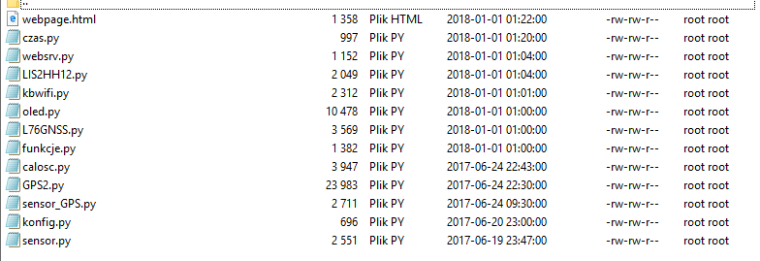
Do you have any concept what can be wrong? - because e.g. file
sensory.pyis quite small
name is also in lower letters without numbers - nothing special.
konfig.pyis really small file 696 bytes...
I can of course do this by Filezilla but..
Hello! It looks like you're interested in this conversation, but you don't have an account yet.
Getting fed up of having to scroll through the same posts each visit? When you register for an account, you'll always come back to exactly where you were before, and choose to be notified of new replies (either via email, or push notification). You'll also be able to save bookmarks and upvote posts to show your appreciation to other community members.
With your input, this post could be even better 💗
Register Login