Pycom firmware updater windows...
-
I am unable to update the firmware with windows upgrade tool version 0.9.2.b2b.
Setup Details:
Host Machine: Windows 7
Device: LoPy
Connector to HOST: USB cable via expansion board.Followed the below steps:
Downloaded the latest firmware update tool from https://software.pycom.io/findupgrade?product=pycom-firmware-updater&type=all&platform=win32&redirect=true
Connected G23 & GND with piece of wires in LoPy expansion board
Plugged in the USB cable to HOST machine
Green LED in expansion board glows
Running the firmware upgrade tool, Selected LoPy-->India-->Next
Next page shows "Communication" With empty Port:(blank)
Clicked "Upgrade" button in the right bottom
Moved to "Result" page with error message "The upgrade failed, please check the connection and try steps again"
-
Hi @RSK, if there is no communication port selected, the software will not be able to talk to the device. I'm not sure if I understood, but is the list empty?
If that's the case, you probably are missing the FTDI drivers. They can be downloaded from: http://www.ftdichip.com/Drivers/D2XX.htm.
Hope this helps. If you can, post back the results here.
-
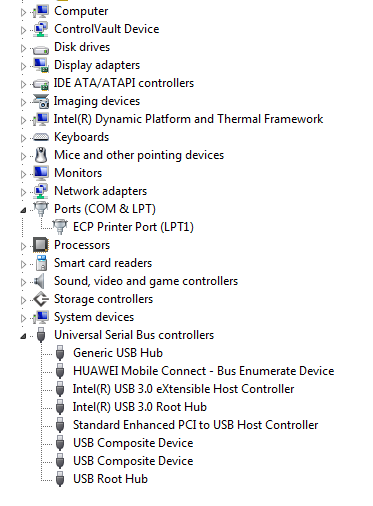
Device is not getting recognised in windows device driver list for me to upgrade the driver, is there any dependency on the jumper settings, None of the jumpers are removed from the expansion board in my setup. I have tried in 3 different windows 7 machines to see if a new device is getting connected once the USB cable of LoPy attached to PC, but device is not getting added in to device manager list.
Documentations are bit confusing, Old instruction says to put device in safe boot mode says to connect G28 wirh 3v3, but new firmware updater tool says connect G23 with GND. Which one to follow. (Assuming that new instruction is correct and followed to connect G23 with GND).
Is there any alternate mechanism available to upgrade firmware using windows command prompt.
Please help to resolve the issue.
-
@RSK Could you be so kind of telling me where are you reading those old instructions? The ones that apply are in the application itself.
The usb to serial chip that is in the expansion board should be detected by your OS as soon as you plug the cable, no matter how the jumpers are set. Can you confirm that you see no changes in the Windows Device Manager with the board plugged in?
Though the drivers are needed in a vanilla Windows 7 installation, the Device Manager should show something even without the drivers in place.
-
@abilio Both are from windows firmware updater tool dialog box,
Old tool: Pointing to instruction provided in https://docs.pycom.io/lopy/lopy/general.html#boot-modes-and-safe-boot
Regarding windows device manager, i am trying to attach the snap shot but it fails (due to size limitation). Will send through email separately. Please provide the email details.
-
@RSK, you can send it to support@pycom.io
-
-
@RSK, after installing the FTDI drivers, you should get an "USB Serial Converter" under "Universal Serial Bus controller". I think it's not there. This is a silly idea, but can you try changing the cable? (or testing the one you have).
-
@abilio Thanks abilio! The issue was due OS, I had to apply the service patch with Windows 7 6.1 B7600 to get FTDI installation successful.
You direction helped to narrow down the problem.
Thanks Again!
Hello! It looks like you're interested in this conversation, but you don't have an account yet.
Getting fed up of having to scroll through the same posts each visit? When you register for an account, you'll always come back to exactly where you were before, and choose to be notified of new replies (either via email, or push notification). You'll also be able to save bookmarks and upvote posts to show your appreciation to other community members.
With your input, this post could be even better 💗
Register Login