Socket documentation
-
Hello All,
I have a question : I can't find anywhere the documentation about Socket, particularly the meaning of the constants (SO_CONFIRMED...). I searched a lot before writing here and I don't understand how to use LoRa without this kind of information. Where can I find it ?
Thanks !
Luc -
@lucdioc
The documentation on Socket, or usocket - for micro-socket - as used here, is at https://docs.pycom.io/chapter/firmwareapi/micropython/usocket.htmlBut true there's not a lot about the meaning of those options, that's in the LoRa side of the documentation kind of hidden as comments in an example
# configuring the data rate
s.setsockopt(socket.SOL_LORA, socket.SO_DR, 5)

# selecting non-confirmed type of messages
s.setsockopt(socket.SOL_LORA, socket.SO_CONFIRMED, False)

# selecting confirmed type of messages
s.setsockopt(socket.SOL_LORA, socket.SO_CONFIRMED, True)
That's all there is for LoRaWAN options
-
Dear JMarcelino,
Thanks for the quick answer !
I'm trying to set SO_CONFIRMED to True, but the messages are still received by Loriot as "ack:False" (I read this using Node-RED).
Any clue of what the SO_CONFIRMED has no effect ?
Sincerely yours,
Luc -
Please share your code.
-
@bmarkus
Do you know if Loriot supports confirmed uplinks in the free community tier? Just wondering what happens because according to the docs downlinks are not supported. -
@bmarkus
Hello,
It's the basic lora node code found in the doc :lora.join(activation=LoRa.OTAA, auth=(app_eui, app_key), timeout=0)
s = socket.socket(socket.AF_LORA, socket.SOCK_RAW)
s.setsockopt(socket.SOL_LORA, socket.SO_DR, 0)
s.setsockopt(socket.SOL_LORA, socket.SO_CONFIRMED, True)
s.setblocking(True)
s.send(bytes([0x01, 0x02, 0x03]))
s.setblocking(False)get any data received (if any...)
data = s.recv(64)
print(data)I have this :

I have a "proof of concept" account on Loriot (meaning that it is not a free account so I should receive downlinks).
Any clue why the SO_CONFIRMED set to True still "arrives" as "ack:false" on Loriot ?
Thanks a lot,
Luc -
I tested a LoPy with a LORIOT server, sending acknowledged uplink messages from LoPy to network server works as expected. Go to Sample Websocket Application on the LORIOT server, you will see the (enqued data sent) which is the ACK sent back to LoPy:
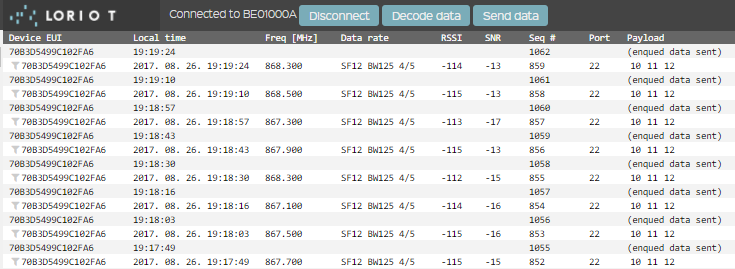
You can check the Application Log also on the server:

It shows the sent DOWNLINK ACK messages.
On the LoPy side you can use lora.callback() which returns different event code for successful and unsuccessful uplinks:
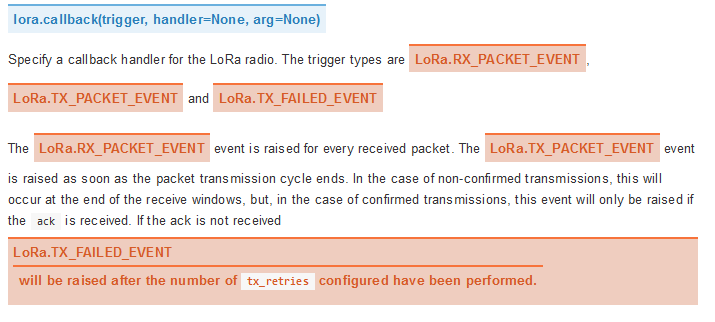
Send messages in a loop (keep 5-10s between them depending on data rate) than turn off gateway or disconnect LoPy antenna and you will see TX_FAILED_EVENT. You can send without antenna safely, it will not damage your LoPy.
It looks that ACK status is not displayed properly in the GUI and JSON output of the network server even if it works properly. We will investigate it, thanks for reporting!
-
@jmarcelino said in Socket documentation:
@bmarkus
Do you know if Loriot supports confirmed uplinks in the free community tier? Just wondering what happens because according to the docs downlinks are not supported.Yes it works as well as OTAA since the latest Network Server update. In the free community tier you can't send download messages to the device but sending and receiving MAC layer messages (commands and responses) works in both directions. You can use ADR also of course and Battery Level is also handled.

Hello! It looks like you're interested in this conversation, but you don't have an account yet.
Getting fed up of having to scroll through the same posts each visit? When you register for an account, you'll always come back to exactly where you were before, and choose to be notified of new replies (either via email, or push notification). You'll also be able to save bookmarks and upvote posts to show your appreciation to other community members.
With your input, this post could be even better 💗
Register Login