Welcome to the Pycom forum Forum
    • \[\[global:header.categories\]\]
    • \[\[global:header.recent\]\]
    • \[\[global:header.tags\]\]
    • \[\[global:header.popular\]\]
    • Login

    Explore Pybytes | Official Documentation | Report a Firmware Bug/Issue | GitHub

    Unable to upgrade (Mac OSX)

    Scheduled Pinned Locked Moved LoPy
    9 Posts 6 Posters 2.5k Views 6 Watching
    Loading More Posts
    • Oldest to Newest
    • Newest to Oldest
    • Most Votes
    Reply
    • Reply as topic
    Log in to reply
    This topic has been deleted. Only users with topic management privileges can see it.
    • H Offline
      herchu
      last edited by

      I've been trying the new app to upgrade my LoPys but failed. The app reports that it couldn't connect to the device.
      The version I've tried is v.9.2.b2a
      Both chips are fine as I'm able to connect through WiFi. My Mac (OSX El Capitan) reports the serial devise as /dev/cu.usbserial-DQ008RYY and it shows up in the dev directory as soon as I connect the USB cable to the expansion board. I have tested the jumper and it has continuity.
      What else I could try?
      Thanks in advance.

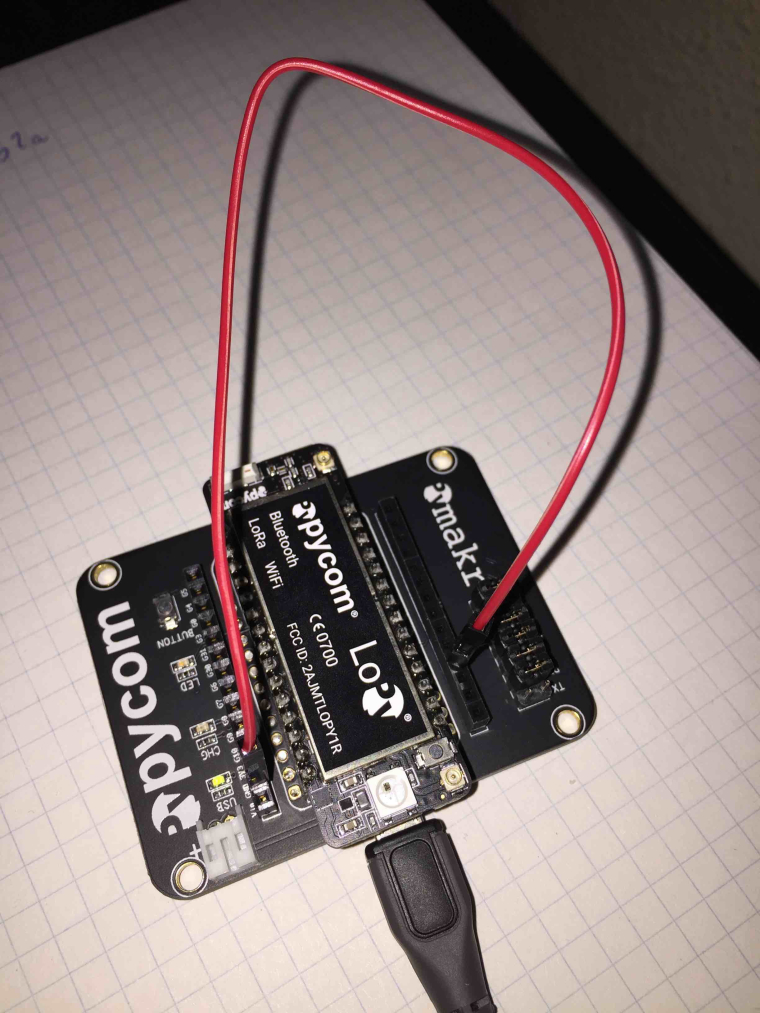
      Here's my LoPy. :-)

      0_1478179141675_IMG_2188-s.jpg

      1 Reply Last reply Reply Quote 0
      • R Offline
        Ralph
        last edited by

        Hi @herchu,

        Thanks for the information and especially taking the effort to upload the picture. It looks like your tx jumper is missing on the richt bottom of the board in this picture. I'm quite confident that re-enabling this jumper will solve your problem :) Possibly it's still in the box it came in, but otherwise you could take the 'Bat' jumper and place it on the Tx pins.

        H 1 Reply Last reply Reply Quote 0
        • J Offline
          jomifo Pybytes Beta
          last edited by

          I've been able to successfully upgrade the firmware on OSX using the ftp method.

          X 1 Reply Last reply Reply Quote 0
          • X Offline
            Xykon administrators @jomifo
            last edited by

            @jomifo said in Unable to upgrade (Mac OSX):

            I've been able to successfully upgrade the firmware on OSX using the ftp method.

            That won't fix the issue with the bootloader setting the flash memory read-only by error. You should really upgrade via the serial port method.

            Christian Ehlers

            J 1 Reply Last reply Reply Quote 0
            • J Offline
              jomifo Pybytes Beta @Xykon
              last edited by

              @Xykon Oh I see... thanks for the head ups.

              1 Reply Last reply Reply Quote 1
              • H Offline
                herchu @Ralph
                last edited by

                @Ralph said in Unable to upgrade (Mac OSX):

                tx jumper

                Yes!!! That was it! It had probably fallen when I unpackaged it.

                Thanks a lot.

                1 Reply Last reply Reply Quote 1
                • F Offline
                  fcabrera
                  last edited by

                  Im having the same problem, what is that jumper? Connections? Thanks

                  H 1 Reply Last reply Reply Quote 0
                  • H Offline
                    herchu @fcabrera
                    last edited by

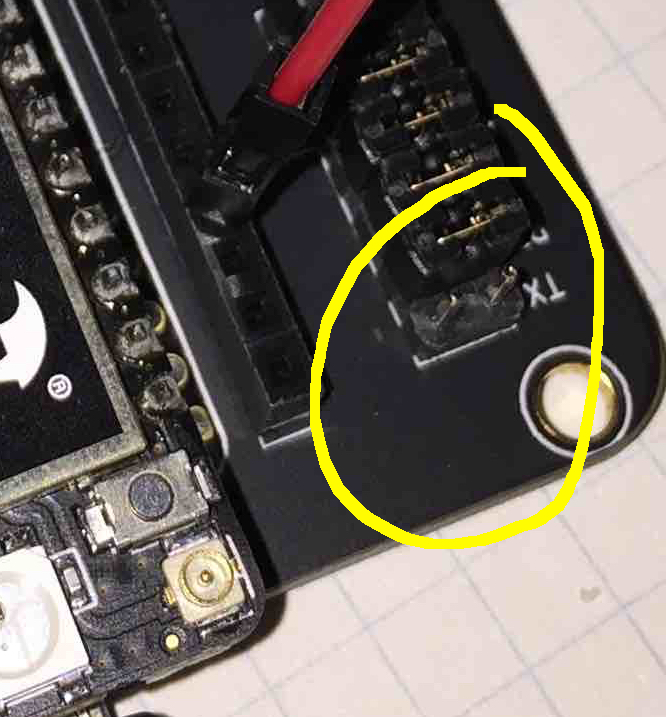
                    @fcabrera The one that is marked in this photo.

                    According to @Ralph if you don't have the extra jumper (a little black connector) to short the TX take off the one at BAT and use it in TX instead.

                    0_1478201007503_jumper-tx.jpeg

                    1 Reply Last reply Reply Quote 0
                    • H Offline
                      hukuzatuna
                      last edited by

                      Yes!!! This solved my problem as well. This note should be added to the official quick start documentation!

                      Cheers,
                      Phil
                      1 Reply Last reply Reply Quote 0

                      Hello! It looks like you're interested in this conversation, but you don't have an account yet.

                      Getting fed up of having to scroll through the same posts each visit? When you register for an account, you'll always come back to exactly where you were before, and choose to be notified of new replies (either via email, or push notification). You'll also be able to save bookmarks and upvote posts to show your appreciation to other community members.

                      With your input, this post could be even better 💗

                      Register Login
                      • 1 / 1
                      • First post
                        Last post

                      Pycom on Twitter

                      Pycom