Pytrack Guidelines
-
Hi, i'm new in using atom with the pymakr plugin. Currently, i am handling a project using lopy together with pytrack for hiker GPS purpose. May i know how can i work with it? Is there any videos for showing how pytrack work?
Thanks.
-
-
@jmarcelino thanks for the videos. I had watched the video but basically introduce pysense more than pytrack. I have a doubt that after i have downloaded the library from github is it straight away can use the coding in pytrack for GPS purpose or i can use it with some changes on coding ?
-
@mj
To be fair the Pysense and Patrick are very similar in how to use and in operation - just have different peripherals so you call different classes.If you look at the example in the Pytrack library it's pretty much self explanatory when it comes to using the GPS using the L76GNSS module:
https://github.com/pycom/pycom-libraries/blob/master/pytrack/main.py
but if something doesn't work for you do post again and I'm sure someone will be able to help
-
@jmarcelino Thanks. By the way i read through the pycom.io documentation there is the need to update the pytrack. I follow the step given until i have install the driver as the picture provided.
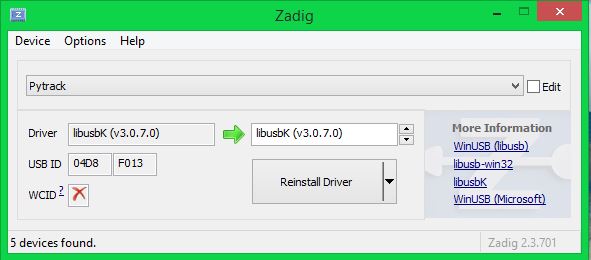
May i know am i successful updating the pytrack? Or i need to continue until the command prompt as stated in documentation as below: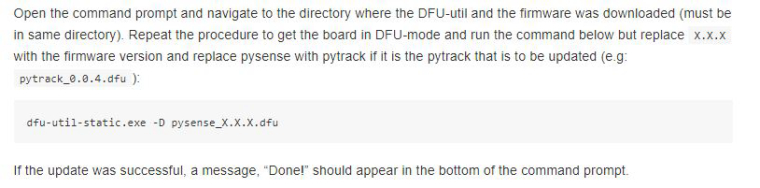
If yes, how can i open the command prompt and navigate to the directory of DFU-util ?
-
@mj You can use the
read_fw_versionmethod of thePytrackclass to retrieve the version number of the Pytrack firmware. -
@jcaron Hi, may i know what does read_fw_version method mean?
Does it mean that i need to undergoes the command prompt although i have install the driver successfully ? -
@mj you would need to connect to the module's REPL via telnet or USB, upload the Pytrack library, import it, and call that method of the library which will return the Pytrack firmware version.
Hello! It looks like you're interested in this conversation, but you don't have an account yet.
Getting fed up of having to scroll through the same posts each visit? When you register for an account, you'll always come back to exactly where you were before, and choose to be notified of new replies (either via email, or push notification). You'll also be able to save bookmarks and upvote posts to show your appreciation to other community members.
With your input, this post could be even better 💗
Register Login