LoPy with TTN Nano Gateway and Arduino (and RFM95) with LMIC lib
-
I'm trying to connect an Adafruit Feather M0 with RFM95 as node via a LoPy as nano gateway to the TTN. What I did till now and what is working:
LoPy as TTN Nano Gateway
I updated my LoPy to the latest firmware version and installed the nano gateway software along this tutorial.
In config.py I used this (default) LoRa settings
# for EU868 LORA_FREQUENCY = 868100000 LORA_GW_DR = "SF7BW125" # DR_5 LORA_NODE_DR = 5- the LoPy is showing up in the TTN console
- it receives packages, but unfortunately not the data from my node ;-) the incoming "foreign" packages are specified in the TTN console as, so this seems to be a working setup:
-- frequency: 868.1
-- mod: lora
-- CR: 4/5
-- data rate: SF7 BW125 - so I assume the gateway is working but not in combination with my node! :-(
Arduino / Adafruit Feather M0 with RFM95
I installed the Arduino-LMIC library from Matthijs Kooijman following this tutorial mostly, and with the help of some threads here [1] [2]. For details see https://community.hiveeyes.org/t/testing-adafruit-feather-m0-lora-rfm95-and-ttn/528
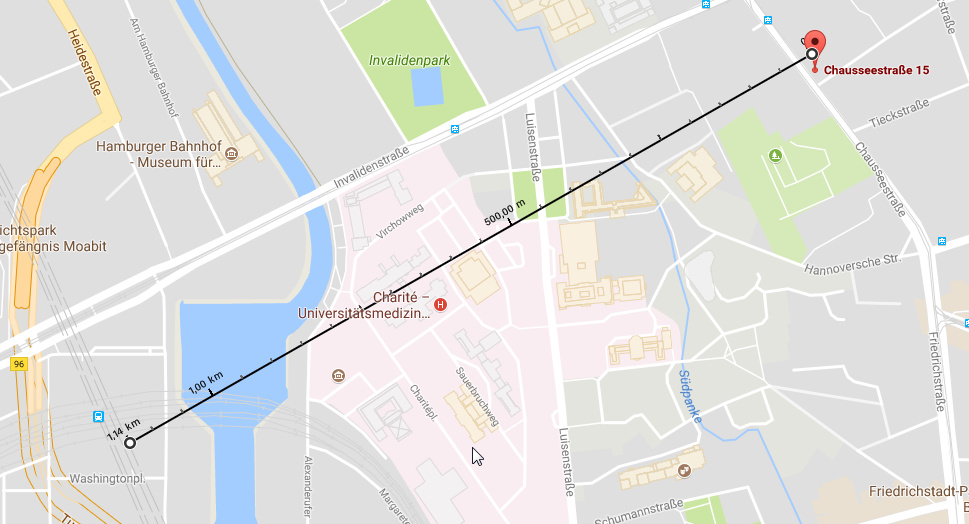
After installation I could send data to a public TTN gateway ("full" TTN Gateway, not a single channel) with a range of 1 km!
![0_1507243987684_0dc223108b52d9eef5fa241cf07a65cd5177f180[1].jpg](/assets/uploads/files/1507243995887-0dc223108b52d9eef5fa241cf07a65cd5177f180-1-resized.jpg)
Addaption Nano Gateway
For working with the Nano Gateway I had to reduce the available channels in the LMIC code. I used the ttn-abp.ino example and commented all frequency lines out exept one:
LMIC_setupChannel(0, 868100000, DR_RANGE_MAP(DR_SF12, DR_SF7),  BAND_CENTI);
// specify only the single (!) channel matching with the LoPy nano gateway!
// uncomment all other
//    LMIC_setupChannel(1, 868300000, DR_RANGE_MAP(DR_SF12, DR_SF7B), BAND_CENTI);
//    LMIC_setupChannel(2, 868500000, DR_RANGE_MAP(DR_SF12, DR_SF7),  BAND_CENTI);
//
//    LMIC_setupChannel(7, 867900000, DR_RANGE_MAP(DR_SF12, DR_SF7),  BAND_CENTI);
//    LMIC_setupChannel(8, 868800000, DR_RANGE_MAP(DR_FSK,  DR_FSK),  BAND_MILLI);
following this advice. https://forum.pycom.io/topic/1635/lorawan-gateway-using-lopy-and-sx1276-node/2
So I think I have done all necessary steps but the data of the Arduino/Feather/LMIC device is not showing up at TTN.
I have in both configuration files a frequency of 868.1 MHz. I wonder hwo can I check or change the other parameters like CR: 4/5 or data rate: SF7 BW125 to match or did I oversee an other point I have to adapt?
-
I think I have found the solution after some research on the TTN board:
https://www.thethingsnetwork.org/forum/t/can-lmic-1-6-be-set-up-to-use-a-single-channel-and-sf/5207/11Beside uncommenting the non fitting channels you have to
- disable the (other) default channels and
- announce a fix spreading factor matching that on the LoPy / nano gateway
Now it is working! Great!
-
In addition a nice explanation from Andreas Spiess
Hello! It looks like you're interested in this conversation, but you don't have an account yet.
Getting fed up of having to scroll through the same posts each visit? When you register for an account, you'll always come back to exactly where you were before, and choose to be notified of new replies (either via email, or push notification). You'll also be able to save bookmarks and upvote posts to show your appreciation to other community members.
With your input, this post could be even better 💗
Register Login