LoPy Beta Release (version='v1.8.1-53-ga8a6e4b on 2016-06-29')
-
First of all, make sure you have followed the getting started instructions, which can be found in: https://cloud.pycom.io/index.php/s/fb19uo4IaEdMldR
The actual IP address for FTP and telnet is: 192.168.4.1
A new release is available which bring bug fixes and a newly added LoRa class as part of the network module.
IMPORTANT NOTE: All jumpers except for the Tx and Rx of the UART need to be removed from the expansion board in order for LoRa to work (this won't be needed on the production version of the LoPy). See the attached picture for reference.
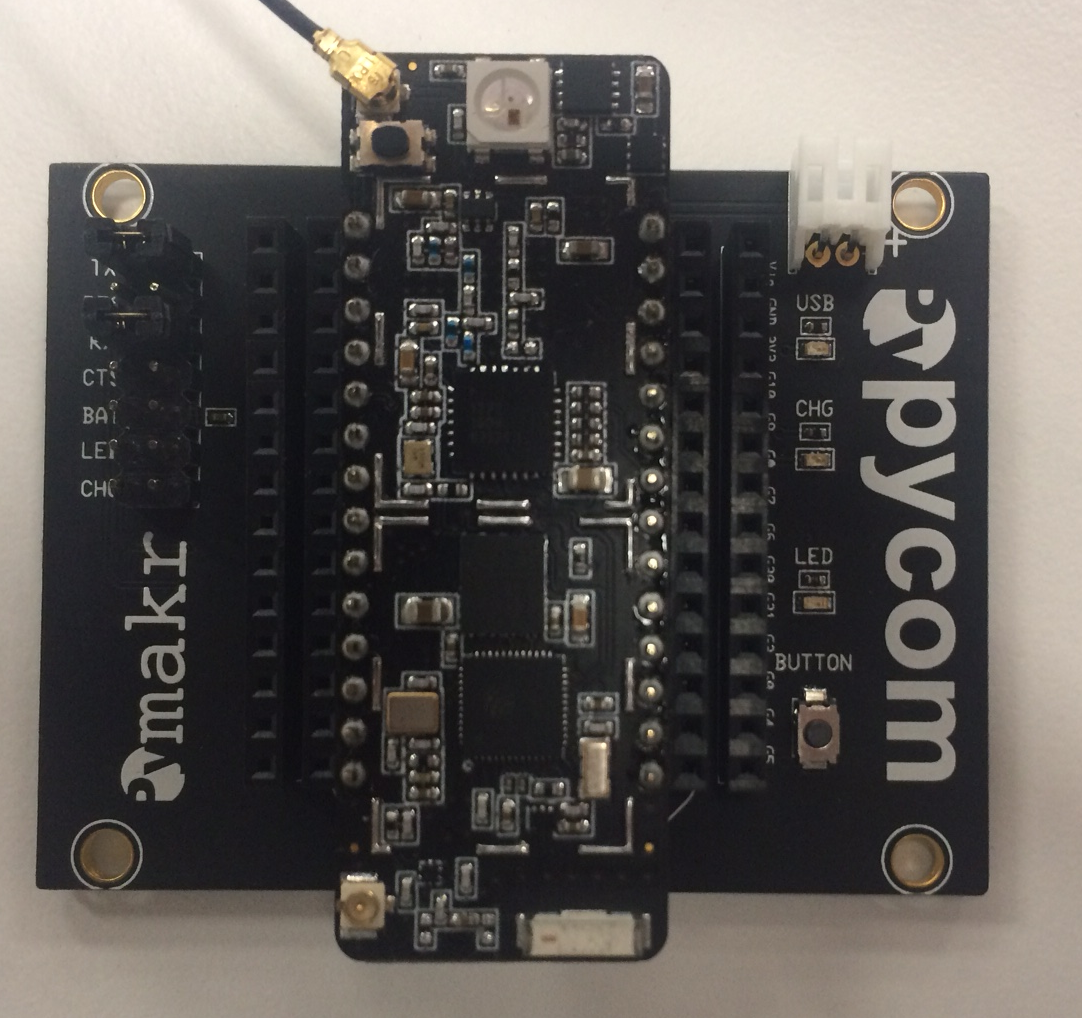
These are the release notes for version='v1.8.1-53-ga8a6e4b on 2016-06-29'
New features:
- LoRa class contructor permits to invert the Tx and Rx IQ signals.
- Minimal time module
Example code:
from network import LoRa

lora = LoRa() # initialize with recommended settings

lora.send('LoRa packet test', False)  # Send data in a synchronous way
lora.recv() # get any data pending in the receive queue
In order to send LoRa packets between your 2 LoPys:
- In LoPy # 1:
from network import LoRa # initialize LoRa as a node (with Rx IQ inversion) lora = LoRa(tx_iq=False, rx_iq=True) for i in range(10): lora.send('LoRa packet test #{}'.format(i), False) # Send data in a synchronous way- In LoPy # 2:
from network import LoRa
import time
# initialize LoRa as a Gateway (with Tx IQ inversion)
lora = LoRa(tx_iq=True, rx_iq=False)

for i in range(10):
    print(lora.recv())  # just receive
    time.sleep(1.5) # wait for 1500 milliseconds
The releases are available here:
https://cloud.pycom.io/index.php/s/khCswKQ6qUmj1n7 (868MHz band)
https://cloud.pycom.io/index.php/s/sU6fbDIqLF6r1U1 (915MHz band)Tip: use os.uname() to get the software version information.
Hello! It looks like you're interested in this conversation, but you don't have an account yet.
Getting fed up of having to scroll through the same posts each visit? When you register for an account, you'll always come back to exactly where you were before, and choose to be notified of new replies (either via email, or push notification). You'll also be able to save bookmarks and upvote posts to show your appreciation to other community members.
With your input, this post could be even better 💗
Register Login